Your Tech Story

Suhani Jain

I am a student pursuing my bachelor's in information technology. I have a interest in writing so, I am working a freelance content writer because I enjoy writing. I also write poetries. I believe in the quote by anne frank "paper has more patience than person

How to Add Google Calendar Event Via Gmail: Quick Tips

How to Add Google Calendar Event Via Gmail: Quick Tips

How to Add Google Calendar Event Via Gmail: Quick Tips

Image Source: cedarville.edu

Have you ever been scrambling to find a date or event detail that you thought you had quickly written down somewhere? If this sounds like you, don’t panic; there is an easy fix for it. Making Google Calendar events straight from Gmail may transform your life by preventing you from ever missing another deadline or significant occasion. Let’s examine the detailed procedure and delve into this productivity trick.


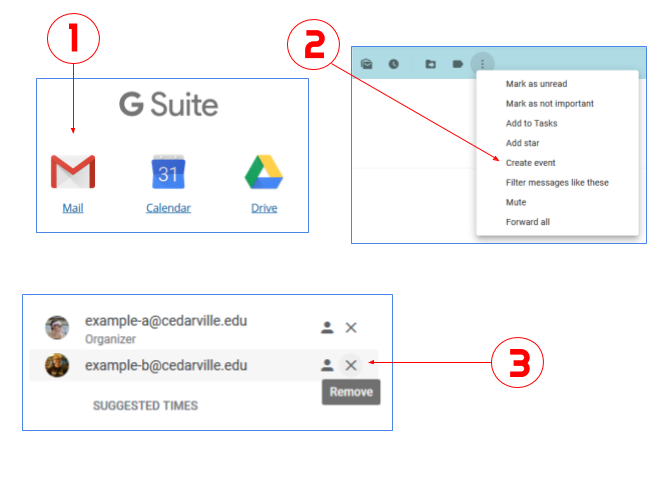
Step 1: Start Gmail

Open Gmail on your phone or computer to get started. The procedure is the same on both systems, giving users freedom.

Step 2: Click on the Email or Event

Open the email or message that has the pertinent details you want to add to your Google Calendar. 

This approach guarantees smooth integration, regardless of the meeting time, project deadline, or any other important information.

Step 3: Construct an Event

Find the “More” toggle (three dots) in the upper-right corner of the email at the top. You will see a drop-down menu with the option to “Create event.”

Step 4: "Allow" Notifications.

Once you click “Create event,” a new window will open and ask if you wish to accept calendar notifications. Selecting alerts guarantees that you get reminders on time. To make this feature active, click “Allow”. Keep in mind that these alerts seem like normal phone or computer notifications, which sets them apart from typical in-browser or in-app reminders.

Step 5: Complete the Information

Although the linked email subject may automatically appear in the subject line, you are free to change it to suit your tastes. Modify the event’s information, such as the time, place, attendees, and reminders that are planned. Use the “Notification” toggle (bell) to set a reminder and select the desired notification period.

Step 6: Save

After completing the information, click the blue “Save” button located in the upper-right corner. You’ve been able to successfully create an event on Google Calendar right from Gmail. You may quickly update information on the event card by editing it if something changes.

Adding Events to Your Calendar from Your Phone

You must manually open the Calendar app and create a new event in order to add an event from your phone. To add a task straight from Gmail to Google Tasks, click the three dots in the upper-right corner of the email and select “Add to tasks.” Before adding a task, make sure you have downloaded the Tasks app.

Putting Events in Google Calendar That Are Permanent

After creating an event, you can choose a repetition range from the drop-down menu or click the “All Day” option to have the event repeat. You may customise Google Calendar to include weekly, monthly, or annual repeats.

 
Microsoft Copilot vs Copilot Pro: Evaluating the Value of the Subscription Fee

Microsoft Copilot vs Copilot Pro: Evaluating the Value of the Subscription Fee

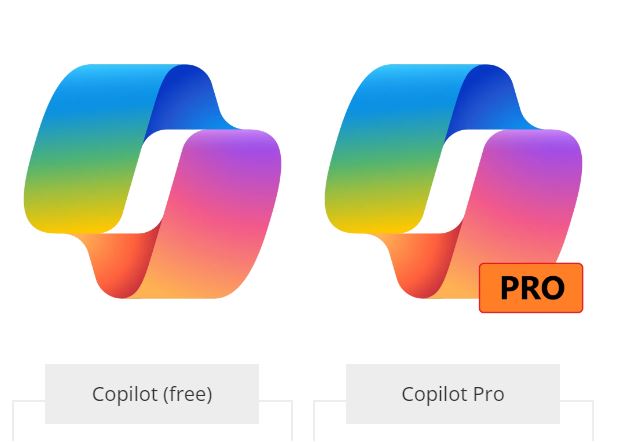
Microsoft has released Copilot Pro, a subscription-based enhancement to Microsoft Copilot, its AI buddy, which makes use of OpenAI’s high-end GPT-4 model. Copilot Pro adds more capabilities, personalised GPT support, and improved connection with Microsoft’s product suite; the free version is still accessible.

Improved Integration with Microsoft 365

Microsoft Copilot vs Copilot Pro: Evaluating the Value of the Subscription Fee

Image Source: phucanh.vn

With connectors for Word, Excel, PowerPoint, Outlook, and OneNote across several platforms, Copilot Pro extends the functionality of Copilot into Microsoft 365. The goal of this more thorough integration is to provide customers a consistent AI experience across many platforms, so they can become accustomed to it from a variety of software applications.

Earliest Access to the Newest GPT Models

Copilot Pro subscribers have first dibs on the newest GPT models. For example, the most recent version of OpenAI’s AI model, GPT-4 Turbo, is available to Copilot Pro customers. This guarantees that users will be able to access the newest developments in artificial intelligence technology as soon as they are made accessible.

Personalised Copilot GPTs for particular uses

The ability to design unique Copilot GPTs with specific goals in mind is one of Copilot Pro’s standout features. This feature increases the tool’s adaptability by enabling users to customise Copilot models to match their specific needs, much to OpenAI’s custom GPTs.

Value Proposition and Copilot Pro Cost

Copilot Pro may be accessed with a $20 monthly membership fee for each user. The cost structure is comparable to that of other AI models, such as Claude Pro and ChatGPT Plus. Copilot Pro’s added functionality, adaptability, and first dibs on the newest GPT model developments constitute its value proposition.

Free Features and Subscription Advantages are Balanced

Microsoft notes that although Copilot Pro adds more features, the free version of Copilot will still get feature upgrades and enhancements. Because of this, customers who choose the free version of Copilot may still take advantage of future improvements, making Copilot a useful tool even in the absence of the Pro upgrade.

User Input and the Final Decision

The choice to upgrade to Copilot Pro is based on the requirements of each user. Users who depend significantly on Microsoft 365 apps could find Copilot Pro’s improved integration and functionality useful. However, if you just use Copilot for simple tasks or online searches, the free edition can be more than enough for you.

In conclusion, Microsoft Copilot Pro offers consumers an option depending on their unique demands and usage patterns by introducing tighter integration into Microsoft’s ecosystem and advanced functionality for a $20 monthly membership cost.

Neuralink Implant Successfully Installed in Human, Elon Musk Confirms

Neuralink Implant Successfully Installed in Human, Elon Musk Confirms

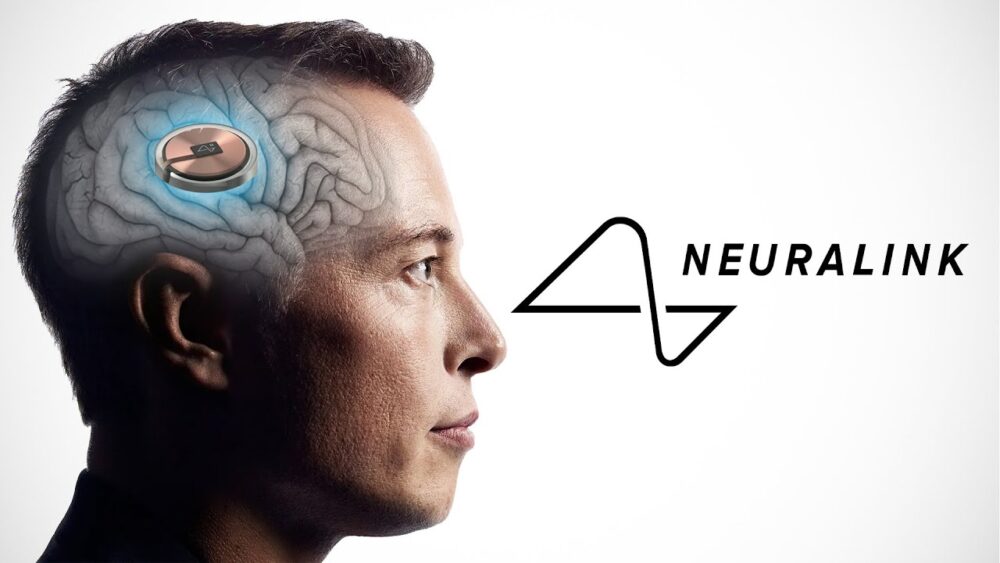
Elon Musk announced that the first human patient had gotten a brain implant from Neuralink, his brain-computer interface (BCI) technology business, on the social networking site X. The invention, called “Telepathy,” seeks to bridge the gap between artificial intelligence and the human brain.

Informing about the human trial via a post on X (formerly Twitter), Musk wrote, “The first human received an implant from @Neuralink yesterday and is recovering well. Initial results show promising neuron spike detection."

“Enables control of your phone or computer, and through them almost any device, just by thinking. Initial users will be those who have lost the use of their limbs. Imagine if Stephen Hawking could communicate faster than a speed typist or auctioneer. That is the goal." Musk followed up in another post.

livemint.com

Neuralink’s Sucess Story

Neuralink Implant Successfully Installed in Human, Elon Musk Confirms

Last autumn, Neuralink began patient recruitment for a clinical study following permission from the US Food and Drug Administration and a hospital ethics board. Participants in the study must be at least 22 years old and have quadriplegia as a result of either amyotrophic lateral sclerosis (ALS) or cervical spinal cord injury. The trial should last for six years.

The original intention of Neuralink was to allow paralysed people to use their brain impulses to control a keyboard or mouse. The business implants a coin-sized gadget into the part of the brain that controls movement intention using a surgical robot that it designed. Brain impulses are wirelessly recorded and sent by this gadget to an app that decodes them.

The patient is recovering properly, according to Elon Musk’s statement, and the initial findings show encouraging neuron spike detection. It will take some time for the patient to recuperate from surgery and complete a training phase, which usually lasts several weeks, before evaluating their ability to operate a computer or other device with the implant.

Despite being the first to investigate BCIs, Neuralink’s accomplishments represent a substantial step towards the eventual integration of artificial intelligence and humans. Academic labs have been working on brain-computer interfaces (BCIs) for years; early adopters took part in tests that allowed paralysed people to manipulate robotic limbs, play video games, and send emails with their thoughts.

With more than 1,000 electrodes spaced over 64 threads as thin as a human hair, Neuralink’s wireless BCI device is a significant improvement over conventional configurations. The company’s strategy tries to make BCIs more useful for at-home use.

Neuralink has encountered controversy despite its technological advancements, especially concerning how it handles study animals. A government probe was prompted after an examination in September found that several monkeys had died while undergoing brain implant testing. The business also had to pay fines for breaking hazardous material transportation regulations set out by the US Department of Transportation.

Neuralink is in competition with other businesses in the developing BCI market, but its new statement highlights how important it is to the advancement of neurotechnology. While there may be obstacles in the way of Musk’s goal of a seamless human-AI merger, Neuralink’s continued efforts mark a significant turning point in this exciting subject.

OpenAI Lifts Ban on the Use of ChatGPT For "Military and Warfare"

Italy Watchdog Accuses OpenAI’s ChatGPT of Violating Privacy Laws

Carrying out an inquiry that was started a year ago, Garante, Italy’s data protection regulator, has declared that OpenAI’s ChatGPT breaches data protection laws. Previously, Garante prohibited ChatGPT due to suspected EU privacy violations. Garante is renowned for taking a proactive approach to AI platform compliance with EU data privacy regulations. Even though OpenAI resolved issues and the service was reactivated, Garante has since discovered components that could point to possible breaches of data protection.

OpenAI Lifts Ban on the Use of ChatGPT For "Military and Warfare"

Image Source: commondreams.org

OpenAI underscored its dedication to harmonising its procedures with EU privacy regulations in reaction to the watchdog’s conclusions. The firm declared that it is actively working to reduce the amount of personal data that is utilised in ChatGPT and other training systems and that it intends to cooperate constructively with Garante.

Garante withheld the specifics of the suspected data privacy breaches that were found. The government has granted Microsoft-sponsored OpenAI a thirty-day period to submit its defence. Garante’s inquiry will take into account the conclusions of a European task group made up of national privacy advocates.

A conversational AI chatbot developed by OpenAI called ChatGPT has come under fire for privacy issues, leading to regulatory actions. After OpenAI resolved concerns about user authorization for the usage of personal data in algorithm training, Garante’s first prohibition was lifted. Even with these modifications, Garante’s new claim suggests that worries about data privacy still exist.

OpenAI's Partnership with Garante and other Regulatory Organisations will be Essential

ChatGPT is one of the most well-known products of OpenAI, which has been at the forefront of creating sophisticated AI models. The company’s strategy focuses on regulatory concerns and ongoing improvement to guarantee adherence to changing privacy requirements.

The investigation’s conclusion will probably have an impact on how AI governance and privacy laws develop in the EU. Strong privacy protections are becoming increasingly important in the use of AI technology, as seen by the proactive approach taken by organisations such as Garante.

This development highlights the greater difficulty encountered by AI developers and businesses in negotiating many regulatory environments throughout the world, each with its own set of guidelines and specifications. 

To create regulations that strike a compromise between privacy protection and innovation in the quickly developing field of artificial intelligence, OpenAI’s partnership with Garante and other regulatory organisations will be essential.

The Italian body said in the statement seen by Euronews Next, that it “concluded that the available evidence pointed to the existence of breaches of the provisions contained in the EU GDPR”. "OpenAI may submit its counterclaims concerning the alleged breaches within 30 days," the statement continued. The body will take account of “the work in progress within the ad-hoc task force set up by the European Data Protection Framework (EDPB) in its final determination on the case,” the statement concluded.

euronews.com
Next-Generation Siri in iOS 18: ChatGPT Style Capabilities Unleashed

Next-Generation Siri in iOS 18: ChatGPT Style Capabilities Unleashed

With the expected release of iOS 18 at this year’s Worldwide Developers Conference, Apple is preparing to take a major step into the artificial intelligence (AI) space, according to Financial Times sources. Even while Apple doesn’t seem part of the current AI buzz, it has been subtly preparing for a big AI reveal.

Next-Generation Siri in iOS 18: ChatGPT Style Capabilities Unleashed

Image Source: indianexpress.com

Apple, renowned for taking its time and being extremely careful, has always entered technological races after allowing rivals to try their hand first. This approach, comparable to the tortoise and the hare—has worked in the past, and experts anticipate that Apple’s AI initiatives will follow a similar path. As reported by the Financial Times, since 2017, the corporation has strategically bought 21 AI companies, surpassing the combined acquisitions of Microsoft and Google.

Even while it likes to keep its AI initiatives quiet, Apple has been actively involved in machine learning, as shown by the most recent iPhones and Apple Watches, which come with potent on-device AI technology. Large language model-powered Siri is supposedly being developed, according to code discovered in the iOS 17.4 beta. Apple reportedly conducts internal testing with OpenAI’s ChatGPT API to create its artificial intelligence models.

In an attempt to take a calculated risk and learn from the mistakes made by early innovators such as OpenAI, the business has been looking at partnering with news publishers to train its AI systems. 

Apple Released a Research Report Describing a Breakthrough

In December, Apple released a research report describing a breakthrough in the flash memory-based on-device operation of large language models (LLMs). This advancement has the potential to democratise generative AI by making it available on a wider variety of devices, such as MacBooks and iPhones.

The key concern is still how AI will be smoothly incorporated into iOS; many believe that Siri will be the main beneficiary of an advancement in AI technology. Recent developments, like the speech capabilities of ChatGPT, highlight the potential to greatly improve digital assistants. It has been suggested that Apple and Amazon are developing AI-powered versions of Alexa, which might give Siri features similar to ChatGPT.

Industry watchers are closely observing how Apple will employ its AI innovations to change the user experience as the countdown to iOS 18 gets underway, particularly concerning the Siri ecosystem. If it is effective, the next version of Siri may represent a major advancement in artificial intelligence, providing consumers with a more sophisticated and user-friendly virtual assistant.

Apple’s strategic manoeuvres, acquisitions, and research achievements indicate a well-thought-out plan to put the company at the vanguard of the AI revolution in the fast-changing field of artificial intelligence. Apple is ready to reveal its AI goals with the upcoming release of iOS 18, which might change the story about the company’s place in the quickly developing artificial intelligence space.

Step-by-Step Guide to Resolve Error Code 0xc0000001 on Windows 10/11

Step-by-Step Guide to Resolve Error Code 0xc0000001 on Windows 10/11

Step-by-Step Guide to Resolve Error Code 0xc0000001 on Windows 10/11

One of the confusing error codes that Windows users may run across is ‘Error Code 0xc0000001,’ which is frequently linked to the Blue Screen of Death (BSOD). Even if these kinds of mistakes might cause delays in work, there are practical solutions to deal with and fix this specific problem on Windows 10 or 11. Several solutions to the ‘Error Code 0xc0000001’ are shown below:

1. Launch the Tool for Startup Repair:

  • Choose the Startup Repair tool when you boot into the Advanced Startup menu.

  • Give the tool permission to examine and fix any possible Windows problems.

  • Restart your computer when it’s finished to see whether the issue is still there.

2. Make use of the Command Prompt:

Click the Advanced options menu to bring up the Command Prompt. One by one, type the following commands, pressing Enter after each one:

  • Copy the Bootrec /fixmbr code.

  • Fixboot / Bootrec

  • Bootrec /rebuildbcd Bootrec /scanos

  • Try a fresh PC reboot to see if anything has improved.

3. Unplug Every External Gadget:

  • Cut off all peripherals and external devices.

  • Reattach them after a brief while.

  • Sometimes problems arise from external devices; try this quick fix to see if it fixes the problem.

4. Enter Safe Mode:

  • Enter Safe Mode, turn off any newly installed third-party programs, and find any problems.

  • Reboot normally after removing the troublesome program in Safe Mode

5. Run a Windows System Restore:

  • This may be used to restore your computer to a time when it was operating properly.

  • Refer to the System Restore handbook for instructions.

6. Conduct a Malware Scan:

  • Use Microsoft Defender or your chosen antivirus program to conduct a malware scan.

  • Several PC problems, including boot failures, can be caused by malware.

7. Use a CHKDSK Scan:

  • To identify and resolve any hard disc problems, use the CHKDSK tool.

  • Run the following command in Command Prompt: chkdsk /f /r.

8. Reset Windows to the Factory Defaults:

  • Consider doing a Windows factory reset as a final option.

  • Before moving on, make sure you have backups of all important data.

  • Resolving ‘Error Code 0xc0000001’ necessitates a methodical approach, experimenting with various fixes until the problem is fixed. 

Users ought to select the approach that most closely matches their technical proficiency and circumstances. Before carrying out any significant operations, such as a factory reset, don’t forget to back up important data. By following these instructions, users should be able to resolve the BSOD issue and get their Windows 10 or 11 PCs back in working order.

Keep in mind that every system is different, therefore these solutions’ efficacy could differ. It could be wise to seek expert help if the issue continues.