Your Tech Story

Suhani Jain

I am a student pursuing my bachelor's in information technology. I have a interest in writing so, I am working a freelance content writer because I enjoy writing. I also write poetries. I believe in the quote by anne frank "paper has more patience than person

Meta Introduces Labels for AI-Generated Images Shared on Facebook, Instagram, and Threads


Meta Introduces Labels for AI-Generated Images Shared on Facebook, Instagram, and Threads

A big move has been launched by Meta, formerly known as Facebook, to address the growing issue of AI-generated photos on its platforms. The business intends to identify artificial intelligence (AI-generated) photographs on Facebook, Instagram, and Threads in the upcoming months. By making this change, consumers will be able to clearly and transparently discern between material provided by AI and content created by humans, which is becoming an increasingly difficult task.

“As the difference between human and synthetic content gets blurred, people want to know where the boundary lies,” states Nick Clegg, President of Global Affairs at Meta.

searchenginejournal.com

Taking Care of the Unclear Boundaries

Meta Introduces Labels for AI-Generated Images Shared on Facebook, Instagram, and Threads

Image Source: openaisea.com

President of Global Affairs at Meta Nick Clegg emphasises the need for openness at a time when it’s getting harder to distinguish between real and fake content. The increasing popularity of AI image-creation technologies makes it necessary for consumers to be aware of the origin and legitimacy of the information they come across on social media.

Future Features & Predictions

In the upcoming months, Meta plans to provide multilingual labelling of AI-generated photographs across all of its platforms. This project is especially important during global elections when the veracity of the information is crucial. To distinguish AI-generated photographs, Meta intends to apply several strategies, including embedded metadata in the image files, visible markers, and invisible watermarks. Furthermore, users will be penalised for failing to notify when the content is produced by AI under the new standards.

These actions emphasise responsible AI development and are in line with best practices that the Partnership on AI (PAI) has advocated.

Looking Forward

To guide its long-term plan, Meta will be actively observing user interaction with labelled AI content over the upcoming year. 

The firm will now use detection technologies to classify AI material from outside suppliers and top AI art platforms, but it presently labels pictures created by its own AI image generator manually.

Users are encouraged to cautiously assess accounts that share photographs in the interim and keep an eye out for visual irregularities that might indicate computer production.

Essential Advice for Companies and Marketers

From Meta’s statement, companies and social media marketers should learn the following important lessons:

  • Authenticity and Transparency: As the use of AI-generated images in marketing grows more widespread, companies should place a high priority on authenticity and transparency, taking into account proactive disclosures.

  • Recognising Audience Preferences: Companies should be aware of whether their target audience prefers “human-made” or artificial intelligence-generated material, and adjust their approach appropriately.

  • Impact on Trust: Marketers should keep a careful eye on user attitude around AI usage, even if properly labelling synthetic material may help to limit negative effects on trust.

  • Ethical AI Development: It is important to emphasise the necessity of ethical AI development and responsible usage since rushing to employ immature AI technology might backfire.

  • Increase in Technology Interest: Marketers should keep up with the latest developments in digital watermarking, metadata standards, and synthetic media identification techniques since these areas are expected to see a rise in interest.

Conclusion

When it comes to addressing the issues raised by AI-generated material on social media sites, Meta’s endeavour represents a major advancement. With an emphasis on openness and user knowledge, Meta wants to enable consumers to choose the material they consume with knowledge. Businesses and marketers need to adjust their plans to appropriately negotiate the shifting terrain of synthetic content as the digital media ecosystem continues to change.

Google Maps Introduces Cutting-Edge Generative AI Features

Google Maps Introduces Cutting-Edge Generative AI Features

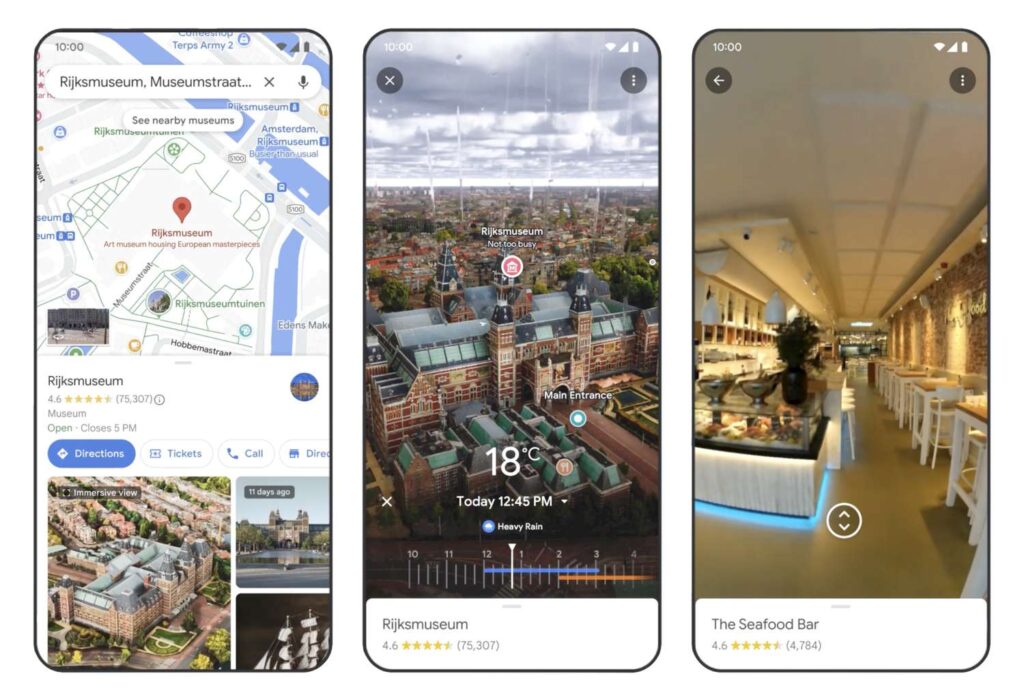
With the release of a major upgrade, Google Maps for Android will now provide weather and Air Quality Index (AQI) data overlays. This capability, which was previously limited to a few devices, is now being made available to a larger user base and offers useful information from within the Maps interface.

Improved Display of AQI and Weather Data

Google Maps Introduces Cutting-Edge Generative AI Features

Image Source: lifewire.com

The most recent version of Google Maps for Android has a weather box that is conspicuously positioned in the upper-left area, directly beneath the search bar. When you tap on this box, a comprehensive card with more meteorological data—such as hourly predictions, temperature extremes, and an AQI section—is displayed. Users may easily navigate while remaining updated about environmental conditions by tapping on the AQI section to overlay air quality data right onto the map.

Compared with the iOS Version

The Android version of Google Maps provides more extensive information in a floating card, but the iOS version also has a weather box beneath the search bar. On the other hand, touching the box on the iOS version does not display any extra weather information. However, the map type and information part of both versions include AQI data.

Introducing the Features of Generative AI

Google recently announced the inclusion of new generative AI tools for Google Maps, in addition to weather and AQI data overlays. Currently in the testing stage, these capabilities are originally accessible in a few US locations. By offering carefully chosen destination suggestions in response to cues, generative AI is being used with the goal of improving user experience.

AI-Driven Suggestions

Based on user questions, Google Maps can now provide personalised suggestions for different activities and destinations thanks to the incorporation of generative AI. For instance, when users ask Maps for recommendations for indoor activities on a rainy day, it will provide things like comedy clubs and movie theatres. Additionally, customers may narrow down their search by adding preferences, like kid-friendly activities, and get recommendations that are specifically catered to their needs.

Future Development and Worldwide Accessibility

Although the new generative AI tools are now only available in certain US locations, Google intends to increase their accessibility in the upcoming months. The goal of these AI-powered improvements is to let consumers adjust their plans and make impulsive decisions based on preferences and situations that are relevant at the moment.

Users may anticipate increasingly sophisticated and customised experiences that are catered to their requirements and interests as Google develops and enhances its Maps platform. Even with the addition of generative AI capabilities and weather data overlays, Google Maps is still a useful tool for exploration and travel.

 
Starship Technologies Raises $90 Million to Expand Delivery Robots

Starship Technologies Raises $90 Million to Expand Delivery Robots

A noteworthy $90 million in investment has been received by Starship Technologies, a trailblazing firm in the delivery robots area, to support its development goals and satisfy the increasing demand for sidewalk delivery robot services.

Investors and Funding Information

Starship Technologies Raises $90 Million to Expand Delivery Robots

Image Source: electrek.co

Two well-known backers with deep ties to the digital investment scene, Plural and Iconical, co-led the capital round. A significant $430 million fund was recently launched by Plural, a venture capital firm with roots in both Estonia and London. A significant player in the investment round was Iconical, a London-based company supported by Janus Friis, a co-founder of both Skype and Starship.

Company Capabilities and Position in the Market

Since its founding, Janus Friis and Ahti Heinla’s Starship Technologies has accomplished a number of noteworthy milestones. With its delivery robots spanning 11 million kilometres over 80 locations in the U.S. and Europe, the firm has a strong track record. Having completed more than 6 million deliveries, Starship has partnered with well-known businesses such as Bolt, Co-Op, Aramark, Sodexo, Chartwells, and Grubhub.

Making Use of the Funding

The recently acquired capital will play a crucial role in enabling geographical growth, improving production capacities, and making additional investments in software and logistical services. In order to accelerate car production, Starship intends to launch a new robotic manufacturing system in association with an unknown partner. The business also hopes to keep enhancing the functionality of its robots, with plans to update them to include enhanced autonomous capabilities and wireless charging.

Getting Around the Competitive Environment

Starship Technologies has persevered and made money in the sidewalk delivery robot industry in spite of obstacles and well-publicized departures. The business’s resilience in a cutthroat industry demonstrates its dedication to both innovation and operational excellence. Starship wants to carve out its place by concentrating on customer-centric solutions and deliberate global development, even if it acknowledges the influence of giants like Amazon.

Future Prognosis and Strategic Alignments

Alistair Westgarth’s exit as CEO of Starship signifies a shift in the company’s leadership and a strategic adjustment made in reaction to market conditions. The decision to concentrate more on expanding into Europe is a reflection of Starship’s flexible strategy to seize new opportunities and respond to changing client demands. With the backing of many investors and a market that is becoming more and more interested in delivery robots solutions, the co-founders of the firm are unwavering in their resolve to transform the delivery environment.

Conclusion

Starship Technologies is well-positioned to solidify its position as a leader in the delivery robots industry as it enters its next phase of expansion, driven by substantial capital and a clear strategy. One pavement at a time, Starship hopes to transform the delivery services of the future via an unwavering dedication to innovation and client pleasure.

 
How to Reset a PS4 Controller: Step-by-Step Guide

How to Reset a PS4 Controller: Step-by-Step Guide

How to Reset a PS4 Controller: Step-by-Step Guide

Image Source: carousell.sg

Resetting your PS4 controller will frequently fix any glitchy behaviour or connection difficulties you may be experiencing. We’ll lead you through both soft and hard resets in this step-by-step tutorial, giving you back control over your gaming experience.

Reconnecting the Controller to do a Soft Reset

  1. Make use of Bluetooth devices: On your PlayStation dashboard, start by going to Settings > Devices > Bluetooth Devices.

  2. Choose the Inactive Controller: Choose the DualShock 4 controller that isn’t in use (the one without the green dot).

  3. Ignore Device: To uninstall the broken controller, press the Options button on your functional controller and choose Forget Device.

  4. Turn off the PS4: Utilise the functional controller to access Power > Switch off the PS4. Restart the console by connecting the broken controller via USB.

  5. Sign in: On the broken controller, press the PS button to access your PS4.

Hard Reset: Restoring Factory Presets

  1. Compile necessary items: Take out an unfurled paper clip or pin and a Micro-USB cord to do a hard reset.

  2. Switch off the PS4: Make sure your PS4 is off, and unplug it from the internet if necessary.

  3. Find the Reset Button: After flipping the controller, locate the recessed reset button next to the L2 button, and push it for at least six seconds with a paper clip.

  4. Let Go and Turn On: After a brief period of time, release the reset button and insert the Micro-USB cable into the controller.

  5. Pair and Sign In: Hit the PS button. A blue light bar indicates that the controller is paired. Open your PlayStation 4 and log in.

Extra Tips for Troubleshooting

  • Switch Off and  Charge: Make sure your controller is charged if the problem continues. You may set a time restriction in the Quick Menu or turn it off by holding down the PS button for ten seconds.

  • Wi-Fi router or modem restart for connectivity issues? Try playing without Wi-Fi after turning off your modem and router and hard resetting the controller.

Try Using a Different Device

To determine whether the problem is device-specific, try your controller on a different gadget. To check for issues with wireless connectivity, attach a friend’s controller to your PS4.

Apple CEO Tim Cook Reveals AI Enhancements for 2024 iPhones

Apple CEO Tim Cook Reveals AI Enhancements for 2024 iPhones

Apple fans have been excitedly anticipating the tech giant’s entry into AI features as the industry welcomes the age of artificial intelligence. The progress that competitor companies like Google and Samsung have achieved in this area has left supporters wondering when Apple would follow suit. By the end of 2024, generative AI will reportedly be available on iPhones, Macs, and other devices, according to plans revealed by Apple CEO Tim Cook.

Apple CEO Tim Cook said: “In terms of generative AI, which, I’d guess, is your focus, we have a lot of work going on internally as I’ve alluded to before. Our MO, if you will, has always been to do work and then talk about work and not to get out in front of ourselves. And so, we’re going to hold that to this as well. But we’ve got some things that we are incredibly excited about that we’ll be talking about later this year.”

timesofindia.indiatimes.com

A Look Into Apple's Future with AI

Apple CEO Tim Cook Reveals AI Enhancements for 2024 iPhones

Image Source: forbesindia.com

Tim Cook updated attendees on Apple’s plans during the company’s most recent quarterly earnings conference. He said that generative AI software features are being developed and would be available to users “later this year.” Cook emphasised that the business would be making large investments in artificial intelligence and that further information about their current efforts in this area will be made public in the upcoming months.

The Fall Unveiling Countdown

Interestingly, Cook used the phrase “generative AI” several times without going into specifics. But he made a very tantalising suggestion about a big release this autumn. This is in line with recent rumours that suggest the iOS 18 upgrade is the biggest in the history of Apple’s operating system. Bloomberg’s Mark Gurman claims that AI will power Apple’s iOS 18, which should provide users of the iPhone with a revolutionary experience.

Anticipation of Fall Events

The company’s custom of unveiling the new iPhone series during this yearly extravaganza has added to the excitement surrounding Apple’s autumn event. Although Tim Cook declined to provide specifics, industry rumours indicate that Apple wants to include artificial intelligence (AI) into its operating systems, which include iOS, iPadOS, and macOS. This calculated action is similar to what tech behemoths like Microsoft, Google, and Samsung have done.

What's in store for Apple users?

The IT community is anxiously awaiting the big unveiling as Apple continues to play it close to the vest. Several rumours and speculations suggest a significant AI integration that may change how users interact with Apple products overall. Fans will have to consider the possibilities and be ready for what may be a game-changing event in Apple’s history for the time being. The internet giant’s history may undergo a significant change when the countdown to autumn begins.

How to Redeem Amazon Gift Card: Step-by-Step Guide

How to Redeem Amazon Gift Card: Step-by-Step Guide

Amazon gift cards are a well-liked option for online shoppers since they provide access to a huge selection of goods. However, for a flawless buying experience, it is essential to comprehend the mechanics of redeeming these cards. This is a thorough tutorial that will help you get the most out of your digital or tangible treasure by explaining how to redeem an Amazon gift card.

Comprehending the Redemption Process for Amazon Gift Cards

How to Redeem Amazon Gift Card: Step-by-Step Guide

The whole amount of an Amazon gift card is instantly applied to your Amazon account upon redemption. Then, you may use this credit to buy a variety of acceptable products that are listed on the site. It’s vital to be aware of the following restrictions: you cannot use your gift card balance to buy other Amazon gift cards, transfer money to other Amazon accounts, or swap money for cash.

If you need more than Amazon to suit your needs when it comes to buying, you might look into other options on third-party gift card marketplaces.

Two Ways to Redeem the Gift Card

Redeeming an Amazon gift card may be done in two main ways, both of which are equally efficient. The first method adds the gift card balance to your Amazon account, enabling you to hold onto the money until you’re prepared to make a purchase. The second approach incorporates redeeming gift cards straight into your shopping cart checkout procedure.

Easy Step-by-Step Instructions for Using Amazon Gift Cards

Step 1: Locate the claim code for an Amazon gift card. Find the claim code on your Amazon gift card, whether it’s digital or physical. This code is visible on the card and is necessary for the redemption procedure.

Step 2: Use the gift card from Amazon

Apply on a Desktop:

  • Launch your browser and go to the Amazon website.

  • Go to the “Account & Lists” option after signing into your account.

  • Click on “Account” and then “Gift Cards.”

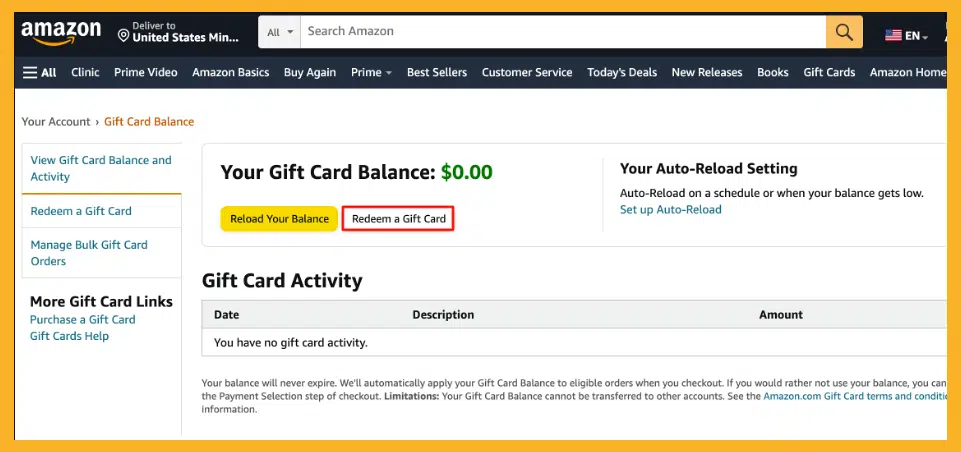
  • After entering your claim code, click “Redeem a Gift Card”.

  • To add the value of the gift card and authenticate it, click “Apply to Your Balance”.

Redeem on a Mobile Device:

  • On your Android, iPhone, or iPad, open the Amazon app.

  • In the bottom bar, tap the user symbol, then choose “Gift Card Balance.”

  • Select “Redeem Gift Card” and input the claim code manually or by scanning your card.

  • To quickly add the value of the gift card, tap “Apply to Your Balance”.

You’ve successfully redeemed your Amazon gift card by following these easy steps, opening up a world of options for your next online shopping binge. Cheers to your shopping!