Your Tech Story

Apple

Italian spyware

Apple And Android Phones Hacked By Italian Spyware Confirmed By Google.

Google, a subsidiary of Alphabet Inc., revealed on Thursday that Apple Inc. and Android mobile devices in Italy and Kazakhstan were spied on by Italian Spyware using hacking tools manufactured in Italy. The story claims that tools to eavesdrop on the private messages and contacts of the targeted devices were developed by the Milan-based RCS Lab, whose website identifies European law enforcement agencies as clients.

With more businesses manufacturing intercepting technology for law enforcement, the worldwide spyware market is growing.

Anti-surveillance campaigners accuse them of assisting governments, which in some circumstances employ such instruments to suppress human and civil rights.

Italian spyware
Image source: www.reuters.com

Google’s findings on RCS Lab come as European and American regulators consider additional restrictions on the selling and import of spyware.

These vendors are enabling the proliferation of dangerous hacking tools and arming governments that would not be able to develop these capabilities in-house,” Google mentioned.

Source: indianexpress.com

Apple, as well as the governments of Italy and Kazakhstan, did not respond immediately to requests for comment.

RCS Lab claims that its products and services conform with European regulations and help law enforcement organizations in their investigations.

“RCS Lab workers are not exposed, nor do they participate in any activities conducted by the relevant customers,” the company told Reuters in an email, adding that any misuse of its goods was unacceptable.

Source: gadgets360.com

Google claimed to have taken security measures to safeguard Android users and to have made them aware of the spyware.

The global spyware market for governments is expanding, with more and more companies developing intercepting tools for law enforcement agencies. Anti-surveillance campaigners accuse them of assisting governments that, in some situations, utilize such tools to repress human and civil rights.

The Israeli spy agency NSO’s Pegasus malware, which was used by multiple nations to spy on journalists, activists, and dissidents, brought the industry into the public eye in recent years.

Bill Marczak, a security researcher at Citizen Lab, claims that although RCS Lab’s application isn’t as stealthy as Pegasus, it can still read messages and view passwords. He added, “This shows that even though these devices are ubiquitous, there’s still a long way to go in securing them against these powerful attacks,”

Source: indianexpress.com

RCS Lab presents itself as a supplier of “lawful interception” equipment and services, including voice, data collection, and “tracking devices,” on its website. It states that it can find 10,000 targets every day in only Europe.

According to Google researchers, RCS Lab previously collaborated with the contentious, now-defunct Italian Spyware firm Hacking Team, which also created surveillance software for foreign agencies to hack into phones and computers. After being the target of a large hack in 2015 that led to the disclosure of numerous internal documents, Hacking Team filed for bankruptcy.

Billy Leonard, a senior researcher at Google, claims that in some instances, Google implied that it believed hackers using RCS spyware worked along with the target’s ISP, suggesting connections to actors with government backing.

iOS 16

iOS 16: 5 Features Apple ‘Borrowed’ From Google’s Android OS.

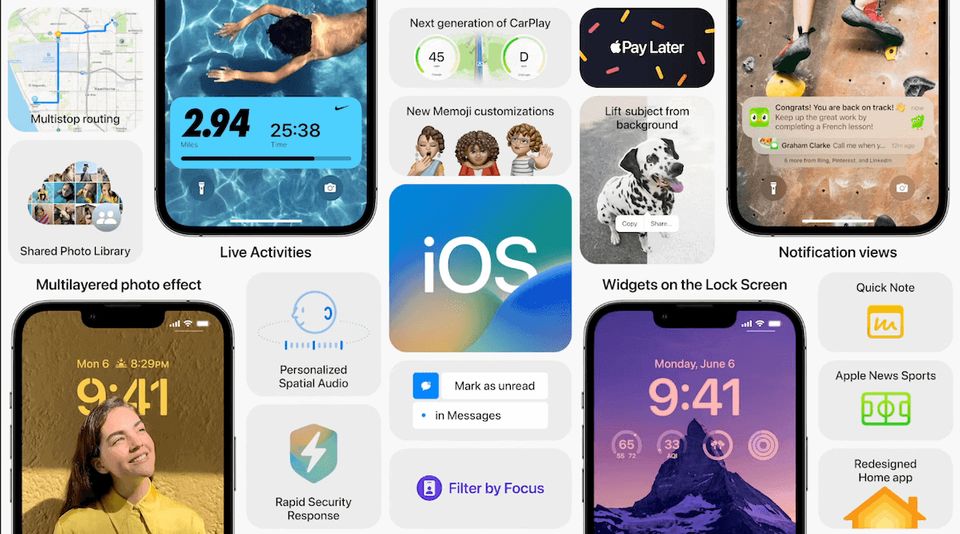
Apple‘s annual WWDC event this week featured a number of announcements, with iOS 16 being one of the more notable. The latest version of the iPhone operating system includes a variety of useful features such as image segmentation for lock screen backgrounds, the ability to use machine learning to trim out subjects in photos, and real-time notifications on the lock screen.

iOS 16 provides a fresh coat of paint for iPhone owners, making your iPhone feel almost “new.” Originally unveiled at Apple’s WWDC The iPhone software update will be introduced as a public beta next month at the WWDC keynote, and will subsequently be broadly released later this year, around the same time. Apple’s iPhone 14 If you’re an Android user, though, some of the new features in iOS 16 don’t exactly seem ‘creative’ or ‘different’ from what you’ve had for years with Google’s mobile operating system. Here are some of the features Apple “borrowed” from Google and Android in iOS 16.

iOS 16
Image source: www.androidheadlines.com

Live Captions:

Live Captions, which Apple announced in real-time for conversations, audio, and videos, is perhaps the most visible iOS 16 feature copied from Android. This is the same as Google’s Live Caption feature, which employs on-device machine learning to transcribe any audio playing on the device (debuting in 2019). Apple claims that Live Captions for iPhone, iPad and Mac can translate any audio content (FaceTime calls, video conferencing apps, or in-person chats) into English. With the release of Android 10, Google began pushing Live Caption services, which are now accessible in English on Pixel 2 and subsequent smartphones.

Shared Photos:

Shared photo capability has been available in Google Photos for a long time, allowing you to share albums with friends and family and have them contribute their own photos to the collection. Google’s service also allows you to add images to an album by face, so you can, for example, automatically add all of your grandmother’s photos to an album. It also proposes exchanging connections based on who’s in the picture.

Shared photo libraries are a popular feature in iOS 16 that consumers have been asking for for a long time. Finally, due to iCloud Shared Photo Library, Apple has made it simple to create a separate photo library that can be shared by up to five people. Since 2017, Google has had Shared Libraries, for those who are unaware. So, with a few minor tweaks, Apple’s iCloud Shared Photo Library functionality was deleted from Google’s page book. Each collaborator has permission to add, edit, favorite, caption, and delete photographs in the iCloud Shared Photo Library feature, which may be shared with up to five other individuals.

New Lock Screen Feature:

The addition of lock screen widgets, which allow you to access information such as the weather, events, time zones, and alarm from your locked display, was one of the main iOS 16 additions promised by Apple. You can even link various Focus profiles to separate lock screens. It sounds cool, but it’s yet another feature that was initially introduced on Android. The new lock screen on iOS 16 is beautiful, but it’s a feature that first appeared in Android with the release of Android 4.2 Jelly Bean in 2012. In reality, Google allowed users to customise the lock screen by adding a clock, calendar, and other elements. Google discontinued this feature with Android 5.0, but Samsung OneUI still has default lock screen widgets. To say the least, Apple drew a lot of inspiration for a smarter lock screen from Google.

Translate Camera:

Apple has incorporated machine learning in a number of ways, and iOS 16 demonstrates another intriguing application of the technology. Apple’s devices now have access to the Translate app’s translate camera feature, which allows you to aim your camera at text to get translations.

The Google Translate app on Android devices has had this capability for years, allowing you to point your phone camera at text and have a translation overlayed in the live viewfinder. Apple’s approach is more limited, as it essentially captures a photo and then overlays a translation onto the captured image’s text.

Schedule Sending Of Emails:

Apple also announced the option to undo email sending in the Mail app, as well as the ability to schedule email sending. The former is very useful if you realize you’ve made a mistake or accidentally sent the mail to the wrong individual.

Both of these capabilities were first introduced in Gmail a few years ago. Undo sending was really first revealed in 2009 as an experimental capability. This feature was first introduced by Google in Inbox, a beta version of Gmail. Inbox was unfortunately deleted by Google in 2019. In any case, these capabilities are available on Gmail for Android, PCs, and iOS, and you’ll be able to utilize them with iOS 16’s built-in Mail app.

Apple WWDC 2022

Apple WWDC 2022 Highlights: iOS 16, New MacBook Models, watchOS 9, and More.

On June 6, 2022, Apple held its Worldwide Developer Conference (WWDC). Tim Cook was the one who started the event. On Apple’s official website, the tech titan held an online-only event. Selected members of the media and YouTubers were present at the Cupertino-based corporation for the event. The Apple WWDC 2022 keynote began at 10 a.m. PST, or 10.30 p.m. IST. Here is everything you need to know:

Apple WWDC 2022
Image source: moneycontrol.com

Apple MacBook Air and Apple MacBook Pro:

The new Apple MacBook Air is out, with MagSafe charging and a notch on the display. This one comes with a 13.6-inch liquid retina display. The display can display 1 billion colours, making it a 10-bit display. The MacBook Air will also get a 1080p camera from Apple. Speakers and microphones are included in the display and keyboard. It comes with a four-speaker audio system. Spatial audio is included with the Apple MacBook Air. On the MacBook Air, Touch ID is still available.

The new MacBook Pro (2022), like the MacBook Air (2022), is powered by the new M2 chipset, and consumers can choose between up to 24GB of unified memory and up to 2TB of storage. According to Apple, the MacBook Pro (2022) has a 13-inch Liquid Retina Display with up to 500 nits of peak brightness and P3 colour compatibility. The MacBook Air, like its predecessor, has an active cooling system, and the fans should provide longer-lasting performance at high clock rates.

Pricing:

The pricing of an Apple MacBook Air (2022) starts at $1,199. (roughly Rs. 93,300). Meanwhile, the Apple MacBook Pro (2022) starts at $1,299 and goes up from there (roughly Rs. 1,01,000). The previous MacBook Air with the M1 chip will continue to be sold for $999, according to Apple (roughly Rs. 77,500). Midnight, Silver, Space Grey, and Starlight Gold will be the colour options for the upcoming MacBook Air model.

Mac0S Ventura 13:

MacOS 13 Ventura, Apple’s next edition of the software for Mac and MacBook machines, was unveiled at the WWDC 2022 keynote on Monday. The updated macOS edition provides an enhanced multitasking experience with Stage Manager. Mail, Notes, Reminders, and Messages are among the preloaded programs that have been redesigned in macOS 13. In addition, macOS 13 Ventura includes a new Safari browser from Apple. Both Intel-powered and Apple Silicon-based Mac machines will be able to download the next macOS update.

Developers who have signed up for the Apple Developer Program were given early access to macOS 13 Ventura for testing reasons. Next month, the new release will be accessible as a public beta, and it will be available for download later this year – most likely in October.

WatchOS 9:

Apple unveiled watchOS 9 at the WWDC 2022 keynote. With the latest watchOS version, Apple Watch wearers will be able to better manage their health and fitness, as well as continuously monitor atrial fibrillation (AFib) and improve sleep tracking. Apple has released the Medications app alongside the introduction of watchOS 9. WatchOS 9 also contains new watch faces and an updated user experience. In order to cater to fitness enthusiasts, Apple has also introduced new training features.

Apple Developer Program participants were the first to receive the watchOS 9 upgrade. Next month, users will be able to participate in a public test of watchOS 9.. This fall, Apple Watch Series 4 or later paired with iPhone 8 or later and iPhone SE (2020) or later running iOS 16 will receive the next watchOS as a free software update (somewhere in September).

iOS 16:

iOS 16, Apple’s next-generation operating system for compatible iPhone devices, has been officially announced. Apple has made tweaks and improvements across the system at its annual WWDC keynote event, as earlier leaks and rumors predicted. The iOS 16 software update will be available later this year, most likely in September, for iPhone 8 and later handsets. It will include enhancements to the operating system, such as a redesigned lock screen and notification system, as well as updated and redesigned system apps. Developer previews will be available this week, with a public beta to follow next month, ahead of the public release later this year.

Apple has started sending out developer previews of iOS 16 to Apple Developer Program members. Meanwhile, an open beta for iOS users will begin in July, and people can join up on the company’s website. According to Apple, the iOS 16 upgrade and the software features demonstrated at Apple WWDC 2022 will be released later this year — most likely in September — for iPhone 8 and subsequent devices.

WWDC 2022

Apple Previews Major Accessibility Features, Including ‘Door Detection’ In The Upcoming WWDC 2022.

Apple revealed a new set of accessibility capabilities on Tuesday that would help individuals with impairments navigate new places and conversations more easily. The new features, which will be available later this year, combining software, hardware, and machine learning. It’s unusual to hear directly from Apple about new features in unreleased iOS releases. These types of announcements are normally saved for a special occasion, such as WWDC 2022. Apple, based in Cupertino, has announced new accessibility capabilities that will be available shortly, most likely with iOS 16. Door recognition and live subtitles for FaceTime, streaming multimedia, and even spoken chats are among Apple’s latest accessibility capabilities.

What’s new:

  • Live subtitles for videos on iPhones, iPads, and Macs are a huge new feature. People who are deaf or hard of hearing will benefit from this feature. They may use Live Captions on the iPhone, iPad, and Mac, making it easier for them to follow any audio content, such as during a phone call or while watching the video. Users can choose the text size, see Live Captions for all FaceTime call participants, and type responses that are spoken aloud. Later this year, English Live Captions will be available in beta for iPhone 11 and later versions, iPad models with the A12 Bionic and later variants, and Macs with Apple hardware. The live captions function simply allows viewers to watch a video with the sound turned off and read along with the text at the bottom of the screen. The capability is compatible with FaceTime calls, streaming services, and other video conferencing apps, according to Apple. If you’re an Android user, Google already has something comparable.
  • Individuals who are blind or have low vision will be able to use their iPhone or iPad to detect a door when they arrive at a new location, determine how far away they are from it, and describe the door’s properties, such as how it can be opened and any nearby signs or symbols, using Door Detection. Along with People Detection and Image Descriptions, the functionality will be part of a new “Detection Mode” in Magnifier. Only iPhones and iPads with a LiDAR scanner will be able to use Door Detection. It will also indicate whether the door is open or closed, as well as whether it can be opened by pushing, pulling, turning a knob, or pulling a handle. Even signs and symbols around the door, such as room numbers or the accessible entrance logo, are read by the function.
WWDC 2022
Image source: phonearena.com
  • In the meantime, Apple has unveiled a new Apple Watch Mirroring feature. This feature, according to Apple, will allow people with disabilities to control Apple Watch using iPhone’s assistive features such as Voice Control and Switch Control, and use inputs such as voice commands, sound actions, head tracking, or external Made for iPhone switches instead of tapping the Apple Watch display. Apple Watch Mirroring makes use of a combination of hardware and software, including “advanced AirPlay features.”. AirPlay advancements will allow consumers to utilize their iPhones to access Apple Watch apps like Blood Oxygen, Heart Rate, Mindfulness, and more.
  • Apple Watch users will be able to use a double-pinch motion to answer or end a phone call, dismiss a notification, snap a photo, play or pause media in the New playing apps, and start, pause, or continue a workout using Quick Actions. This year, all of these new accessibility features will be implemented.
  • Apple will add 20 new languages and locations to voiceover, its screen reader for blind and poor vision customers, including Bengali, Bulgarian, Catalan, Ukrainian, and Vietnamese. Users will also be able to choose from hundreds of new optimized voices across languages, as well as a new Text Checker tool to detect text formatting issues. There will also be sound and haptic feedback for Voiceover users in Apple Maps to find the starting point for walking directions, as well as adjustable response times for Siri, new themes and customization options in Apple Books, and sound and haptic feedback for unique home doorbells and appliances.

The announcement of new accessibility capabilities comes just days before Apple’s Worldwide Developers Conference (WWDC 2022), which will be held entirely online from June 6 to June 10. WWDC 2022 is an annual developer conference where Apple usually announces new versions of iOS, iPadOS, macOS, watchOS, and tvOS. Apple released iOS 15.5, the latest version of its iPhone operating system, earlier this week.

iOS 15.4

iOS 15.4 Update Now Available For Download, Allows You To Unlock Your iPhone With Mask On

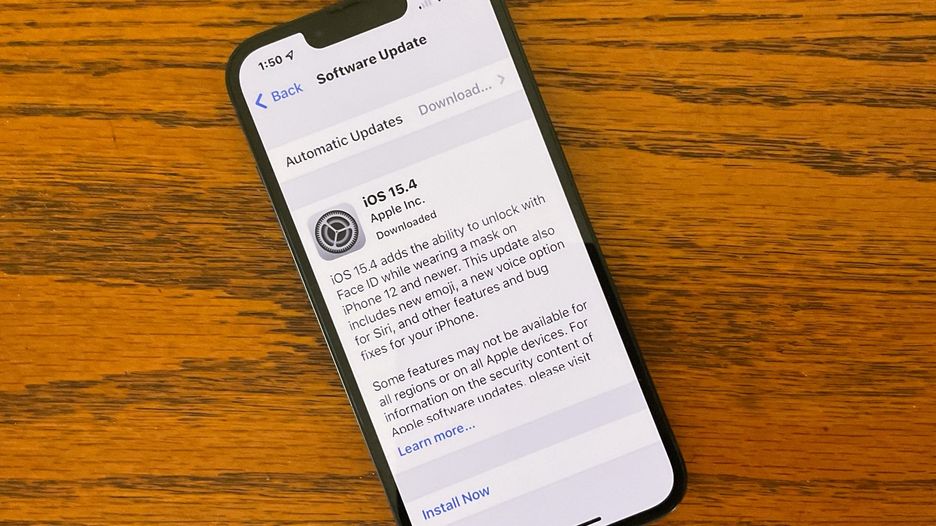
The latest version of Apple’s iOS 15.4 is now available for download, and the Face ID feature now works with a mask. With a face mask on, users will be able to unlock their iPhones and autofill passwords using Face ID. Apple claims that the feature authenticates by scanning unique features around the eye area, but it does warn that Face ID works best when the entire face is visible. Users do not, however, need to wear a mask when setting up Face ID.

Users of Apple iPhones can download and install iOS 15.4 by going to Settings> General> Software Update. Because the update is around 1.25GB in size, make sure you have WiFi when installing it. If you haven’t updated your iPhone in a while, the file size may be larger. You can also set a reminder to install the update while the phone is charging overnight. Here’s a rundown of what the new iOS 15.4 update has to offer.

Face ID

Face ID will first function while wearing a mask. After you install the new update, you’ll find this option in the settings. While wearing a mask, users will be able to use Face ID to access Apple Pay and password autofill in Safari. Users will be able to choose whether or not to use Face ID with a mask in the settings.

The iPhone 12 and newer devices, which include the iPhone 12, iPhone 12 mini, iPhone 12 Pro, Pro Max, and the latest iPhone 13 lineup, have this capability. Users of Apple’s iPhone 11 series, iPhone XS series, and iPhone X will be unable to use the feature.

iOS 15.4
Image source: www.cultofmac.com

Emoji

Apple’s iOS 15.4 update also adds new emojis to the keyboard, including faces, hand gestures, and everyday objects. Users can now select different skin tones for each hand when using the handshake emoji.

Facetime, Siri, and Vaccination

SharePlay sessions can now be started directly from supported apps with the new update. Meanwhile, on iPhone XS, iPhone XR, iPhone 11, or newer, Siri can now provide time and date information while offline. Additionally, EU residents can download and store verification of their vaccination, test results, and recovery records via the EU Digital Covid Certificate support in the Health app using the Vaccination Cards feature. The Covid-19 vaccination card in Apple Wallet now supports the EU Digital Covid Certificate format.

Other Features

Support for Italian and Chinese on Safari web page translation is also included in the update. Seasons, as well as played, unplayed, saved, and downloaded episodes, are now available in the Podcasts app. Apple iCloud custom email domains can be managed in Settings, and the News app’s Today feed and Audio tab will feature improved audio content discovery. Users will also be able to add text to Notes and Reminders using the camera on the keyboard. With Reminders, Shortcuts now supports adding, removing, and querying tags.
Apple has also changed the settings for Emergency SOS. Users can now use Call with Hold to get access to this. Furthermore, in Emergency SOS settings, a Call with 5 Presses is still an option.

Magnifier’s close-up mode now uses the iPhone 13 Pro and iPhone 13 Pro Max’s Ultra-Wide camera to help users see small objects. Users will be able to save passwords in their own notes in Apple’s Settings app.
This update contains some bug fixes as well. The keyboard was inserting a full stop between typed numbers, the News widgets in Today View were not opening articles when tapped, and photos and videos were not syncing to iCloud Photo Library.

Another issue addressed by the update is the Speak Screen Accessibility feature in the Books app quitting unexpectedly. It also resolves an issue where the Live Listen did not turn off when the Control Centre was turned off.

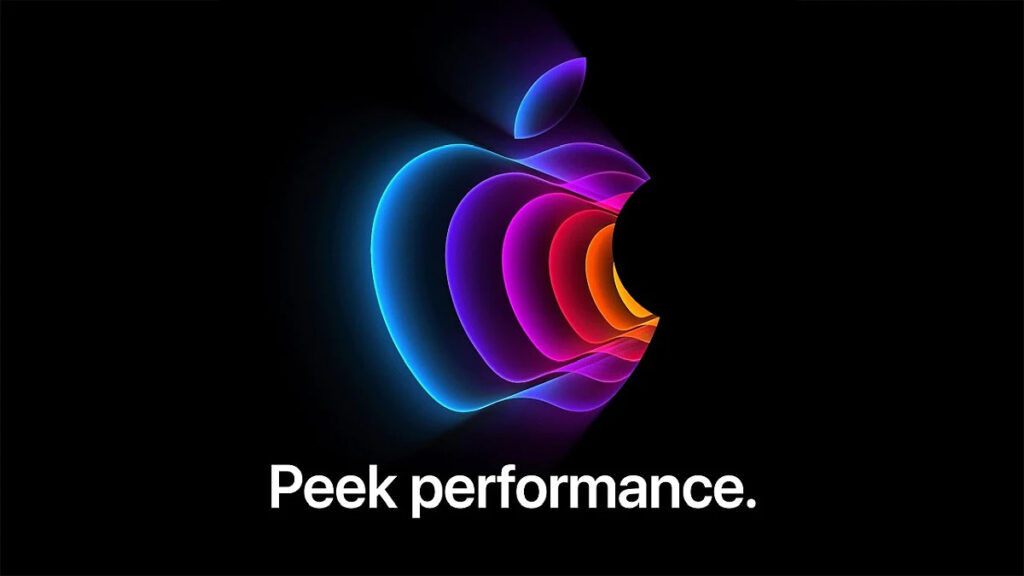
Peek Performance

Highlights From Apple’s March 8 Event: Announcements From The ‘Peek Performance’ Event.

Apple‘s first product event of the year has come to a close. The Cupertino behemoth unveiled the iPhone SE 3, iPad Air 5 with M1 chipset, and Mac Studio desktop computer at Peek Performance. Along with these, Apple teased a new Mac Pro but didn’t reveal any details about it. The device will be unveiled at a later date by the company.
The iPhone SE 3 succeeds the iPhone SE 2, which was released in 2020, while the iPad Air 5 succeeds the iPad Air 4, which was released in the same year. Although the iPhone SE 3 and iPad Air 5 have the same design as their predecessors, the devices have been upgraded with powerful interiors. Check out everything Apple announced at Peek Performance.

Apple announced the iPhone SE 3 at its Spring event, which was dubbed “Peek Performance” after a series of leaks and rumours. The Apple A15 Bionic chipset, which also powers the iPhone 13 series, is used in the iPhone SE 3. It supports 5G networks.

Peek Performance
Image source: i.gadgets360cdn.com

The iPhone SE 3 follows the design of its predecessor, the iPhone SE 2020, with rounded edges. Touch ID is built into the phone, which has a 4.7-inch display. The phone is water and dust resistant, with IP67 certification, for added security. The phone has only one camera on the back, which is a 12-megapixel sensor.

In international markets, the iPhone SE 3 costs $429. The phone is available in India for Rs 43,900. From March 11 onwards, pre-orders will be available. Midnight, starlight, (PRODUCT)RED and green will be among the four colours available for the iPhone SE 3. From March 18, the smartphone will be available for purchase in India and other countries.

The new iPad Air 5 features the most powerful M1 chipset, which also powers the new MacBooks and iPad Pro. The iPad Air 5 was previously rumoured to have an A15 Bionic chipset. The iPad Air 5 does, however, have the same design as the iPad Air 4.

The 10.9-inch Liquid Retina display on the iPad Air 5 has 3.8 million pixels, 500 nits of brightness, and a P3 wide colour gamut. Like the iPad Air 4, it has squared edges. The new iPad also includes a Touch ID fingerprint sensor that also serves as a power button. The iPad also has eSIM, stereo speakers, and Wi-Fi 6 capabilities.

The iPad Air 5 also has a 12-megapixel wide-angle camera on the back and a 12-megapixel ultra-wide-angle camera on the front, both of which are designed to improve video calls.

The WiFi variant of the new iPad Air 5 is priced at Rs 54,900 in India, while the WiFi+ Cellular model is priced at Rs 68,900. The iPad Air 5 will be available in a variety of colours, including space grey, starlight, pink, purple, and blue.

At its Spring Event, Apple also unveiled the Mac Studio, an entirely new Mac. It is expected to be more powerful than Apple’s Mac mini, which was released in 2020. The M1 Ultra chip, which is more powerful than the M1 chipset, powers the Mac Studio.

The Mac Studio will be available in two versions, one with the M1 Max and the other with the M1 Ultra, according to Apple. In India, the M1 Max starts at Rs 189,900, while the Studio with the M1 Ultra is priced at Rs 3,89,900.