Your Tech Story

Tech News

How to Keep Your Kids off Wi-Fi and Take Control of Your Internet


How to Keep Your Kids off Wi-Fi and Take Control of Your Internet

How to Keep Your Kids off Wi-Fi and Take Control of Your Internet

Image Source: pcmag.com

As our kids become more and more engrossed in the digital world, worries about improper content exposure, cyberbullying, and online threats have intensified. Only 23% of parents, nonetheless, proactively keep an eye on their kids’ internet use. This may be addressed by following this brief advice, which explains how to take charge of your home internet and give your children a safer online experience.

Router for Parental Control

Put web filters on every device: Invest in a parental control router to act as your house internet’s choke point and impose online filters on all of your children’s gadgets.

Control via your router: To reduce tampering, deactivate wireless remote administration, put the router away from children, and enable site prohibitions.

Plan Outtime for Internet Blackouts:

Encourage balance by establishing clear guidelines and planning regular internet blackout times to promote family time and offline activities.

Personalise downtime: Choose the best times to limit internet usage to improve family time and sleeping patterns.

Ban Unsecured Wi-Fi Networks:

Perform a Wi-Fi search to find and ban networks that might be dangerous for your kids.

Engage in conversation with your neighbours: Bring up the significance of internet safety and ask them to protect their Wi-Fi networks.

Parental Controls for Mobile Devices:

Aura is a family safety software that lets you set time restrictions, monitor and block particular websites and applications, and get notifications concerning cyberbullying.

iOS devices: To manage access and schedule downtime, use Apple’s Screen Time settings.

Android devices: Use Google Family Link to monitor and manage use online.

Game Console Parental Controls:

Set deadlines: Establish time limits for gaming under the American Academy of Paediatrics’ recommendations.

Make use of safe gaming resources: Turn on parental controls on game consoles to keep an eye out for offensive and cyberbullying content.

Don't Leave Devices in Common Areas:

Establish ground rules for the home: No electronics in the bedrooms during certain hours, unless used for homework.

Shared workspace: To provide a regulated atmosphere, set up a shared study room for family activities and gadget charging.

Promote Social Media Conduct That Is Responsible:

Determine maturity: Before giving your child access to social media, determine whether they are ready.

Privacy awareness: To reduce hazards, teach kids how to share personal information online responsibly.

To combat cyberbullying: teach kids the consequences of their actions online, encourage compassion, and provide them with the resources they need to file reports.

While parental controls are useful tools, developing an open line of communication with your children on safe internet usage is just as important if you want to earn their trust. Parents may actively participate in creating a safe and responsible internet environment for their children by putting these strategies into practice.

OpenAI Seeks $90 Billion Valuation in Possible Share Sale, WSJ Says

OpenAI Is in Talks to Raise New Funding at Valuation of $100 Billion or More

In a seismic move within the tech sphere, OpenAI, the renowned artificial intelligence research laboratory, is reportedly in the initial stages of securing a substantial round of funding that could catapult its valuation to an unprecedented $100 billion or more. According to Bloomberg News, sources privy to these discussions revealed that the organization is actively engaging in talks aimed at securing this remarkable investment.

Uncertainties Surrounding Valuation and Timing

OpenAI Seeks $90 Billion Valuation in Possible Share Sale, WSJ Says

Image Source: finance.yahoo.com

While the discussions are underway, it’s important to note that the terms, valuation, and precise timing of this imminent funding round have yet to be solidified. The fluidity of the situation implies that these crucial elements remain subject to potential alterations before finalization. However, the mere prospect of OpenAI approaching such a staggering valuation is indicative of the profound confidence and investor interest in the organization’s innovative pursuits and technological advancements.

Exploring Collaborations for Technological Advancements

In a related development, OpenAI is reportedly delving into discussions regarding funding for a groundbreaking chip venture in collaboration with G42, an influential entity based in Abu Dhabi. These discussions signify the organization’s strategic intentions to venture into hardware innovations, an area pivotal to the evolution and application of artificial intelligence technologies. The potential partnership with G42 underscores the global nature of OpenAI’s vision and its commitment to forging strategic alliances for cutting-edge technological advancements.

Redefining AI Landscapes with Bold Financial Moves

Should OpenAI successfully secure this round of funding at the anticipated valuation, it would undoubtedly mark a historic moment not just for the organization but for the broader tech industry. Such a valuation would underscore the remarkable trajectory and influential position of OpenAI within the artificial intelligence landscape, potentially setting new benchmarks for valuation in the tech sphere.

The implications of this potential funding transcend mere financial figures; they signify a pivotal moment in the technological landscape, underscoring the growing significance and potential of AI-driven innovations in shaping our future. OpenAI’s pursuit of this substantial investment reaffirms its commitment to pioneering advancements that redefine the boundaries of artificial intelligence.

As the negotiations progress, stakeholders within the tech industry eagerly await the outcome, poised to witness a potential milestone that could reshape the very fabric of the technological landscape.

How to Start a YouTube Channel for Vlogging Like a Pro

How to Start a YouTube Channel for Vlogging Like a Pro

Starting a YouTube channel for vlogging can be an exciting venture. Be it a hobby or a career path, these tips will guide you in creating a successful and professional vlogging channel.

Defining Your Niche

Identify what you’re passionate about and what you can consistently create content on. A specific niche helps attract a dedicated audience

Understanding Your Audience

Know who your target audience is. It is important to understand their interests and preferences to create relevant and engaging content.

Creating High-Quality Content

Quality is important in vlogging. Focus on creating clear, entertaining, and informative content that adds value to your audience.

Investing in the Right Equipment

How to Start a YouTube Channel for Vlogging Like a Pro

Image Source: amberscript.com

Although you don’t need high-end gear to start with, investing in a good camera, microphone, and lighting setup can significantly improve video quality.

Mastering Video Editing

Learning basic video editing skills can greatly improve your content. Use editing software to add effects, music, and graphics to your video.

Optimizing for SEO

Use relevant keywords, catchy titles, and descriptions to make your videos more discoverable on YouTube.

Building an Online Presence

Promote your channel on social media platforms and join online communities. This helps in building a wider audience base.

Engaging with Your Audience

Respond to comments, solicit feedback, and engage your audience in your content. Engagement increases audience loyalty and channel growth.

Consistency and Scheduling

Maintain a consistent posting schedule. Regular video uploads keep your audience engaged and also attract new viewers.

Monetizing Your Channel

Once your channel meets YouTube’s eligibility criteria, explore different monetization options like ads, sponsorships, and merchandise.

Analyzing Performance Metrics

Use YouTube Analytics to analyze metrics like views, watch time, and subscriber growth to refine your strategy.

Collaborating with Other YouTubers

Collaboration can bring your channel to a wider audience. Partner with other YouTubers to create joint content.

Staying Updated with YouTube Trends

Stay informed about the latest trends and updates on YouTube. Adapting to changes can help keep your content relevant.

Conclusion

Starting a YouTube channel requires passion, dedication, and strategy. By following these tips, you can start a successful vlogging journey.

Unlocking the Secrets of Apple's New Journal App in iOS 17

Unlocking the Secrets of Apple’s New Journal App in iOS 17

Apple’s Journal App in iOS 17 is a game-changer for anyone looking to document their thoughts, ideas, and daily experiences. This comprehensive guide will introduce you to the app’s intuitive interface, showing you how to create, personalize, and organize your journal entries. Learn to enhance your writing with advanced text features, add multimedia for a richer experience, and integrate seamlessly with other iOS apps. Whether you’re documenting memories, tracking goals, or seeking a mindful escape, the Journal App in iOS 17 is your perfect companion, blending functionality with creativity for an enriching journaling journey.

Navigating the Interface

Familiarize yourself with the user-friendly interface, which includes key features such as entry lists, search functions, and settings.

Creating Your First Journal Entry

Unlocking the Secrets of Apple's New Journal App in iOS 17

Image Source: tomsguide.com

Let’s create your first entry. I’ll guide you through a simple process to start your journaling journey. Discover how to effortlessly input your thoughts, emotions, or daily experiences, customizing each entry with text styles, colors, and multimedia enhancements. Whether you’re chronicling a special moment, jotting down ideas, or simply recording your day, Apple’s Journal App makes it intuitive and enjoyable, setting the stage for a rich, personalized journaling experience on your iOS device.

Utilizing Advanced Text Features

Apple’s Journal app goes beyond basic journaling with its range of advanced text features, allowing you to create entries that are as unique as your experiences. Dive deeper into a variety of text customization options, including diverse fonts, styles, and colors to creatively express your ideas and stories.

Adding Media to Your Entries

This feature allows you to bring your stories to life with vivid visuals and sounds. Whether it’s a memorable photo, an inspirational video clip, or a piece of audio that captures the essence of your day, embedding media in your journal entries enriches your storytelling, making each page not only It becomes a record of your life, but also a living tapestry of memories.

Using Tags and Categories

Learn to efficiently organize your entries using tags and categories for easy retrieval and reference.

Integrating with Other iOS Apps

Maximize your journaling experience by syncing your entries with other iOS apps like Calendar and Reminders.

Customizing Your Journal Experience

Customize your journal with theme, font, and layout options to match your personal style.

Privacy and Security in the Journal App

Understand the privacy and security features of the app to keep your personal entries safe and secure.

Using the Journal App for Productivity and Mindfulness

Explore how the Journal App can be a tool for increasing productivity and mindfulness in your daily life.

Conclusion

Apple’s Journal App in iOS 17 offers a fantastic platform for capturing your life’s moments. Dive in and start exploring its vast potential!

Tencent Leads $80 Billion Rout as China Rekindles Crackdown Fear

Tencent Leads $80 Billion Rout as China Rekindles Crackdown Fear

On December 22, Tencent Holdings spearheaded an unprecedented $80 billion downturn in China’s digital sphere, sparked by the unanticipated enforcement of fresh gaming restrictions. The announcement, issued by the top gaming regulator, aimed to curb excessive spending and time commitment within gaming platforms.

Tencent Leads $80 Billion Rout as China Rekindles Crackdown Fear

Image Source: business-standard.com

The new regulations encompass a spectrum of limitations, from capping individual in-game expenditures to prohibiting incentives for frequent log-ins and compulsive player challenges. This move evoked vivid memories of the 2021 tech industry crackdown, which disrupted sectors like e-commerce and education, deeply impacting companies like Ant Group Co. and Alibaba Group Holding Ltd.

Investor Bewilderment and Market Fallout

Tencent, along with counterparts NetEase Inc. and Bilibili Inc., witnessed staggering drops in market value, signaling investor concern about the unforeseen and ambiguous nature of the regulatory changes. Developers and designers flooded social platforms with confusion and outrage, particularly perturbed by the undefined spending caps that could severely impact revenue streams reliant on in-game purchases.

Lingering Apprehension and Industry Outlook

Industry analysts and market participants expressed apprehension about potential future measures targeting the internet sector, paralleling past stringent actions against various industries. The regulatory interventions, although ostensibly focused on gaming addiction and cultural preservation, sent shockwaves across investors and industry insiders, prompting concerns about the broader implications for market stability and growth.

The ambiguous wording of the regulations left stakeholders grappling with uncertainties, with the rules lacking clarity on their commencement and potential revisions based on public feedback. While Tencent’s reassurances about maintaining operational continuity provided some solace, skepticism prevails amidst fears of prolonged regulatory pressure on the digital landscape.

Impact on Global Gaming Paradigm

Beyond China’s borders, these developments might signal a shift away from the prevalent freemium model, potentially influencing international gaming policies concerning addiction and in-game spending. Analysts foresee a domino effect, prompting other countries to contemplate measures against addictive gaming practices.

The resilience or reversal of these stringent measures remains contingent on public response and ongoing discussions between stakeholders and regulatory bodies. As the industry braces for a potentially transformative phase, the implications of China’s regulatory stance on its colossal digital market will reverberate globally, influencing future gaming paradigms and regulatory frameworks.

The Ultimate Guide to Connecting Your Surface Pro to a Monitor

The Ultimate Guide to Connecting Your Surface Pro to a Monitor

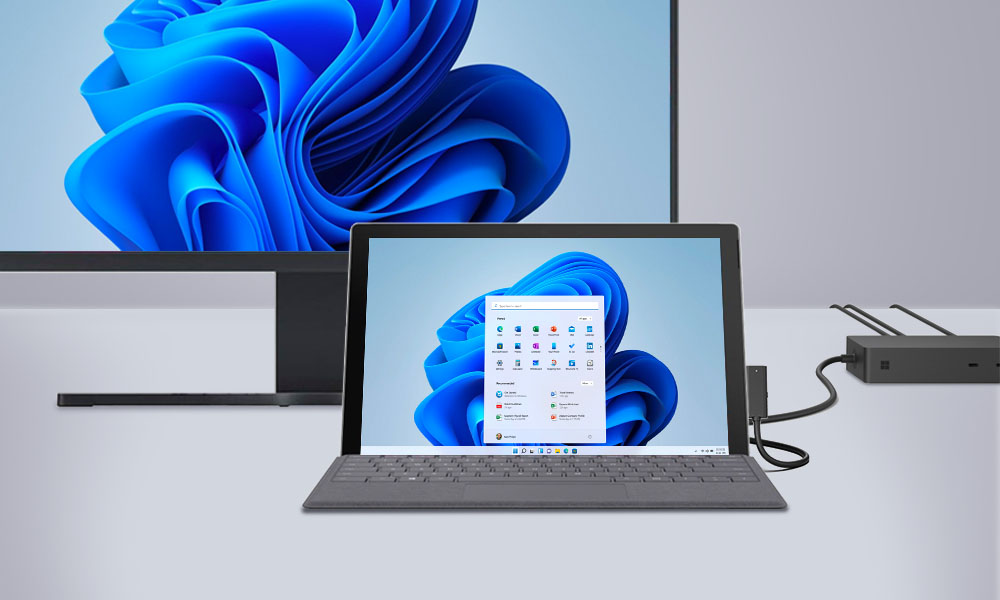
Connecting the Surface Pro to a monitor is a straightforward process that significantly expands your visual workspace. Whether for increased productivity, better multitasking, or better entertainment experiences, connecting your Surface Pro to an external monitor is a game-changer. This simple but impressive process involves identifying the correct port on your device (such as USB-C or Mini DisplayPort), selecting a compatible monitor, and using the appropriate cable or adapter. Once connected, you can easily adjust display settings like resolution and orientation to suit your needs. Ideal for professionals, creative people, and tech enthusiasts, this setup unlocks the full potential of your Surface Pro, turning it into a more powerful and versatile workstation.

Understanding Surface Pro Ports

Understanding the ports on your Surface Pro is key to maximizing its functionality, especially when it comes to connecting external devices like a monitor. Here’s a description of the common ports you’ll find on the various Surface Pro models.

Choosing the Right Monitor

The Ultimate Guide to Connecting Your Surface Pro to a Monitor

Image Source: gechic.com

Not all monitors are created equal. When selecting a monitor for your Surface Pro, it’s important to consider a variety of factors to ensure you get the most out of your dual-screen setup. Consider size, resolution, and port compatibility.

Types of Cables and Adapters

You’ll probably need a cable or adapter to connect. We’ll explore HDMI, DisplayPort, and USB-C options.

Configuring Display Settings on Windows

Once you’ve successfully connected your Surface Pro to a monitor, the next step is to fine-tune your display settings to ensure an optimal viewing experience. Here’s how to adjust key settings like resolution, orientation, and others.

Benefits of a Dual Monitor Setup

Discover the transformative power of a dual monitor setup! Embrace the vastness of extended screen space that not only doubles your digital workspace but also boosts your productivity. Whether for professional work, creative projects, or even to enhance your entertainment experience, learn why upgrading to two monitors could be a game-changer in your daily digital life.

Customizing Your Workspace

Organize your digital workspace effectively. Here’s how to manage Windows and apps on multiple screens.

Surface Pro Docking Station: Expanding Your Options

For even more connectivity, consider using the Surface Pro Docking Station.

Wireless Display Options

Prefer to go wireless? We’ll discuss Miracast and other wireless display methods.

Surface Pro in Professional Environments

The Surface Pro shines in professional environments, offering a seamless blend of portability, power, and versatility. Its lightweight design and robust performance make it an ideal choice for business professionals on the go. With features like a high-resolution touchscreen, detachable keyboard, and stylus support, it easily adapts to different work scenarios. The compatibility of the Surface Pro turns it into a desktop-like experience when needed.

Conclusion

Extending your Surface Pro’s display to a monitor opens up a world of possibilities. Whether for work or play, this is a simple but effective upgrade.