Your Tech Story

Tech News

A Step-by-Step Guide to Unsubscribe From Unwanted Emails and Newsletters

A Step-by-Step Guide to Unsubscribe From Unwanted Emails and Newsletters

Is there an avalanche of promotional emails, newsletters you never signed up for, and important communications filling your inbox? Then you are not by yourself. Unwanted newsletters and emails can clog your inbox, making locating important communications difficult. Thankfully, there are easy ways to get rid of these annoying messages without having to take extreme actions.

Simply Unsubscribe Links

A Step-by-Step Guide to Unsubscribe From Unwanted Emails and Newsletters

Image Source: lifewire.com

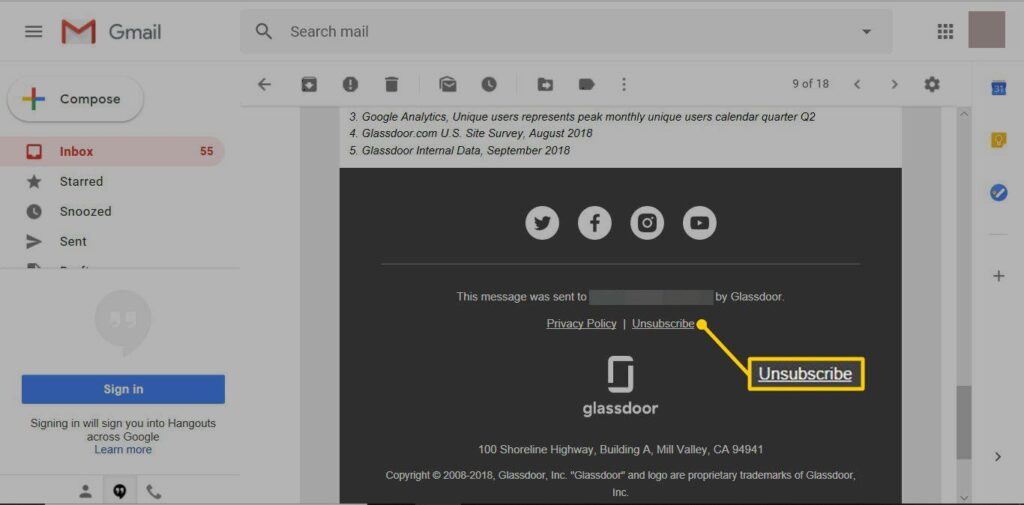
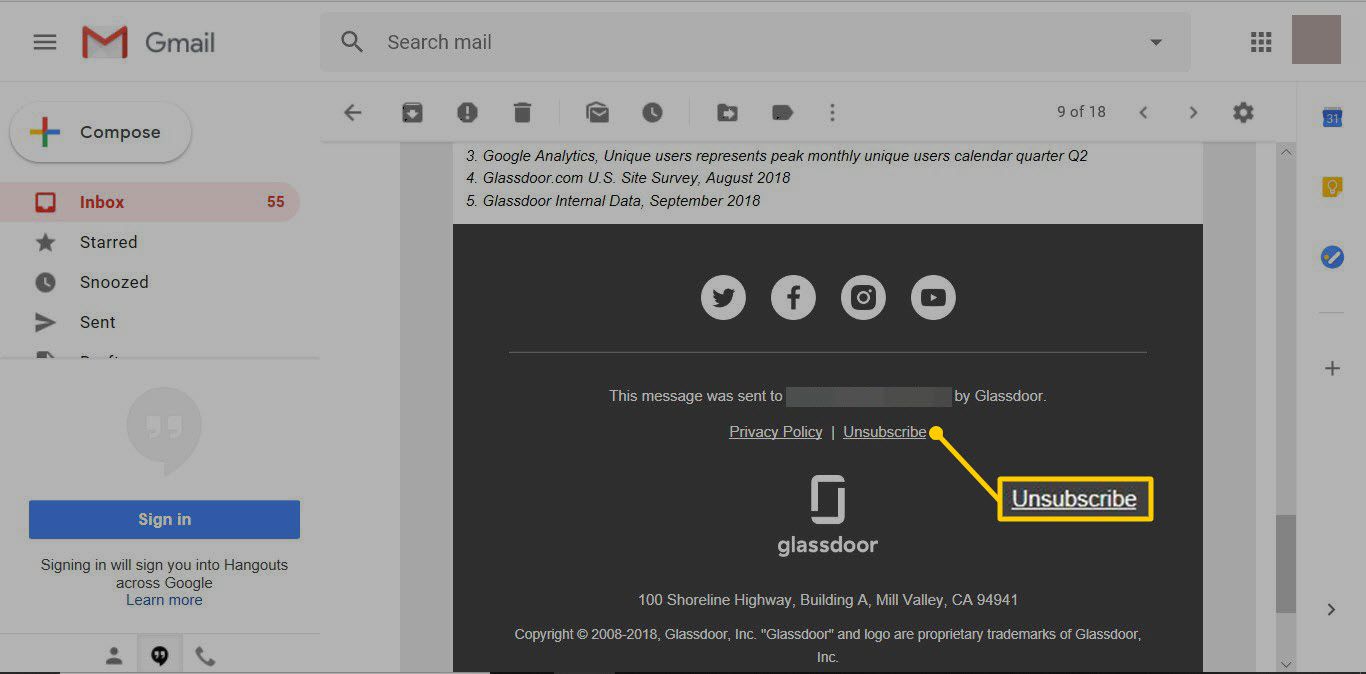
The easiest method for getting off an email list is to use the unsubscribe feature that the sender has built-in. These links, which are usually near the bottom of the email, could be obscured or difficult to find in order to deter unsubscribing. Nonetheless, many email providers streamline the procedure to increase user accessibility.

Gmail Unsubscribe:

Gmail from Google provides an easy-to-use unsubscribe feature for emails that are subscription-based. Gmail will display an unsubscribe link prominently at the top of emails that it recognises as subscription-based. To easily opt out of receiving future messages, users only need to click on this link.

Methods for Gmail Unsubscription:

  • Open Gmail and go to your inbox after logging in.

  • When you open the undesired email, choose “Unsubscribe” by clicking the button adjacent to the sender’s address.

  • Click “Unsubscribe” to confirm your choice in the pop-up box.

  • You have the option to transfer the mail to spam for additional filtration.

Removing from Outlook

Users of Microsoft Outlook can unsubscribe from emails in a similar way. Outlook users may simply stop unwanted subscriptions by clicking the unsubscribe link at the top of the email.

Outlook Unsubscribe Procedures:

  • Open the Outlook desktop programme or go to Outlook.com.

  • To cancel a subscription, open the email that contains the subscription.

  • Above the sender’s details, click the “Unsubscribe” option.

  • Click “Unsubscribe” to validate your selection in the pop-up box.

More Unsubscribing Methods

  • Other ways to unsubscribe from unsolicited emails exist if you can’t find a link to unsubscribe or if you have another email provider:

  • Look for the Unsubscribe option in the message: Look for the unsubscribe link in the email message; it’s generally in the footer or near the bottom.

  • Employ a Mass Unsubscribe Service: To unsubscribe from emails in masse, use services like Unroll.me, Clean Email, or Cleanfox.

  • Modify Your Preferences for Email: To stop getting unsolicited emails, change your email options on the websites of any company with whom you have an account.

These instructions will help you clear up your inbox and take back control of your email correspondence so that only the messages you wish to receive end up there.

 
Apple's First Foldable Device Could Replace the iPad Mini by 2026

Apple’s First Foldable Device Could Replace the iPad Mini by 2026

It seems that Apple is finally taking significant strides towards the development of its much-anticipated foldable iPhone. Recent reports indicate that the tech giant is exploring the concept of a clamshell-style foldable device, a move that could potentially revolutionize the market. However, while excitement brews over the prospect of this innovative gadget, several challenges and uncertainties loom on the horizon.

According to insider sources, Apple has begun prototyping at least two versions of the foldable iPhone, with a widthwise folding mechanism reminiscent of a clamshell. While earlier estimations suggested a possible release date as early as 2025, complications surrounding pricing and consumer appeal have reportedly delayed the project’s timeline. The hefty cost of such a device coupled with the challenge of identifying compelling features to justify its price tag have left Apple deliberating its next move.

Overcoming Technical Hurdles: Design Ambitions vs. Real-World Constraints

Apple's First Foldable Device Could Replace the iPad Mini by 2026

Image Source: imore.com

Apple’s industrial design team has set ambitious goals for the foldable iPhone, envisioning a sleek and slim device that seamlessly integrates into users’ daily lives. However, the practicalities of incorporating essential components like batteries and screens have posed significant challenges. Achieving a crease-free foldable screen, essential for a seamless user experience, remains a primary focus for Apple. The company is reportedly exploring innovative solutions to address this issue and deliver a superior product.

The Road Ahead: Navigating Uncertainties and Anticipated Features

Despite promising predictions from analysts and supply chain experts, the exact release date of the foldable iPhone remains uncertain. Speculations regarding features such as stylus support and screen size continue to fuel anticipation among consumers. While concept designs offer a glimpse into the potential of this groundbreaking device, it’s essential to approach such rumors with caution, considering the fluid nature of product development in the tech industry.

As Apple ventures into the realm of foldable devices, the possibility of a foldable iPhone replacing the iPad Mini looms large. While challenges and uncertainties persist, the tech giant’s commitment to innovation and quality assurance bodes well for the future of foldable technology. Whether the foldable iPhone lives up to its hype remains to be seen, but one thing is certain – the evolution of smartphones is poised to take a significant leap forward in the years to come.

How to Use Facebook Business Manager for Maximum Impact in 2024

How to Use Facebook Business Manager for Maximum Impact in 2024

In the dynamic landscape of digital marketing, Meta’s Facebook Business Manager stands out as a vital tool for businesses aiming to streamline their online advertising efforts. As we move into 2024, effectively leveraging this platform can set your business apart, providing comprehensive control over your Facebook marketing and advertising activities. This guide will walk you through the essentials of using Facebook Business Manager, ensuring you’re well-equipped to optimize your online presence.

Introduction to Facebook Business Manager

How to Use Facebook Business Manager for Maximum Impact in 2024

Image Source: socialmediaexaminer.com

Facebook Business Manager is a free platform by Meta, designed to centralize control over your Facebook and Instagram properties, including Pages, ad accounts, audiences, pixels, and more. This is especially useful for managing multiple assets and team members under one roof, ensuring clarity and security in your digital marketing efforts.

Setting Up Your Account

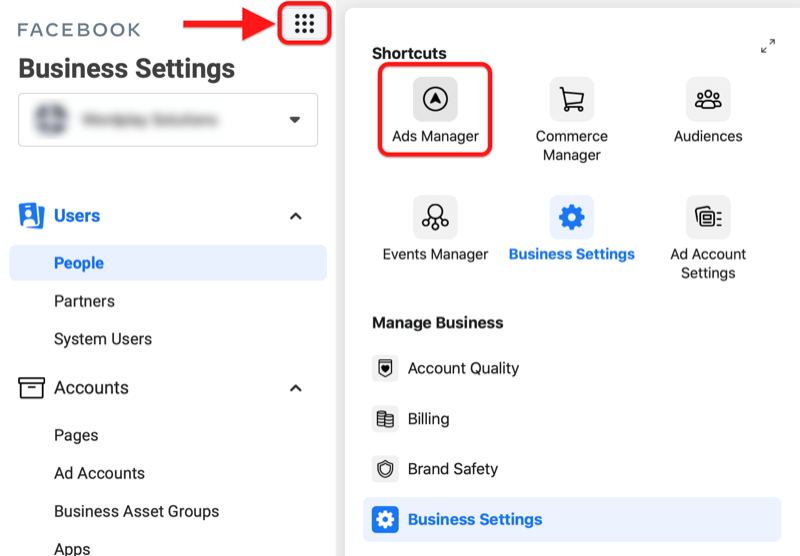
  • Go to the Business Manager setup page: Start by visiting the Facebook Business Manager website and select the “Create Account” option.

  • Enter Your Business Details: rovide your business name, your first name, and your business email address to set up your account.

  • Add Your Facebook Business Page: If you have an existing page, you can add it to your Business Manager account. If not, you have the option to create a new one.

Main Features of Facebook Business Manager

Managing Assets

You can add and manage various assets like Posting, Pages, ad accounts, and Instagram accounts. This centralized approach makes it easy for your team to control access and permissions.

Adding People and Assigning Roles

Business Manager allows you to add team members and assign them specific roles, from administrative to limited access, increasing security and efficiency.

Insights and Analytics

Access detailed insights and analytics about your campaigns and overall performance, enabling data-driven decisions to optimize your strategies.

Creating and Managing Ad Campaigns

Planning Your Campaigns

Begin by identifying your marketing goals, such as increasing brand recognition, leads generation, or boosting sales. These objectives will shape the framework of your advertising campaigns.

Creating Ad Sets and Ads

For each campaign, create ad sets to target specific audiences with tailored ads. This segmentation improves campaign effectiveness.

Budgeting and Scheduling

Set your budget and schedule your ads. Facebook offers flexibility in budgeting, allowing daily or lifetime budgets and the ability to schedule ads for optimal times.

Utilizing Advanced Features

Pixel Integration

Integrate the Facebook pixel with your website to track conversions and retarget website visitors, increasing your ad accuracy.

Catalogs and Inventory Management

For e-commerce businesses, catalog access and managing inventory through Business Manager can streamline product advertising on Facebook.

Custom Audiences and Lookalike Audiences

Take advantage of custom audiences by targeting ads based on your existing contacts or website visitors. Lookalike audiences help you reach new users similar to your best customers.

Tips for Maximizing Your ROI

  • Best Practices for Ad Targeting: Use Facebook’s robust targeting options to reach your ideal audience based on demographics, interests, and behavior.

  • Creative Strategies for Advertising Content: Engage your audience with engaging advertising content that resonates with their interests and needs.

  • Analyzing and Optimizing Campaign Performance: Regularly review campaign analytics to understand what’s working and make adjustments for continuous improvement.

Conclusion

As we embrace advances in digital marketing in 2024, Meta’s Facebook Business Manager remains the cornerstone for businesses looking to tackle the complexities of online advertising. By mastering this tool, you can enhance your marketing strategies, get better results, and gain a competitive edge in the digital marketplace.

Meta Introduces Labels for AI-Generated Images Shared on Facebook, Instagram, and Threads

Meta Introduces Labels for AI-Generated Images Shared on Facebook, Instagram, and Threads

A big move has been launched by Meta, formerly known as Facebook, to address the growing issue of AI-generated photos on its platforms. The business intends to identify artificial intelligence (AI-generated) photographs on Facebook, Instagram, and Threads in the upcoming months. By making this change, consumers will be able to clearly and transparently discern between material provided by AI and content created by humans, which is becoming an increasingly difficult task.

“As the difference between human and synthetic content gets blurred, people want to know where the boundary lies,” states Nick Clegg, President of Global Affairs at Meta.

searchenginejournal.com

Taking Care of the Unclear Boundaries

Meta Introduces Labels for AI-Generated Images Shared on Facebook, Instagram, and Threads

Image Source: openaisea.com

President of Global Affairs at Meta Nick Clegg emphasises the need for openness at a time when it’s getting harder to distinguish between real and fake content. The increasing popularity of AI image-creation technologies makes it necessary for consumers to be aware of the origin and legitimacy of the information they come across on social media.

Future Features & Predictions

In the upcoming months, Meta plans to provide multilingual labelling of AI-generated photographs across all of its platforms. This project is especially important during global elections when the veracity of the information is crucial. To distinguish AI-generated photographs, Meta intends to apply several strategies, including embedded metadata in the image files, visible markers, and invisible watermarks. Furthermore, users will be penalised for failing to notify when the content is produced by AI under the new standards.

These actions emphasise responsible AI development and are in line with best practices that the Partnership on AI (PAI) has advocated.

Looking Forward

To guide its long-term plan, Meta will be actively observing user interaction with labelled AI content over the upcoming year. 

The firm will now use detection technologies to classify AI material from outside suppliers and top AI art platforms, but it presently labels pictures created by its own AI image generator manually.

Users are encouraged to cautiously assess accounts that share photographs in the interim and keep an eye out for visual irregularities that might indicate computer production.

Essential Advice for Companies and Marketers

From Meta’s statement, companies and social media marketers should learn the following important lessons:

  • Authenticity and Transparency: As the use of AI-generated images in marketing grows more widespread, companies should place a high priority on authenticity and transparency, taking into account proactive disclosures.

  • Recognising Audience Preferences: Companies should be aware of whether their target audience prefers “human-made” or artificial intelligence-generated material, and adjust their approach appropriately.

  • Impact on Trust: Marketers should keep a careful eye on user attitude around AI usage, even if properly labelling synthetic material may help to limit negative effects on trust.

  • Ethical AI Development: It is important to emphasise the necessity of ethical AI development and responsible usage since rushing to employ immature AI technology might backfire.

  • Increase in Technology Interest: Marketers should keep up with the latest developments in digital watermarking, metadata standards, and synthetic media identification techniques since these areas are expected to see a rise in interest.

Conclusion

When it comes to addressing the issues raised by AI-generated material on social media sites, Meta’s endeavour represents a major advancement. With an emphasis on openness and user knowledge, Meta wants to enable consumers to choose the material they consume with knowledge. Businesses and marketers need to adjust their plans to appropriately negotiate the shifting terrain of synthetic content as the digital media ecosystem continues to change.

WhatsApp Will Soon Work to Enable Chats with Other Encrypted Messaging Apps

WhatsApp Will Soon Work to Enable Chats with Other Encrypted Messaging Apps

In a digital age where communication knows no bounds, WhatsApp, the behemoth messaging platform with over 2 billion users, is poised to revolutionize the way we connect online. The recent announcement of WhatsApp’s intention to enable cross-platform messaging interoperability marks a significant departure from its traditionally closed ecosystem approach. Let’s delve into this groundbreaking development and its potential implications for the future of messaging.

WhatsApp Will Soon Work to Enable Chats with Other Encrypted Messaging Apps

Image Source: iphoneincanada.ca

WhatsApp’s foray into interoperability isn’t a spur-of-the-moment decision; rather, it’s the culmination of meticulous planning over the past two years. Against the backdrop of Meta, WhatsApp’s parent company, facing regulatory pressure in the EU, the timing of this move underscores its strategic importance.

Initial Focus: One-on-One Messaging

While the prospect of seamlessly exchanging messages across different platforms is enticing, WhatsApp is taking a measured approach. Initially, the emphasis will be on one-on-one messaging, with group chats and calls excluded from the equation. Users will have the autonomy to opt-in, ensuring a seamless yet controlled transition.

The crux of WhatsApp’s endeavor lies in striking the delicate balance between accessibility and security. Enabling cross-platform messaging, especially for an encrypted app like WhatsApp, presents a formidable technical challenge. However, WhatsApp is steadfast in its commitment to upholding privacy standards, with stringent protocols in place for third-party integration.

Signal's Encryption Protocol: The Gold Standard

Central to WhatsApp’s interoperability vision is the adoption of Signal’s encryption protocol by third-party apps. This standardized approach not only ensures robust security but also streamlines the integration process. By collaborating with industry peers and offering comprehensive documentation, WhatsApp aims to foster a seamless ecosystem of interconnected messaging platforms.

Despite WhatsApp’s proactive stance, convincing other messaging apps to embrace interoperability remains an uphill battle. The complexity of technical integrations coupled with apprehensions about privacy and data security may prolong the adoption timeline. Nonetheless, WhatsApp remains undeterred in its pursuit of a more connected digital landscape.

Regulatory Imperatives and Global Expansion

Under EU regulations, WhatsApp is under pressure to roll out interoperability within a strict six-month timeframe. While the focus initially lies on Europe, the global implications of this initiative remain significant. Moreover, parallels can be drawn with Apple’s iMessage, which may face similar regulatory scrutiny and potentially bridge the gap between iOS and Android users.

As WhatsApp charts a new course towards interconnected messaging, the implications are far-reaching. The prospect of seamless communication across platforms heralds a new era of digital connectivity. However, the road ahead is fraught with challenges, necessitating collaborative efforts and unwavering commitment to privacy and security.

In conclusion, WhatsApp’s ambitious plans for interoperability underscore its commitment to redefining the future of messaging. While the journey ahead may be rife with obstacles, the potential rewards are equally profound, promising a more interconnected and inclusive digital landscape for users worldwide.

How to Enable or Disable Google Assistant on Your Android Device

How to Enable or Disable Google Assistant on Your Android Device

Google Assistant has become an integral part of the Android experience, offering users with a hands-free way to control their devices, search the Internet, and manage their daily tasks. Whether you’re new to Android or a longtime user, understanding how to effectively manage Google Assistant can increase the functionality of your device. This article guides you through the process of turning Google Assistant on and off, as well as some tips for getting the most out of it.

Understanding Google Assistant

How to Enable or Disable Google Assistant on Your Android Device

Image Source: lifewire.com

The Google Assistant is voice-activated software that provides a conversational interface to Google’s search and organizational tools. From setting reminders and sending texts to controlling smart home devices, its capabilities are vast and constantly growing.

Turning On Google Assistant

Step 1: Check Device Compatibility

  • Ensure your Android device is running Android 5.0 (Lollipop) or higher and has Google Play Services installed.

Step 2: Update Your Device

  • Go to Settings > System > Advanced > System Update to check for any available updates to ensure your device is running the latest version of its operating system.

Step 3: Open Google Assistant Settings

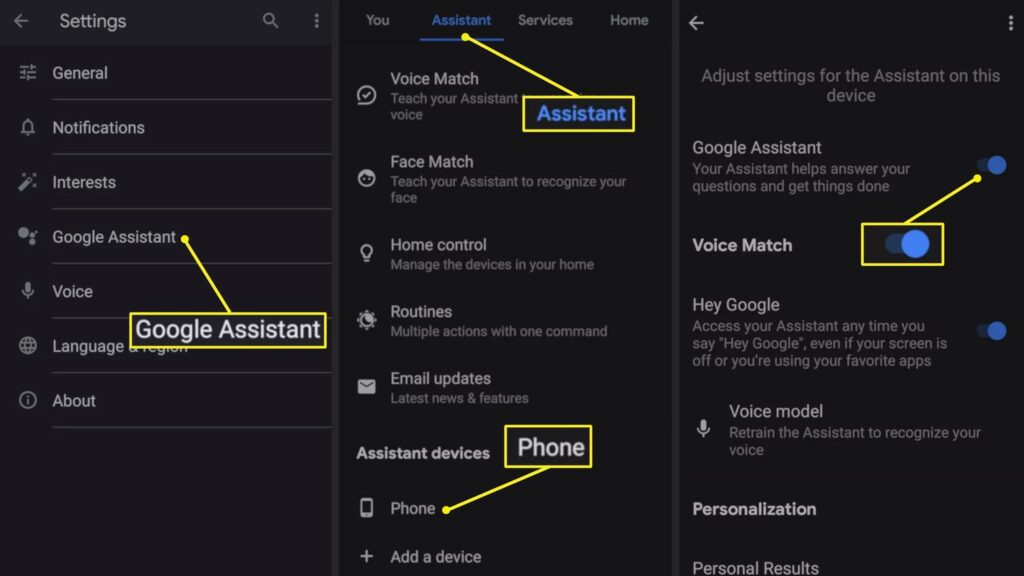
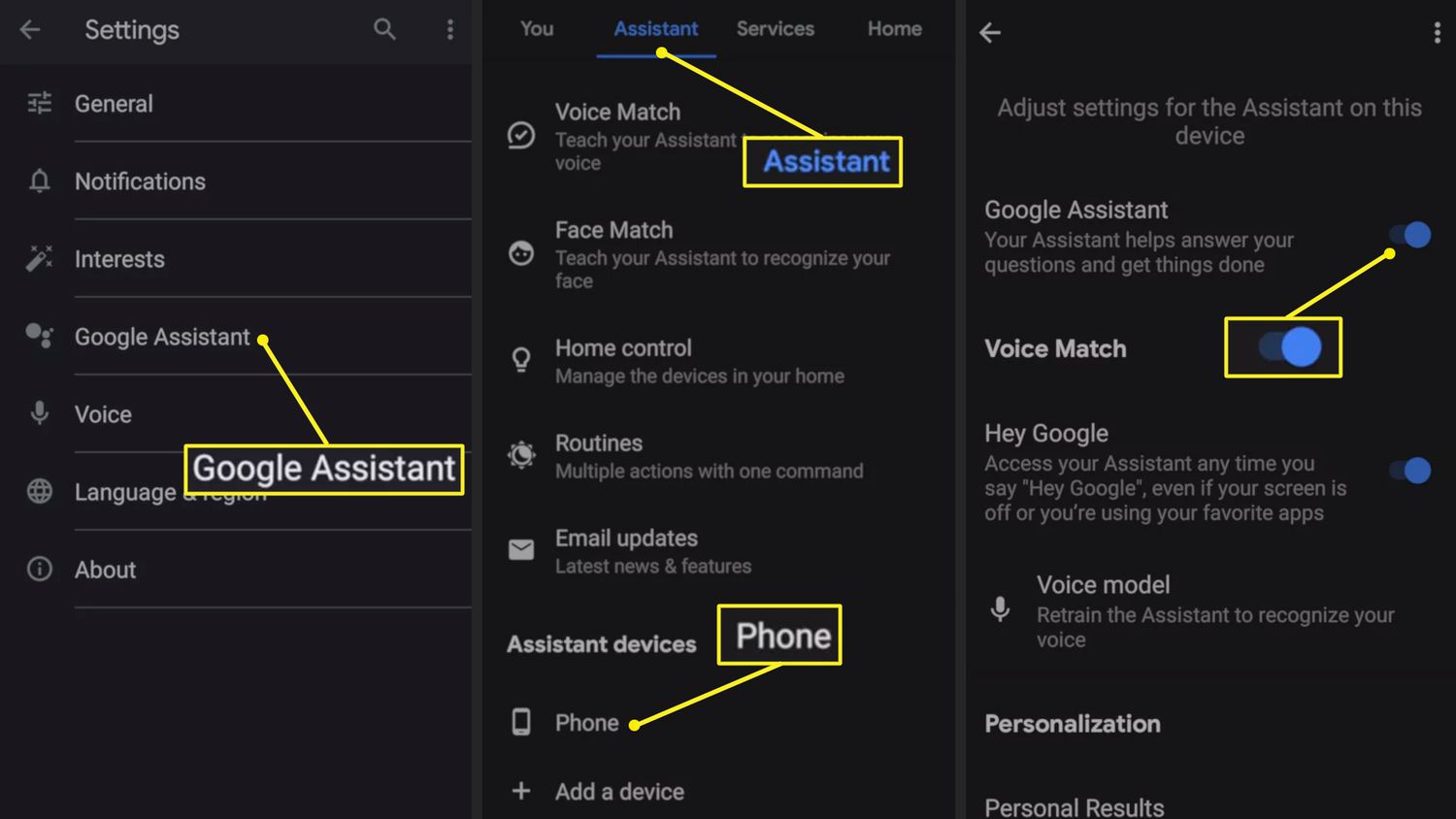
  • Long-press the Home button to activate Google Assistant or open the Google app, tap on “More” (three dots or lines) at the bottom right, go to “Settings,” and then select “Google Assistant.”

Step 4: Navigate to the ‘Assistant’ Tab

  • In the Google Assistant settings menu, tap on the “Assistant” tab to access various settings and preferences.

Step 5: Activate Google Assistant

  • Scroll down to “Assistant devices” and choose your device (e.g., Phone). Here, make sure the Google Assistant toggle is turned on.

Step 6: Set Up Voice Match (Optional)

  • For hands-free operation, you can set up Voice Match by finding this option in the “Assistant” tab. Follow the prompts to teach Google Assistant to recognize your voice.

Step 7: Test Google Assistant

  • Say “OK Google” or long-press the Home button to start using Google Assistant. Try asking a question or issuing a command to ensure it’s working correctly.

Turning Off Google Assistant

Step 1: Access Google Assistant Settings

  • Just like turning it on, access the Google Assistant settings by long-pressing the Home button or through the Google app.

Step 2: Go to the ‘Assistant’ Tab

  • Within the Google Assistant settings menu, select the “Assistant” tab to find the settings related to your devices.

Step 3: Find Your Device

  • Under “Assistant devices,” select your device (e.g., Phone) to access its specific settings.

Step 4: Disable Google Assistant

  • Toggle off the option for Google Assistant to disable it on your device. This will turn off Google Assistant’s ability to respond to voice commands or the Home button activation.

Conclusion

Google Assistant can significantly enhance your Android experience with its wide range of features. By following this guide, you can easily turn Google Assistant on or off depending on your preference. Experiment with its settings to customize its functionality to suit your needs.