Your Tech Story

Tech News

How to Configure a VPN on Your Android

How to Configure a VPN on Your Android

How to Configure a VPN on Your Android

Image Source: clario.com

Setting up a VPN (Virtual Private Network) on your Android device can help shield your online activity from prying eyes in the modern digital world when security and privacy are crucial. Here’s a thorough tutorial on setting up a VPN on your Android device, regardless of your reasons for wanting to protect your privacy, access content that is blocked, or secure your connection when using public Wi-Fi.

Selecting a Trustworthy VPN

Choosing a reputable VPN service is essential before beginning the setup procedure. Even while there are many free VPNs out online, they frequently have restrictions and privacy issues. Here are a few well-liked VPN suggestions for Android:

  • NordVPN: Well-known for its extensive server network, quick connections, and strong security features.

  • ExpressVPN: Strong encryption, good speed, and easy-to-use applications are all features of ExpressVPN.

  • Surfshark: An inexpensive VPN with a tonne of features and limitless simultaneous connections.

How to Configure an Android VPN

On an Android smartphone, setting up a VPN is simple and may be done in a few different ways, depending on your preferences.

Installing a VPN App

  • Set up a VPN application: Get a VPN app from the Google Play Store, such as Surfshark, NordVPN, or ExpressVPN.

  • To log in, open the VPN app and enter your login details.

  • Choose a Server: Select a server location via the VPN application.

  • Link: To create a secure VPN connection, tap the “Connect” button.

Manual Setup (Integrated VPN)

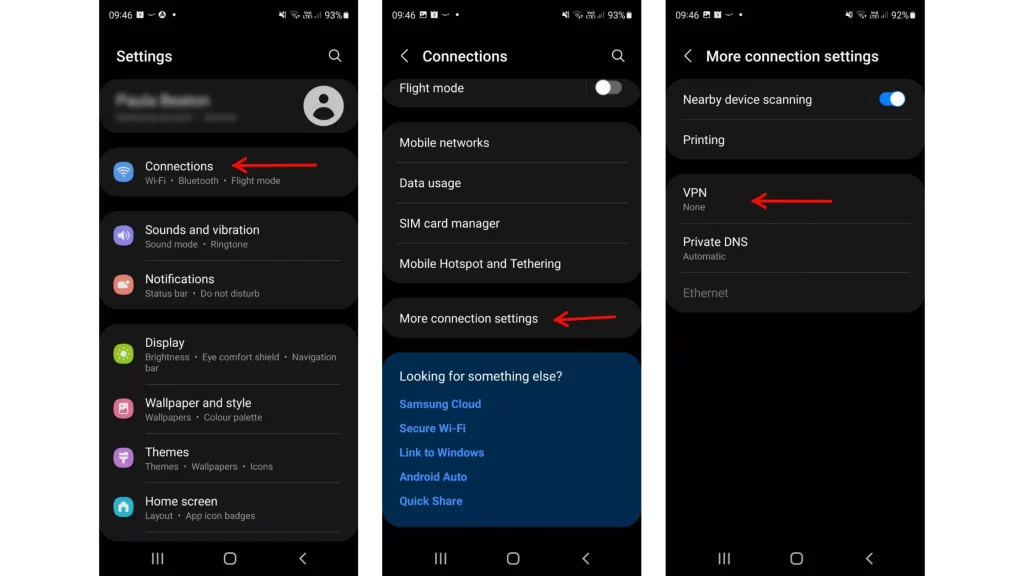
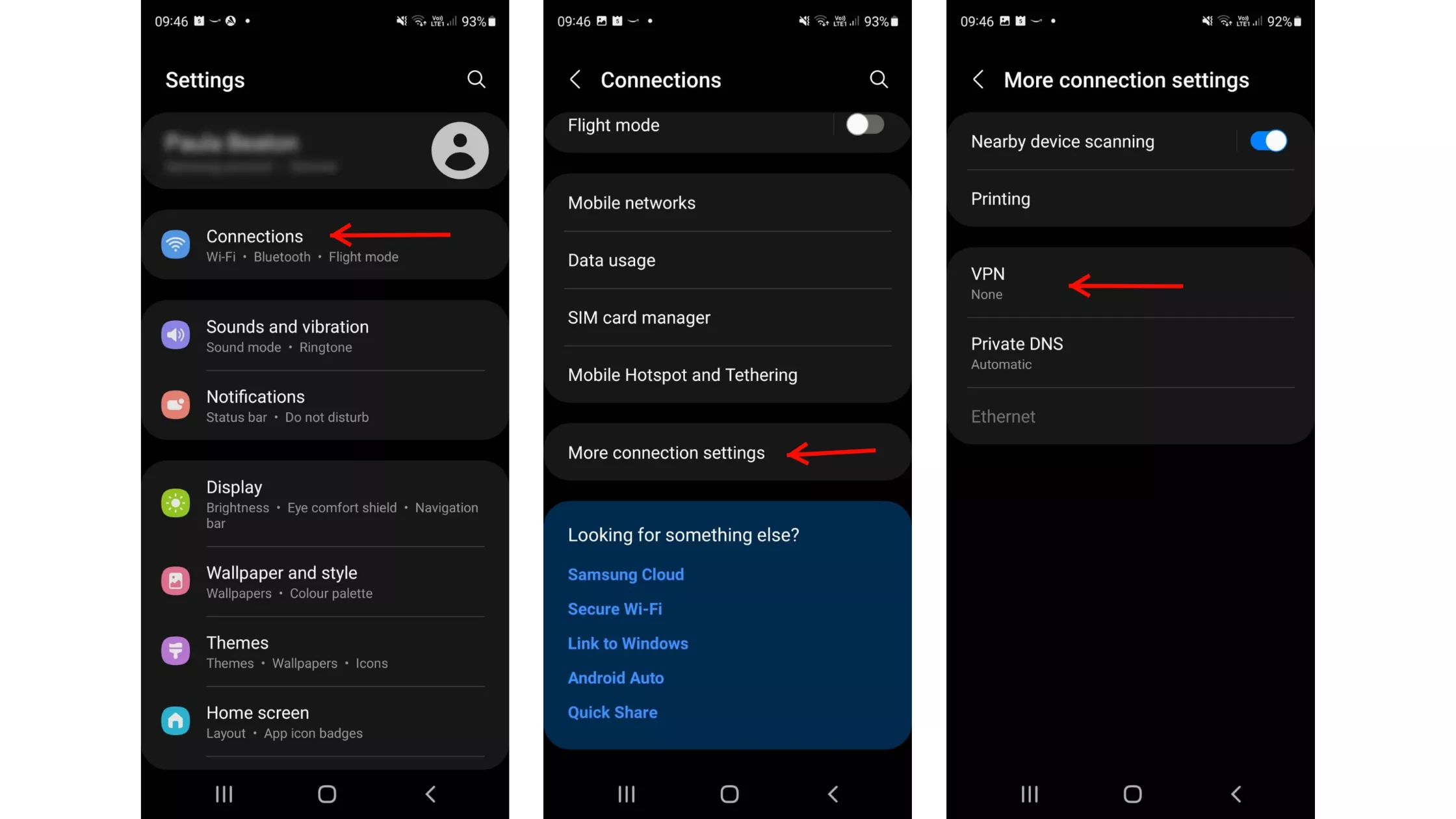
  • Get to the Android Settings: Your Android device’s Settings app should open.

  • Go to the Network & Internet page: Select “Network & Internet” from the menu. 

  • Choose a VPN: Select “VPN” from the network settings menu.

  • Create a VPN Profile: To create a new VPN profile, tap the “+” symbol.

  • Enter your VPN information here: Enter the necessary VPN server information that your VPN provider has sent you.

  • Save Profile: Conserve the VPN profile configuration.

Configuring an OpenVPN

  • Get OpenVPN Connect by downloading it: OpenVPN Connect may be installed via the Google Play Store.

  • Configuration for Import: OpenVPN Connect should import the VPN configuration file that your VPN provider sent you.

  • Connect to Server: To create a VPN connection, click “Connect” in the OpenVPN Connect app.

Setting a VPN connection on an Android device

Connecting to a VPN on your Android smartphone is simple after it has been configured:

  • Get VPN Settings Access: Go into the settings on your Android smartphone.

  • Open the VPN: Navigate to “Network & Internet” > “VPN.”

  • Include a VPN profile: Input your VPN credentials by tapping “Add VPN Profile”.

  • Save Preferences: To save the VPN profile, click “Save”.

  • You can establish a direct connection to the VPN profile from the VPN settings menu if it has already been configured.

Removing Yourself from an Android VPN

To unplug your Android smartphone from a VPN:

  • Get VPN Settings Access: Navigate to “VPN” under “Network & Internet” in your device settings.

  • To disable a VPN, either flip the switch to “Off” or choose “Disconnect” from the menu next to the VPN profile.

  • Modifying the VPN Settings on an Android Device

You May Personalise the VPN Experience to your Tastes by Adjusting the VPN Settings on your Android Device:

  • Always On VPN: To maintain an active VPN connection at all times, enable “Always On”.

  • Clear alerts: While the VPN is operational, turn off the persistent alerts.

  • Establish a work profile to provide safe access to private networks.

Why a VPN Is Necessary for Android

On your Android smartphone, using a VPN has the following advantages:

  • Enhanced Privacy: Hides your IP address and online activity by encrypting your internet traffic.

  • Secure Public Wi-Fi: Prevents possible hackers from accessing your data on public Wi-Fi networks.

  • Access to Restricted Content: Get around geo-restrictions and internet censorship to access content from around the world.

  • VoIP Call Security: Provides safe Voice over Internet Protocol (VoIP) connections.

  • Streaming and torrenting: Provides access to geo-blocked streaming material and secure torrenting.

To sum up, installing a VPN on your Android phone is a simple procedure that improves your internet security, accessibility, and privacy. You may use your Android device to browse the internet more safely and securely by selecting a reliable VPN service and adhering to these setup guidelines.

 
A Quick Guide to Cancelling Your Spotify Premium Subscription

A Quick Guide to Cancelling Your Spotify Premium Subscription

A Quick Guide to Cancelling Your Spotify Premium Subscription

Image Source: youtube.com

Are you considering canceling your Spotify Premium subscription? Whether you want to cut costs, switch to another service, or just don’t use it enough to justify the expense, canceling Spotify Premium is straightforward.

1. Via the Spotify Website

Cancelling your subscription through the Spotify website is perhaps the easiest way. Just follow these steps:

Step-by-Step Instructions:

  1. Log In: Visit the Spotify website and log into your account. You’ll need your username and password. If you usually log in through Facebook or Apple, use those credentials.

  2. Account Overview: Once logged in, navigate to your account page by clicking on your profile name in the top right corner, then select ‘Account’ from the dropdown menu.

  3. Subscription Details: In your account page, click on ‘Subscription’ in the sidebar. Here you’ll see your current subscription status and details.

  4. Change or Cancel: Click on ‘Change or Cancel’ to view your options. Select ‘Cancel Premium.’

  5. Confirm Cancellation: Spotify will likely try to persuade you to stay with various offers. If you’re sure about cancelling, continue and confirm your cancellation.

After these steps, your account will revert to Spotify Free at the end of your current billing cycle.

2. Using the Spotify App

While you can’t cancel directly through the Spotify app on your mobile device, you can use it to access the necessary web page where you can complete the cancellation.

Steps to Navigate:

  1. Open the App: Launch the Spotify app on your mobile device.

  2. Account Settings: Go to ‘Your Library’, tap on the settings gear in the top right corner, and then select ‘Account’.

  3. Subscription Page: This will redirect you to the Spotify subscription page in your web browser, where you can follow the same steps as listed above for the website to cancel your subscription.

3. Contacting Customer Support

If you encounter any issues or prefer not to navigate the cancellation process yourself, Spotify’s customer support is available to assist.

How to Reach Out:

  1. Customer Support Page: Go to the Spotify website, scroll to the bottom and click on ‘About’ where you will find ‘Contact Us.’

  2. Choose Your Issue: Follow the prompts to specify your issue – in this case, ‘Subscription’. You will then be directed to choose how you’d like to get help, either through email, live chat, or a community forum.

  3. Request Cancellation: Once in contact with a representative, request that your subscription be cancelled. They may ask for confirmation details such as your account information.

Things to Keep in Mind

  • Refunds: Spotify does not typically issue refunds for unused time unless there was an issue with billing. Check their refund policy for specifics.

  • Reactivation: If you decide to return to Spotify Premium, reactivating your subscription is just as easy as cancelling it.

  • Saved Music: Remember, once you revert to Spotify Free, you will lose access to premium features such as offline listening and ad-free music, but your playlists and saved music will remain intact.

Conclusion

Canceling your Spotify Premium subscription is easy if you follow the right steps. Whether you choose to navigate to their website, use the app to redirect you, or talk directly to customer support, Spotify has made the process as user-friendly as possible. Make sure you understand the terms and conditions of returning to a free account and make the decision that best suits your listening needs and budget.

Apple Removes WhatsApp and Threads from Chinese App Store Following Government Directive

Apple Removes WhatsApp and Threads from Chinese App Store Following Government Directive

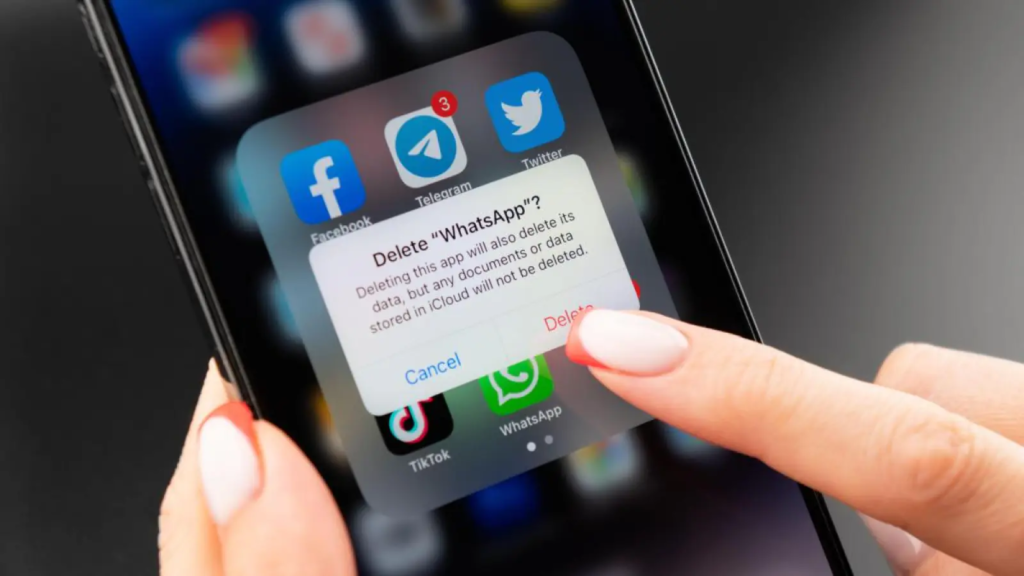
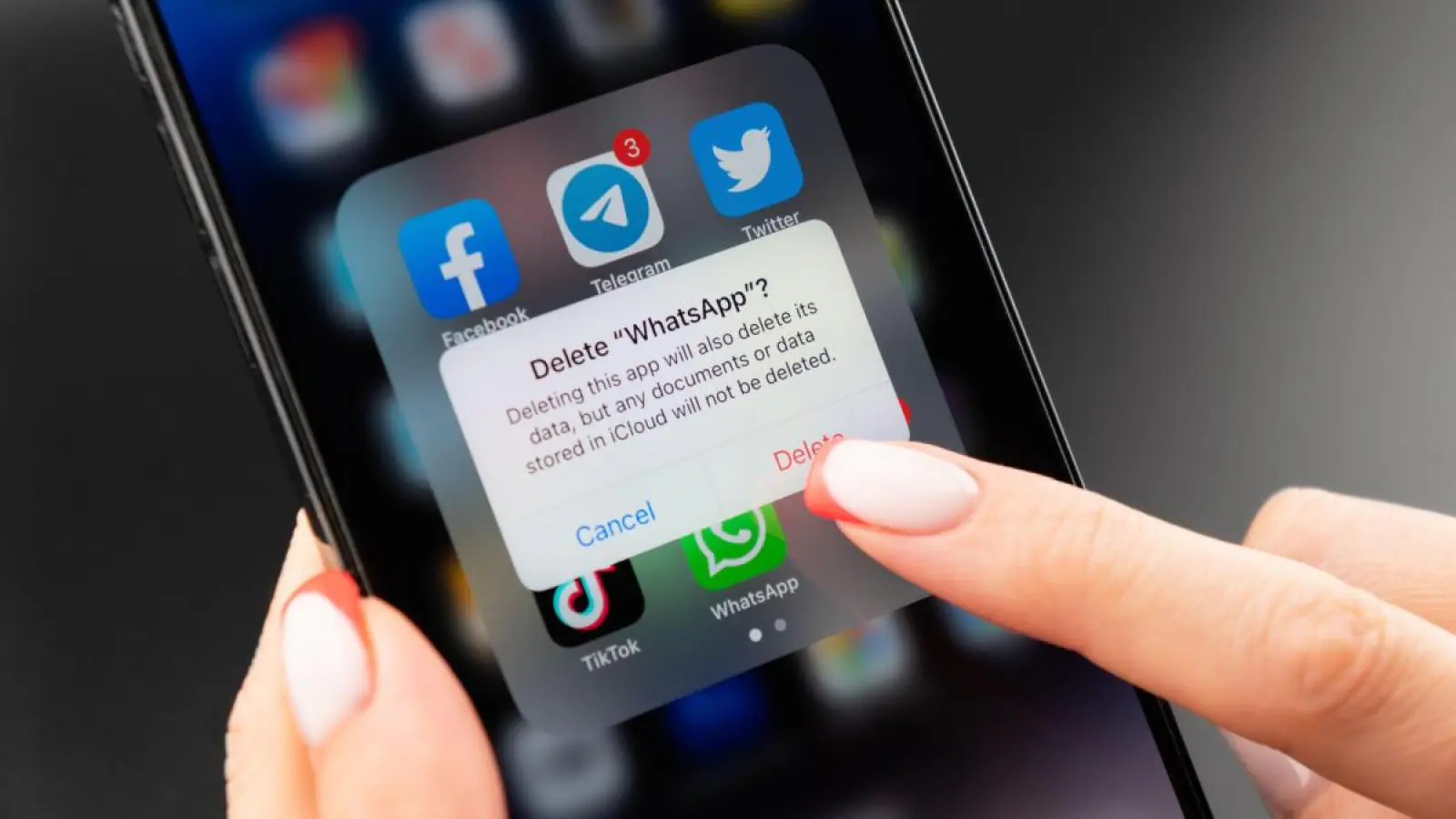
In a significant development, Apple has removed popular messaging apps WhatsApp and Threads from its App Store in China in compliance with a recent government order. The move reflects ongoing tensions between Chinese authorities and global technology companies over control and data privacy.

Government Demands and Compliance

Apple Removes WhatsApp and Threads from Chinese App Store Following Government Directive

Image Source: en.sangritimes.com

The Chinese government’s request to remove these apps is part of broader efforts to regulate Internet use and maintain strict control over digital information flows within the country. Although the specific reasons for the ban have not been publicly disclosed, it is understood that concerns over data security and content management are at the heart of the decision.

Apple’s compliance with the government order highlights the delicate balance that international companies must maintain when operating in China. The tech giant has previously faced criticism for complying with government demands that conflict with its stated commitment to privacy and free expression.

Impact on Users and Market

The removal of WhatsApp and Threads from the App Store will have a direct impact on millions of users in China who rely on these platforms to communicate with peers both domestically and internationally. WhatsApp, known for its end-to-end encryption, and Threads, a new app developed by Instagram, have been popular among users seeking secure ways of communicating.

The decision to ban these apps will also have a significant impact on China’s broader technology market. This highlights the challenges foreign companies face in China’s regulatory environment, which increasingly favors domestic companies and platforms.

Response from Apple and App Developers

Apple has not released an extensive comment on the issue but confirmed that it removed the apps from its Chinese App Store in compliance with local laws. Meanwhile, representatives from Meta, the parent company of WhatsApp and Threads, expressed concern over the development, emphasizing the importance of open and secure communications platforms.

Broader Implications for Tech and Privacy

The incident is part of a larger narrative about the tension between national security concerns and individual privacy rights. China’s approach to Internet governance, which is characterized by heavy censorship and surveillance, contrasts sharply with Western norms, where freedom of expression and user privacy are more rigorously protected.

Looking Forward

The removal of WhatsApp and Threads is likely to spark further discussion on global governance and the role of major technology firms in advocating for user rights while complying with local regulations. As digital communications become increasingly essential, the balance between government surveillance and personal privacy remains an important issue for users and companies around the world.

In conclusion, Apple’s decision to remove these apps at the behest of the Chinese government is a reminder of the complex interplay between global businesses, national policies, and user rights in the digital age. Thus, it sets a precedent that will undoubtedly influence the future operations of tech companies in China and possibly other countries with strict regulatory frameworks.

Step-by-Step Guide: Connecting Your Apple Vision Pro to a Mac

A Quick and Easy Guide to Setting Up Your Apple Vision Pro with a Mac

Step-by-Step Guide: Connecting Your Apple Vision Pro to a Mac

Image Source: digit.in

The distinction between the physical and digital realms is blurred with Apple’s Vision Pro headset, providing an immersive experience. By connecting this cutting-edge device to your MacBook or Mac, you may greatly improve its usefulness and completely change the way you interact digitally and work. Combining the Vision Pro with your Mac brings up a world of possibilities, whether your goal is to increase efficiency or explore cutting-edge apps. This comprehensive how-to guide will walk you through the process of connecting your Apple Vision Pro headset to your Mac and integrating macOS apps into the immersive Vision Pro experience.

Prerequisites for Pre-Connection

Prior to beginning the pairing procedure, make sure your Mac or MacBook and your Apple Vision Pro headset fulfil the following requirements for smooth synchronisation and integration:

  1. Same Apple ID: Verify that the same Apple ID is being used to log onto both devices. In order to enable seamless communication and synchronisation between the Vision Pro and your Mac, this step is essential.

  2. Mac OS compatible: Verify that macOS Sonoma or a later operating system version is installed on your computer. The enhanced features and functions of the Vision Pro are optimally supported thanks to this compatibility. 

  3. Updated Software: Most recent software Update the operating system on your Apple Vision Pro headset to the most recent version. Updating the software on a device is crucial for making use of all of its features and receiving the newest improvements.

  4. Proximity: Throughout the pairing procedure, keep both devices at a fair distance from one another—ideally, no more than ten metres. For the Vision Pro and your Mac to have a steady and dependable wireless connection, proximity is essential.

  5. Bluetooth and Wi-Fi: Turn on Bluetooth and Wi-Fi on your Mac and the Apple Vision Pro headset. For the devices to connect with each other seamlessly and to establish communication, certain wireless technologies are necessary.

You may link the Apple Vision Pro headset with your Mac or MacBook with confidence if certain pre-connection conditions are satisfied. This will enable a seamless and effective integration of the headset.

Connection Guide:

Method 1: Instructions for Setting Up a Connection Using Apple Vision Pro

  • Put on the Vision Pro: To use Apple Vision Pro, put on your headset.

  • Establish Connection: Point your screen’s direction towards your Mac’s screen and find the ‘Connect’ button.

  • Verification: Press the ‘Connect’ button to start the Vision Pro and Mac pairing process.

Method 2: Establishing a Connection using the Control Centre (Mac Virtual Display)

  • Centre for Access Control: With your Apple Vision Pro, open Control Centre by looking up and clicking the drop-down symbol (✇) to see more options.

  • Click on Mac Virtual Display. To enable connection, find and choose the ‘Mac Virtual Display’ option from the Control Centre menu. 

  • Select Your Mac: It will show you a list of devices that are available, including your Mac. Choose your Mac from the list in order to connect.

  • Verification: Verify the connection to complete the pairing procedure and start using the Vision Pro as a Mac virtual display.

Additional Instructions

  • Discontinuing Device Connection: Just press the ‘X’ button in the Control Centre on your Vision Pro headset to unplug the device from your Mac.

  • Resizing Virtual Display: Using pinch and drag actions, you may change the size of the Vision Pro’s virtual display window to fit your needs.

Advantages of Linking Mac with Apple Vision Pro

A number of advantages become available when you connect your Apple Vision Pro to your Mac, including:

  • Expanded Workspace: To improve productivity and multitasking on your Mac, use the Vision Pro as a virtual display.

  • Smooth Integration: For better user experiences, smoothly incorporate macOS apps into the immersive Vision Pro headset environment.

  • Enhanced Control: Use the Vision Pro interface’s simple movements and controls to navigate and interact with Mac programmes.

By connecting the Apple Vision Pro to your Mac or MacBook, you can take your digital interactions to new levels. The device is the epitome of augmented reality technology. A smooth connection between your Mac and Vision Pro headset may be made by following these easy steps, opening up a world of creative possibilities and immersive experiences.

Planiware Makes Paris Debut After Raising $297 Million

Planiware Makes Paris Debut After Raising $297 Million

After generating €278 million ($297 million) in its initial public offering (IPO), Planisware, a software firm specialising in business project management solutions, had a spectacular debut on the Paris stock exchange. The listing is a major achievement for the French stock market and shows that investors are once again interested in Europe’s innovation industry.

Performance of the Market and Valuation

Planiware Makes Paris Debut After Raising $297 Million

Image Source: techfundingnews.com

Planisware’s shares had a rise of 33 percent on their trading debut after their initial public offering (IPO), starting at €21.01, far higher than the €16 per share selling price. Planisware’s impressive start brought its valuation to €1.1 billion ($1.2 billion), suggesting that investors are willing to pay a premium for the company’s shares.

IPO Resurrection in Europe

The listing of Planisware is indicative of a larger upsurge in initial public offerings (IPOs) in Europe, especially in the software and technology sector. Since media and technology firms have had difficulty joining the largest stock exchange in Europe, Paris, Planisware’s successful initial public offering (IPO) is noteworthy. One of the major tech offerings in the area prior to Planisware was Technoprobe S.p.A.’s IPO in early 2022, which garnered over $800 million.

Success Particular to the Company

Planisware’s successful launch, in the opinion of Edmund Shing, global chief investment officer at BNP Paribas Wealth Management, is more a result of the company’s distinct advantages than of a general industry trend. Shing pointed out that the rarity of software businesses in Europe makes them highly sought after, which drives up consumer interest in Planisware’s shares.

Interest from Investors and Stakeholder Participation

Even while larger IT businesses are preferred by individual investors, smaller European tech startups such as Planisware have been able to draw attention from investors. Following the IPO, the company’s founders will own a majority interest, demonstrating their dedication to and faith in Planisware’s potential for future growth. The €100 million invested in the IPO by cornerstone investors, such as CDC Tech Premium, a Caisse des Dépôts fund that specialises in European tech IPOs, showed Planisware even more institutional backing.

Sustained Market Outperformance

Planisware’s stock was up 28 percent at €20.53 as of the most recent trading report, indicating that the market is still enthusiastic and that the company is receiving favourable feedback. Investor trust in Planisware’s business strategy, technological offerings, and potential for expansion in the enterprise software industry is bolstered by this outstanding market performance.

The triumphant launch of Planisware on the Paris stock market signifies the increasing positivity and curiosity towards Europe’s technology industry, implying possible prospects for subsequent tech initial public offerings in the area.

Tim Cook Visits Singapore to Bolster Apple's Expansion in Southeast Asia

Tim Cook Visits Singapore to Bolster Apple’s Expansion in Southeast Asia

Apple CEO Tim Cook’s presence in Singapore marks a pivotal moment in the tech giant’s expansion strategy, particularly in Southeast Asia. Amid challenges in China, Cook is focusing on bolstering Apple’s presence and sales growth in the dynamic Southeast Asian market.

Strategic Investments and High-Level Meetings

Tim Cook Visits Singapore to Bolster Apple's Expansion in Southeast Asia

Image Source: cnbc.com

Cook’s visit to Singapore coincides with Apple’s announcement of a significant investment exceeding $250 million into its Singapore operations. This investment is not only a testament to Singapore’s strategic importance as a regional hub but also reflects Apple’s commitment to furthering its footprint in Southeast Asia. During his stay, Cook is scheduled to meet with Singapore’s upcoming Prime Minister Lawrence Wong and outgoing Prime Minister Lee Hsien Loong. This high-level engagement underscores Apple’s intention to deepen its ties with Singapore’s leadership and business ecosystem.

Seizing Opportunities in Southeast Asia

Apple’s expansion plans in Southeast Asia align with the region’s burgeoning tech landscape. Cook’s recent stops in Vietnam and Indonesia highlight Apple’s efforts to tap into the region’s vibrant market. With the launch of an online Apple Store in Vietnam and ongoing recruitment for its first retail center in Malaysia, Apple is strategically positioning itself to capitalize on Southeast Asia’s growth potential. The region’s smartphone market, projected to grow significantly in 2024, presents a lucrative opportunity for Apple amidst global challenges.

Cook’s emphasis on Southeast Asia as a crucial manufacturing hub further underscores Apple’s long-term strategy. Diversifying its supply chain beyond China has been a strategic imperative for Apple since 2022, driven by supply disruptions during the pandemic. Vietnam has emerged as a key manufacturing location for Apple, while Indonesia remains under consideration for future manufacturing endeavors, as indicated by Cook’s recent statements.

Navigating Global Challenges

Apple’s focus on Southeast Asia comes at a time when global smartphone shipments, particularly in China, have faced headwinds. With increased competition and shifting consumer preferences, Cook’s strategic engagements and investments in Southeast Asia signal Apple’s resilience and adaptability in navigating complex market dynamics.

As Cook concludes his whirlwind tour across Southeast Asia, the outcomes of his high-level meetings and strategic investments in Singapore will likely shape Apple’s trajectory in the region. With a keen eye on expansion, innovation, and market diversification, Apple remains poised to capitalize on the vast opportunities presented by Southeast Asia’s dynamic tech landscape.