Your Tech Story

Suhani Jain

I am a student pursuing my bachelor's in information technology. I have a interest in writing so, I am working a freelance content writer because I enjoy writing. I also write poetries. I believe in the quote by anne frank "paper has more patience than person

How to Stop Facebook and Instagram From Spying on Your Internet Activity


How to Stop Facebook and Instagram From Spying on Your Internet Activity

The piece acknowledges Facebook and Instagram’s status for monitoring the activities of users online while offering tips on how to improve privacy on these networks. Even when a person isn’t engaged with Facebook or Instagram, the parent firm, Meta, provides tools such as “Your Activity Off Meta Technologies” to handle and detach the information gathered about their online behaviour.

Recognising Your Meta-Technology Activity:

How to Stop Facebook and Instagram From Spying on Your Internet Activity

Image Source: pcmag.com

Meta has access to more than just what users do on its social platforms. Users can check, remove, and stop data relating to their off-Meta actions on other websites from being saved by using this tool. This includes any data that websites, applications, or businesses provide with Facebook or Instagram about the online activities of their users, such as going to websites or completing transactions. According to consumer choices, this data is used to customise targeted advertisements.

Managing and Accessing Off-Meta Activity:

Facebook or Instagram settings allow users to view and manage their off-Meta activity. Go to Settings & Privacy > Settings > Your Information > on Facebook. Outside of Facebook. Navigate to Settings & Privacy > Accounts Centre > your information and permissions > on Instagram. Your use of non-Meta technology.

Handling Off-Meta Activity:

Users can observe current activity, erase past activity, disconnect certain activities, and control upcoming activity via the Accounts Centre page. Users have the option to delete all of their previous activity or unplug particular actions that Facebook has gathered from various sources. Users can disable gathering information for actions taken on both platforms in the future by selecting the Manage Future Activity feature.

Off-Meta Data Downloading:

Users can save and evaluate their off-Meta action data. The Instagram app or the Facebook page can be used for this. Users may specify which profiles to download, how many details to download, and which categories of data to save by choosing the “Download your information” option in the settings. On the user’s PC, the downloaded data is available as a zip file.

Using the Facebook Security Checkup:

To improve account security, Facebook offers a Privacy Checkup tool. Users may evaluate and modify their privacy settings by tapping on the user’s profile icon and going to Settings & Privacy > Privacy Checkup. With the tool’s coverage of subjects such as “Who can see what you share,” people may manage the exposure of their data.

Avoid Online Job Scams With These 7 Simple Tips

Avoid Online Job Scams With These 7 Simple Tips

There have always been job frauds in one way or another, whether it’s through phoney job advertisements on TV, radio, or in newspapers.

However, as an increasing number of individuals use the internet to look for work, employment scams have both shifted online and increased in frequency. Here’s how to stay away from them.

1. Before applying, do some online research on the company

Avoid Online Job Scams With These 7 Simple Tips

Image Source: flexjobs.com

Is the business still in operation? Does that firm employ a hiring supervisor or recruiter? Is hiring for this position at the company? Check the website of the company to confirm these details. Does the job advertising contain a link that points to a secure website that begins with https://? To see the actual URL, move your mouse cursor over the URL.

2. Check Postings Located on Job and Networking Websites

Verify whether the position is posted on the firm website if you discovered it on an outside employment board like LinkedIn or Indeed.com. While not all employers have a page where job openings are posted, many do. Consider it a warning sign and keep looking if the vacancy you saw elsewhere isn’t posted there.

3. Wait to provide bank account details until after you are hired.

A fraudster may ask for cash or the details of a bank account during the interview. A respectable employer won’t request your bank account information before contract signing and direct deposit setup. if necessary, they won’t ever require you to verify your Internet banking login and password; instead, they will just ask to confirm the bank name, routing number, account number, and SWIFT code.

4. Verify the Identity of the Employer

Never accept a job offer only based on an email, a phone call, or a chat app. Demand a face-to-face interview or video conference.

5. Never Use Wire Transfer for Transferring Money to Someone You Meet on the Internet.

Once more, con artists can attempt to get payment for fictitious background checks or training expenses. Such demands are not going to come from a respectable business or employment.

6. Avoid Giving Personal Information to Networking Sites or Apps for Job Searches

Never provide your Social Security number or any other private data on online applications found on unaffiliated job-hunting websites. Keep that for the recruiting manager or HR division of the potential employer.

7. Verify That the Website Is Secure If You Need to Enter Your Social Security Number

Look for “https://” in the web URL. Enter your details only after speaking with a live person or over a video call.

How to Download Videos from X (Formerly Twitter)?

How to Download Videos from X (Formerly Twitter)?

Although Twitter debuted as a micro-blogging platform, it has evolved into a massive social media platform that offers a wide variety of information in many formats. The platform, which is now called X, is a hub for original producers who only provide content as well as viral videos. If you frequent X, you have probably seen a video you liked and wanted to show your friends even if they don’t use the platform. Take a look at these short ways to download a 2023 X/Twitter video. 

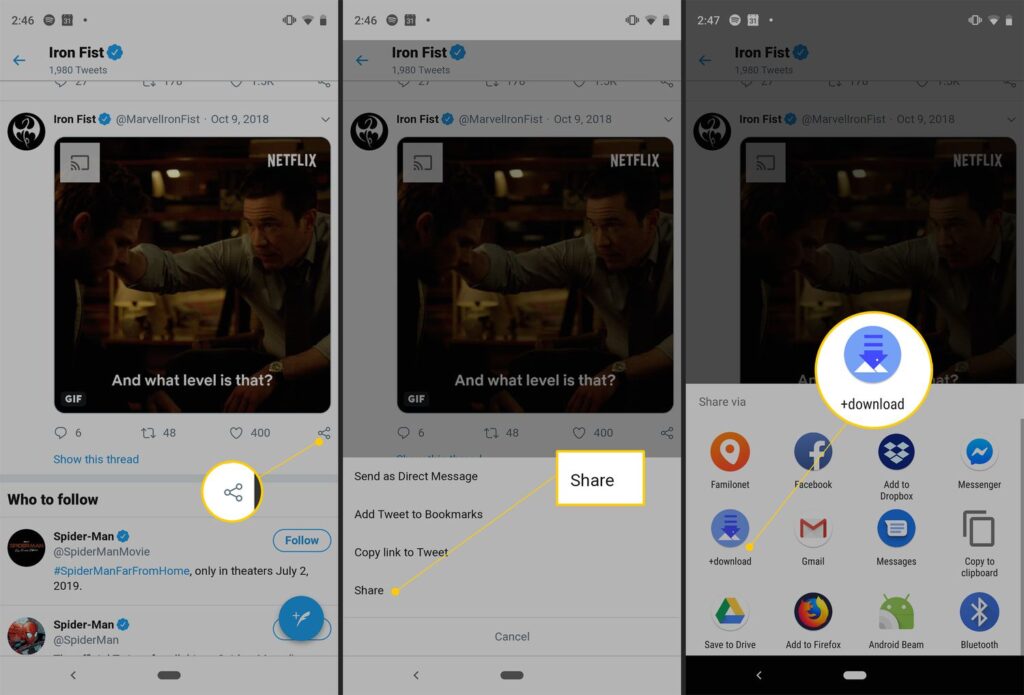
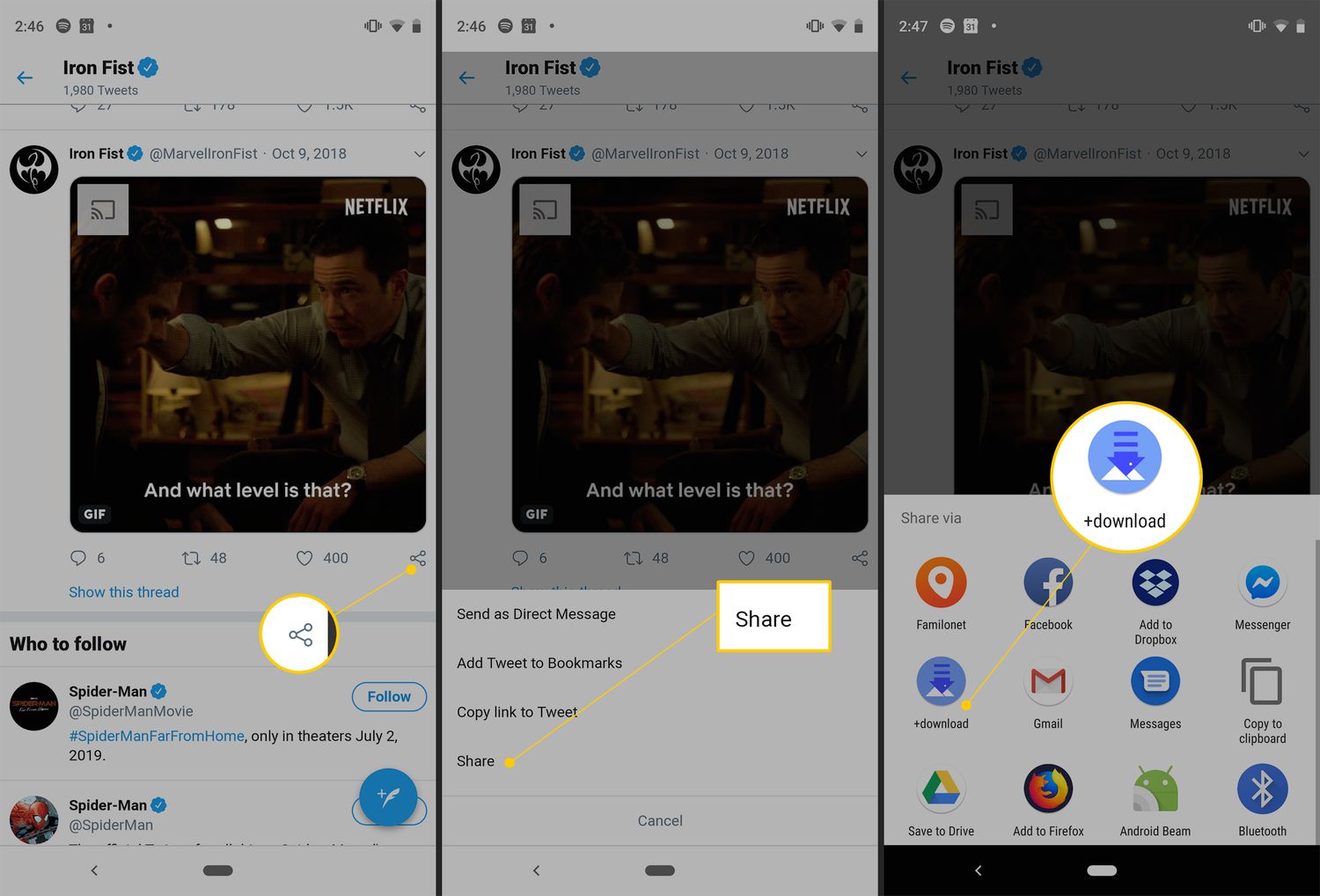
Use the App itself to Download Videos from X (Twitter).

How to Download Videos from X (Formerly Twitter)?

Image Source: lifewire.com

Only Blue members have the ability to download videos from Twitter natively. It’s possible that not every video on the site can be downloaded, though.

Video owners have the authority to determine if other people who use the app are permitted to save the video to their respective devices.

Step 1: On your smartphone, open the X app and choose the video you wish to download.

Step 2: Verify that the video is playing in its entirety.

Step 3: In the upper-right corner of the screen, press the ellipses in step three. 

Step 4: Choose Download video in step four. 

Your device will save the video.

Another Approach is to Download a Video Straight From the X App

A different method exists for downloading a video from X that does not need fullscreen mode. Although there is nothing inappropriate with this strategy, users may occasionally decide not to view videos, particularly if they are in the public eye and also do not have headsets on. Fortunately, X lets you download a video without ever viewing it. This is the method.

Step 1: Open the post with the clip on your phone by using the X app.

Step 2: Hold down the video for a prolonged period of time until a menu appears.

Step 3: Select “Download video.”

Make use of a Third-Party Tool

Even for Twitter Blue members, downloading videos from Twitter to a Desktop is not possible natively, therefore you will want the assistance of a third-party software. Here’s the way to use the Twitter Vid tool to accomplish that.

To Download Movies from X, Use a Chrome Extension.

It might be time-consuming to constantly switch to a third-party software if you frequently save Twitter videos to your computer. You’d be better off with a Chrome addon. You may download any video from Twitter using the extremely useful addon provided by Twitter Vid, the third-party utility we previously highlighted. 

AI Startup Sarvam Raises $41 Million to Tap India Growth

AI Startup Sarvam Raises $41 Million to Tap India Growth

Emerging from stealth mode, Sarvam AI has revealed that it has secured a total of $41 million, as the five-month-old Indian business works to develop a range of full-stack generative artificial intelligence technologies in the most populated country in the world.

The seed and Series A investment rounds together raised 41 million dollars in capital. Together with Peak XV Partners, Lightspeed managed the Series A round as well as co-led the seed. Khosla Ventures along with Peak XV also took part in the Series A investment.

AI Startup Sarvam Raises $41 Million to Tap India Growth

Image Source: bloomberg.com

According to Vivek Raghavan, founder of Sarvam AI, the Bengaluru-based business is developing extensive language models which incorporate Indian languages, as reported by TechCrunch. The firm is also developing a platform that would let companies use large language models in their development.

Currently employing roughly eighteen people, Sarvam AI is concentrating on developing LLMs using speech as the preferred UI in India. This approach, together with its focus on local language assistance, tries to uniquely address the needs of the Indian market.

“This requires us to change the architecture of existing open models and to train them in custom ways to teach the new language. The advantage is that the resultant models are more efficient (in terms of tokens consumed) for understanding and generating Indian language than any of the existing LLMs,” said Raghavan.

techcrunch.com

About five months ago, Raghavan along with Pratyush Kumar, both former employees of information technology veteran Nandan Nilekani-supported AI4Bharat of Indian Institute of Technology Madras, founded Sarvam. Raghavan also worked with UIDAI, the organisation in charge of the widely used Aadhaar identity system in India, for more than ten years.

“I have seen firsthand the enormous value in innovating at foundational layers and deploying at population scale,” he said. “India has demonstrated that it can harness technology differently, and with GenAI we have an opportunity to reimagine how this technology can add value to people’s lives.”

techcrunch.com

Business will launch First Model in the Market in few Weeks

During the next several weeks, the business intends to release the initial model to the market.

The Sarvam investment arrives at a period in which investors across the world are scrambling to find and support AI breakthroughs, betting on the idea that innovations in the field would boost productivity across a wide range of sectors and that cutting-edge firms will generate profits that will last for generations.

Despite having one of the biggest ecosystems for startups globally, India has not yet had a significant influence on the quickly developing field of artificial intelligence. There are currently no native Indian competitors standing a chance against the might of major language model behemoths like Google’s Bard, Amazon-supported Anthropic, and OpenAI’s ChatGPT.

ChatGPT vs. Google Bard: Which Is Good for Data Analysis?

ChatGPT vs. Google Bard: Which Is Good for Data Analysis?

Experts in the quickly developing field of data analysis now have more options thanks to the development of artificial intelligence-powered language models. These models, provide sophisticated natural language processing capacities, including ChatGPT and Google’s recently released Bard. But which of these AI technologies is more appropriate for data analysis? To identify their advantages and disadvantages in terms of data analysis, let’s dive into a thorough comparison.

Understanding Bard and ChatGPT

OpenAI’s ChatGPT is well-known for its conversational skills and has been used extensively for a range of natural language processing applications. Conversely, Google’s Bard is a more recent addition to the market, designed to produce poetry, prose, as well as conversational replies by utilising its extensive linguistic and contextual expertise.

Data Analysis Capabilities

ChatGPT is an effective tool for understanding and analysing textual data because of its ability to grasp and react to complicated inquiries. This is where ChatGPT excels in data analysis. Tasks such as sentiment analysis, summarised analysis, as well as contextual understanding benefit from their capacity to elicit understanding from unorganised data and offer nuanced solutions.

ChatGPT vs. Google Bard: Which Is Good for Data Analysis?

Image Source: geeksforgeeks.org

Bard might not be as adept at data analysis because of its emphasis on generating creative words. Its use in the field of structured data analysis may be restricted, even though it may provide imaginative material and captivating tales.

Language Model Performance

ChatGPT’s reputation as a flexible tool for information-driven activities has been solidified by its exceptional results in language interpretation and processing. It is an invaluable tool for data professionals due to its capacity to comprehend and react to inquiries about statistical analysis, trend detection, and exploratory data analysis.

On the other hand, Bard’s main advantages are his inventive language creation and contextual narrative. Its major concentration on creative writing may restrict its application in standard data analysis tasks, even though it may demonstrate expertise in producing narrative-style interpretations of data.

Accessibility and Integration

Thanks to its comprehensive platform connection, ChatGPT is easily accessible and customizable for a diverse variety of data analysis procedures. Its adaptability in interfacing with databases, visualisation platforms, and analytics tools increases its usefulness for data experts.

Bard is a more recent product, thus further development and integration may be necessary to make it compatible with the unique needs of data analysis processes. Given its current emphasis on producing artistic material, it could need to undergo further modifications to meet the analytical and organised requirements of data analysis procedures.

How to Share Your WhatsApp Status on Instagram

How to Share Your WhatsApp Status on Instagram?

Users will be able to post WhatsApp status notifications to Instagram thanks to a brand-new function that WhatsApp is developing. This will work similarly to the current method of sharing your Instagram Stories on Facebook Stories. Notably, a beta version of the WhatsApp Android application has been observed to have the functionality, which is now under development. Although the feature’s release date is unknown at this moment, its beta status suggests that it will happen soon. WABetaInfo discovered the functionality. This capability appears to be another step towards achieving cross-platform interoperability for all Meta apps, as envisioned by Mark Zuckerberg.

How to Share Your WhatsApp Status on Instagram

Image Source: gadgetbridge.com

According to the document, individuals won’t have to leave WhatsApp to upload their status updates to Instagram thanks to a new function. As previously indicated, posting to Facebook is presently an option, just like when posting a Story on Instagram. With just one swipe, individuals who use WhatsApp will be free to update both their Instagram Story as well as WhatsApp Status at the same time.

As of right moment, WhatsApp users may immediately publish updates to their WhatsApp Status on Facebook stories. Users will soon be able to broadcast their WhatsApp status on both social media platforms, Facebook and Instagram at the same time thanks to this functionality.

You should also notice that users will still have the final say over this WhatsApp-Instagram publishing, just like with Instagram and the present settings for cross-platform- posting between Facebook and WhatsApp. This implies that users’ WhatsApp Status will only be autonomously shared on Instagram if they so want. To activate the functionality, users would need to navigate to Settings. Similar to Facebook-WhatsApp cross-posting, users will maintain control over which Status updates appear on Facebook as well as Instagram Stories regardless of whether they have been enabled. Users will additionally be given the ability to disable the setting at any time.

New Feature in Upcoming days

There are rumours that WhatsApp is developing an intriguing new function that would let users look up contacts or messages by username. Users who choose not to publish their phone numbers will have some privacy thanks to the feature that gives them the option to choose a username. It is expected that those who value privacy and want greater influence over personal data would benefit most from this breakthrough.