Your Tech Story

tech news

Mi Notebook Pro X 15

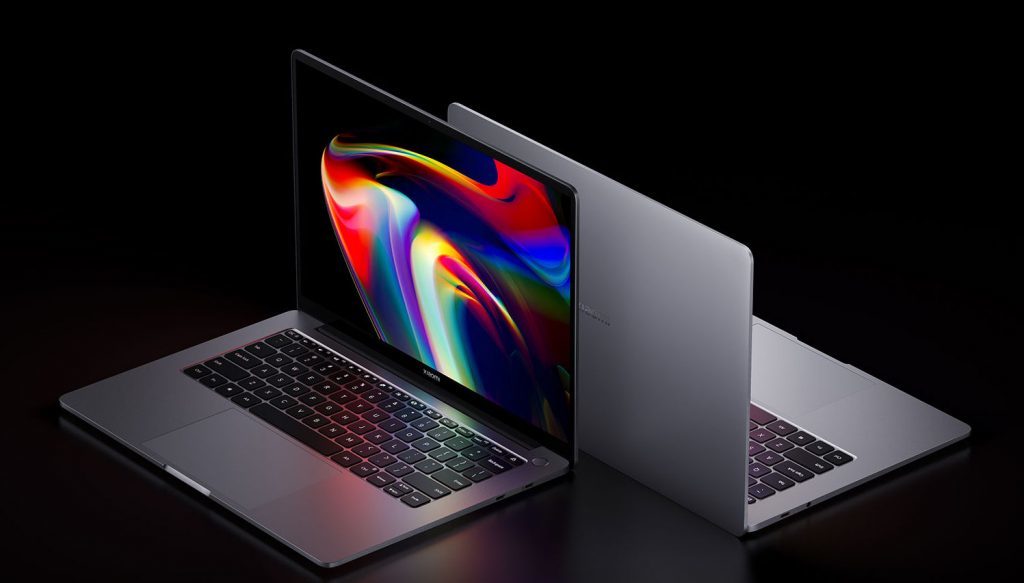
Xiaomi launched the new Mi Notebook Pro X 15 with a 15.6-inch 3.5K Samsung E4 OLED Display.

Xiaomi is an internet company that focuses on smartphones and smart hardware that are linked by an Internet of Things (IoT) platform. Xiaomi strives for a high-quality user experience and operational efficiency while emphasizing both innovation and quality. The company works tirelessly to create amazing products at reasonable prices so that everyone on the planet can live a better life through innovative technology. With 324.8 million smart devices connected to its platform, excluding smartphones and laptops, the company has established the world’s leading consumer AIoT (AI+IoT) platform.

When a notebook or laptop launch appears on the horizon in a sea of smartphones, it instantly becomes an eye-ball grabber. In recent weeks, this has been happening with the Realme Book laptop, and now Xiaomi has launched its notebook. The company is rapidly expanding its notebook portfolio. The Mi Notebook Pro 14 and Mi Notebook Pro 15 were released earlier this year. Xiaomi has added another notebook to its Pro lineup today. The Mi Notebook Pro X 15, Xiaomi’s latest laptop, has been released in China, featuring high-end hardware and a high-resolution display.

Pricing for the Mi Notebook Pro X 15

The 11th-generation Intel Core i5-11300H processor variant with 16GB RAM and 512GB SSD storage is priced at CNY 7,999 (roughly Rs 92,100) for the Mi Notebook Pro X 15. At CNY 9,999, there is also a high-end Intel Core i7-11370H processor, 32GB RAM, and 1TB SSD storage (about Rs. 1,15,100). Both variants are currently available for pre-order in China, and shipments will begin on July 9. However, the Mi Notebook Pro X 15’s global availability and pricing have yet to be announced. Here are all of the laptop’s detailed specifications.

Mi Notebook Pro X 15
Image Source: fonearena.com

Details and Specifications

The Mi Notebook Pro X 15 runs Windows 10 Home and has a 15.6-inch 3.5K (3,456×2,160 pixel) Samsung E4 OLED display with 261ppi pixel density, a 16:10 aspect ratio, and a 100 percent sRGB and DCI-P3 color gamut. The display is also DC dimmable and has a peak brightness of 600 nits. In addition, the laptop has a thin profile, making it portable enough to be used as an ultrabook. The 348.9×240.2×18.47mm Mi Notebook Pro X 15 weighs 1.9 kilograms.

Xiaomi has also chosen a metal body for the laptop, giving it a premium look and feel. It’s made of a 6-series aluminum alloy that’s been shaped with a Computerized Numerical Control (CNC) machine. Under the hood, there is up to an 11th-generation Intel Core i7 processor, Nvidia GeForce RTX 3050 Ti graphics as standard, and up to 32GB of LPDDR4x RAM. The laptop also has up to 1TB of PCIe storage. The laptop has Nvidia GeForce RTX 3050 Ti graphics and faster-charging support for the built-in battery.

Xiaomi has included a full-size, backlit keyboard with 1.3mm key travel. A built-in ambient light sensor allows the machine to automatically adjust the lighting of the keyboard and display based on the environment. Users can also manually adjust the keyboard backlight in three different levels.

The Mi Notebook Pro X 15 has Bluetooth v.5.2 and Wi-Fi 6 and two USB-A 3.2 Gen 2 ports, a USB Type-C port, Thunderbolt 4, a 3.5mm headphone jack, and an HDMI 2.1 port. A fingerprint sensor is also embedded within the power key, allowing for one-key boot and unlock functionality. The Mi Notebook Pro X 15 features four DTS-enabled speaker units. A 2×2 microphone array is also included, as is a built-in 720p webcam for video conferencing.

On the Mi Notebook Pro X 15, Xiaomi has included an 80Whr battery that is rated to provide up to 11.5 hours of video playback on a single charge. The laptop is also equipped with a 130W USB Type-C power adapter, which is capable of charging half of the Mi Notebook Pro X 15’s battery in 25 minutes.

Windows 11

Windows 11 is out with New Features and Better Interface.

Exactly after six years of the launch of Windows 10 (July 2015), Microsoft has come up with another version of its Windows operating system, i.e. Windows 11. The company has made a few changes in terms of the look and feel of the OS and has also eliminated many old features that were no longer relevant. There have been a lot of talks about the new OS for the past year, and people have been successful in getting some information about it before the official release, but still, there is a lot that came with the actual launch of the product.

What’s New in Windows 11

Microsoft is the leading OS developer, and most people use Windows PCs because of its simplicity. This time too, the company has tried to simplify the interface even more for the users, such that to maintain its popularity amid the tough competition from rivals like macOS and Chrome OS. Though Microsoft has held its position quite strong, improvement is still important to stay relevant. The new Windows 11 has got a new UI, better windows management features as well as it will now offer support for Android apps as well.

Windows 11
Image Source: c.s-microsoft.com

The Updated Features

Talking about the redesign of the Windows 11 OS, the company has been making changes to the taskbar of the OS for past years, but the look has always been similar. This time, the company has shifted the windows icon and other app icons to the middle of the taskbar from the left but has kept the items in the right as it is. Microsoft has still kept the option to place the start button and other icons on the left open.

When we click on the windows icon, the start menu opens up in the center of the screen, having a search bar on the top of it. Below the search bar, the menu says Pinned Apps, under which a 6*6 grid of apps has been placed. Following the grid underneath, there is space for app recommendations. There is an option for putting up the user’s picture below the recommendation section in the menu on the left and the power off button on the right.

The next big change has been made to the startup tone of Windows along with the other notification tones as well as it has got new themes and wallpapers, too. Microsoft has also introduced a new feature Snap Layouts with Windows 11, which enhances the multitasking experience for the users as now the users can open multiple different screens on the desktop by hovering the mouse over the maximize button. The OS is capable of remembering the users’ choices as well, such that it will keep the previously selected windows and apps ready in the form of Snap Group for easy access in the future.

Microsoft has also added support for multiple monitors in Windows 11, so it becomes easier for the users to use the work on virtual desktops. This support for virtual desktops also includes the option to put different wallpapers for different screens. The company has also tried to improve the touch experience for the Windows tablets, which it had intended to do with its Windows 10X project, which never saw the daylight.

Side-by-side, Microsoft has also made some improvements to the touch keyboard and has included support for GIFs in partnership with Tenor. The keyboard allows the voice commands for making typing easier.

The new normal work and study from home culture have also inspired Microsoft to add some features for people. The company has incorporated the Teams app into Windows 11 and has also made it easier for the users to share their screens with each other during the meeting.

Microsoft has also kept the gamers in mind and has incorporated support for Auto HDR and DirectX 12 Ultimate as well as for xCloud in Windows 11. The users also get an Xbox Game Pass along with the OS, which lets them play popular games on their machines.

Microsoft has also revamped the design of its Microsoft Store for Windows 11 and has adopted the new zero-revenue share for the developers. According to the new policy, Microsoft has exempted the commission on uploading apps on Microsoft Store for the developers, so that it can attract more and more developers. Other than Microsoft Store, the company has also incorporated the Amazon AppStore into the new OS, so that to make Android App available for the users.

Also, the company claims that the new OS is faster in terms of installing updates as now the updates will be 40% smaller, and these will run in the background to provide a seamless experience for the users.

Availability, Free Upgrade, and Hardware Requirements

For now, Windows 11 has been made available to the insider members, and the Windows 10 users will receive the upgrade by the end of this year. Windows 11 is available in Windows 11 Home or Windows 11 Pro versions.

According to the company, the new PCs will be empowered by Windows 11 only, whereas Windows 10 PC users will have the access to the PC Health Check app, which will define if their PCs are suitable for Windows 11 upgrade or not. For the Windows 7 and 8 PCs, the Windows 11 be available only after the users purchase a Windows 10 license.

Talking about the hardware requirements, the OS will run on a 64-bit x86 or ARM processor and need 4GB of RAM as well as 64GB of storage.

Lenovo Thinkpad X1 Fold

Lenovo Thinkpad X1 Fold With Folding 2k Display Now Available In India.

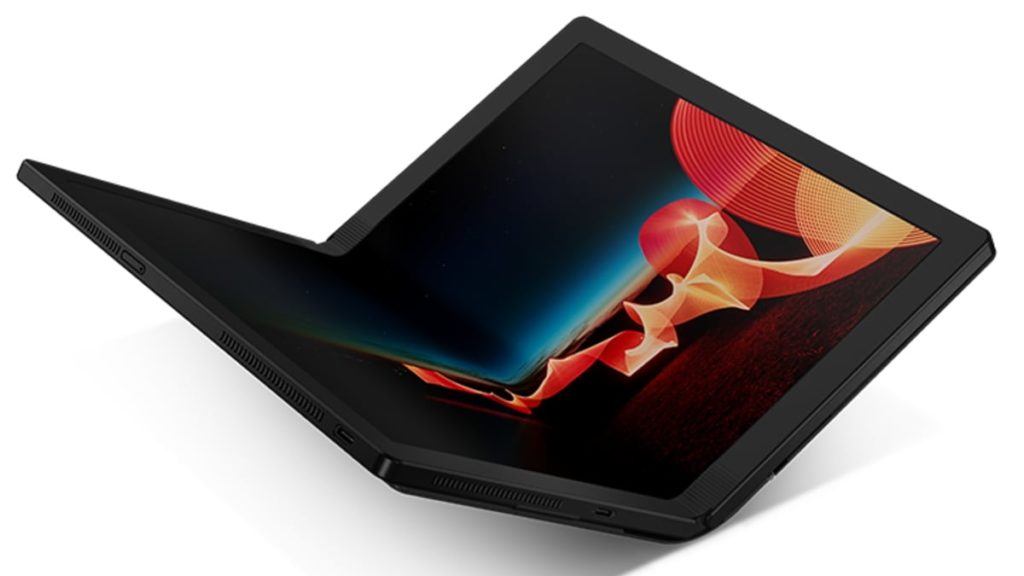
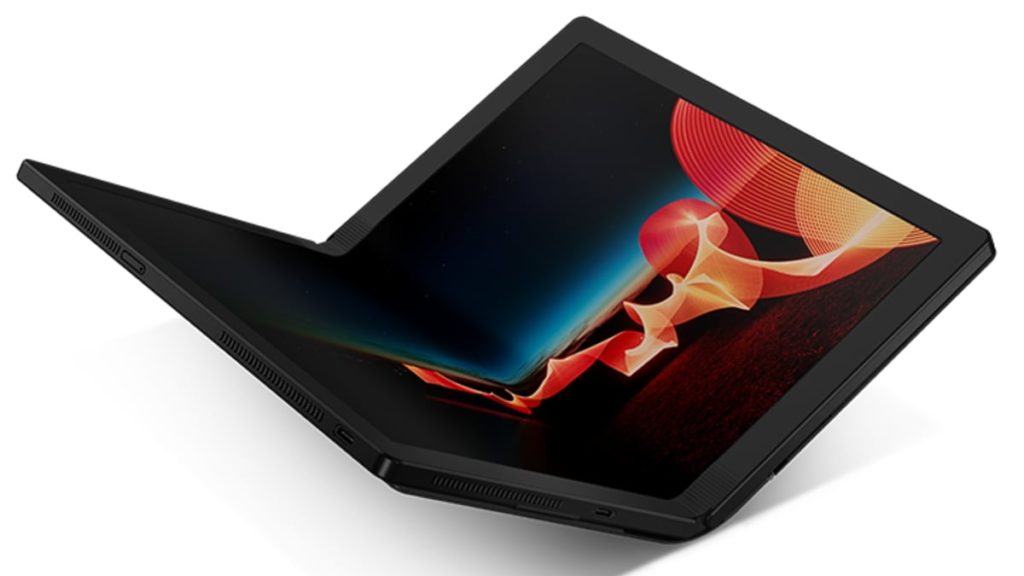
On Tuesday, Lenovo ThinkPad X1 Fold, the company’s first flagship laptop with a folding display, was released in India. The folding design of the ThinkPad X1 Fold is enabled by a multilink torque hinge. Lenovo has also included a Bluetooth Mini Fold Keyboard, which nestles inside the fold and wireless charges when placed on top of the screen. When opened, the ThinkPad X1 Fold also functions as a tablet. When you want to browse the web, watch a video, or listen to a presentation, you can use it as a tablet by using the built-in kickstand or the optional easel to prop it up.

Lenovo Thinkpad X1 Fold Specifications

The Lenovo ThinkPad X1 Fold laptop has a 13.3-inch 2K (2,048×1,536 pixel) pOLED display from LG Display that can be folded to allow for a variety of use cases. The ThinkPad X1 Fold looks more like a sketchbook than a laptop thanks to its attractive leather folio. It is not only compact and stylish, but it is also functional. With a weight of only 2.2 pounds, it is small enough to fit into a jacket pocket or even a small handbag.

To enable the folding form factor, there is a mechanical hinge between the display. Users can use the ThinkPad X1 Fold as a regular laptop in landscape mode or as a notebook in portrait mode, taking notes or drawing sketches with Lenovo’s Active Pen. Lenovo has also included its Easel Stand, which allows for easy portrait or landscape placement on a desk, as well as the Bluetooth Mini Fold Keyboard, which allows the ThinkPad X1 Fold to function as a traditional laptop.

Lenovo Thinkpad X1 Fold
Image Source: gadgets.ndtv.com

Lenovo ThinkPad X1 Fold runs Windows 10 Pro and comes preloaded with the Lenovo Mode Switcher app, which allows the machine to change orientation as needed. It quickly and easily splits the screen into two halves or uses full width for one large display. The ThinkPad X1 Fold, as the name implies, offers a split-screen experience. Fold it like a book for two side-by-side displays—ideal for comparing things, taking notes, reading, or simply multitasking. Turn it so that the split-screen appears from top to bottom, and you can sketch, jot notes, or type using the on-screen keyboard.

Unlike folding phones, which are fragile and easily damaged, the Lenovo ThinkPad X1 Fold is marketed as a rugged and tough device. MIL-STD 810H certification is claimed to have been obtained. Furthermore, Lenovo claims that the ThinkPad X1 Fold underwent additional testing to ensure that the screen could withstand the stresses of being opened and closed thousands of times. The ThinkPad X1 Fold encrypts data with a discrete Trusted Platform Module (dTPM), making it more difficult to hack and keeping your critical data more secure.

The ThinkPad X1 Fold is powered by an Intel Core i5 processor, Intel UHD graphics, 8GB of LPDDR4x RAM, and up to 1TB of PCIe-NVMe M.2 2242 SSD. Wi-Fi 6, Bluetooth v5.1, and two USB Type-C 3.2 Gen 2 ports are among the connectivity options (one of which can be used as a DisplayPort). Optional 5G/ 4G LTE support is also available. For a better multimedia experience, Lenovo has included four microphones and a Dolby Atmos speaker system. The ThinkPad X1 Fold also has a Hybrid infrared (IR) and an HD webcam for Windows Hello facial recognition and video chat.

On a single charge, the ThinkPad X1 Fold can provide up to 10.4 hours of video playback. In addition, there is 50W Rapid Charge fast charging technology.

Price And Availability

The Lenovo ThinkPad X1 Fold is priced at Rs. 3,29,000. The laptop is currently available for purchase through the Lenovo India website for a starting price of Rs. 2,48,508. Gadgets 360 contacted the company and was told that the difference between the listed and official prices is due to limited-time offers that will end at the end of this month. Customers can also choose a no-cost EMI option that lasts up to six months. Lenovo ThinkPad X1 Fold was released in the United States in January of last year for $2,499 USD (roughly Rs. 1,85,700).

Yamaha

Yamaha has rolled out SR-C20A and SR-B20A soundbars with in-built Subwoofers and Bluetooth 5G connectivity

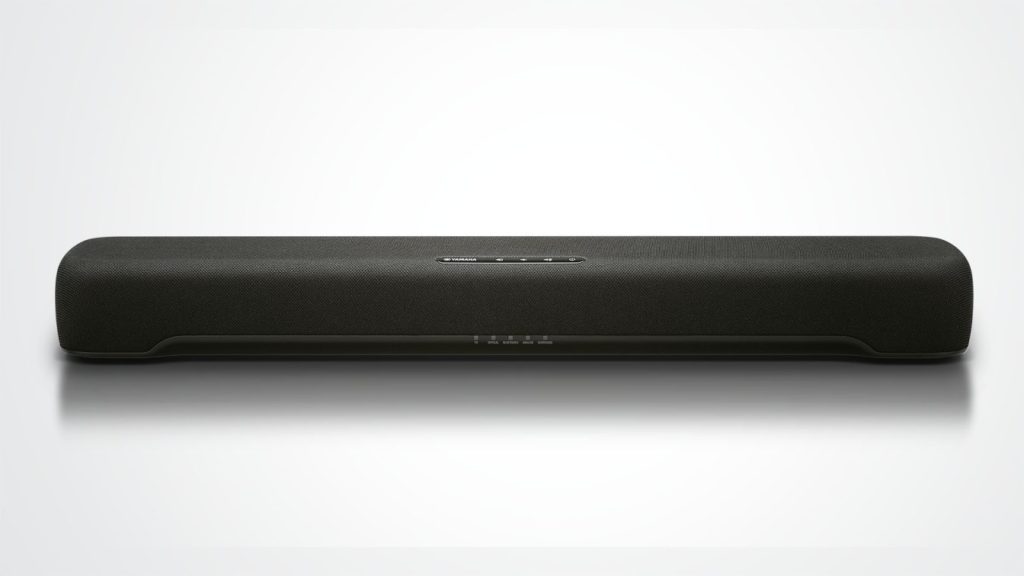
Yamaha has launched two new models of soundbars, namely, SR-C20A and SR-B20A in the Indian market. These soundbars can be controlled via an app which increases the convenience to use them. The name of the app is the Sound Bar Remote app which is newly developed to control the soundbars, change content, sound volume, switch on/off, etc from our tablet or smartphone. Both the soundbar models are equipped with an HDMI out port which supports TV ARC (Audio Return Channel) so that the audio from the connected TV is transmitted easily. The Yamaha SR-B20A is a bit more powerful than SR-C20A as it delivers 120W of total sound output. So, let’s have a detailed look at all the other specifications of these two new soundbars.

Specifications and Features of Yamaha SR-C20A

The sound technology in the Yamaha SR-C20A is the Dolby Audio and has four different modes, namely, stereo, standard, movie, and gaming. The model has a 2.1 channel setup provided with two 20W speakers for the left and the right channel. There is also a 60W subwoofer (in-built) provided with this model and offers a total sound output of 100W. The brand new Yamaha SR-C20A is also provided with an Analogue Input Port but there is no subwoofer output port.

Along with the built-in subwoofer, the model also has passive radiators which together create a very wide and impressive bass range. If someone wants to give the bass an extra boost, they can also use the Bass extension feature. With the help of the Virtual Sound Technology connected with the television, one can get a movie theatre-like experience as it reproduces immersive sound effects. The Clear Voice tech enables the users or the audience to hear sounds clearly especially movie dialogue even when the surrounding has high sound effects.

Yamaha
Image Source: cdn.mos.cms.futurecdn.net

The soundbars can be easily mounted on the wall and it is advised to install them below your TV screen to get the best experience. You can expand your entertainment as it offers the choice to connect not only with television but also with any other Bluetooth-compatible device. So, you can turn on you’re relax mode listening to your favorite music album, or be attentive to those class lectures. You can also pair it with your game console to experience a rich gaming battle.

Specifications and Features of SR-B20A

As mentioned earlier, the sound output of SR-B20A is 120W which is more than C20A and has two 30W channel speakers for the left and right sides. Though both the models have Digital Optical In ports, they do not support 4K pass through. In this model, the subwoofer has an output port which is absent in the case of SR-C20A. Speaking of sound quality, the new Yamaha SR-B20A has DTS Virtual:X which provides virtual 3D sound mode. So, along with experiencing the rich sound quality from four sides, you can feel it all over the room giving the true immersive feeling.

Like SR-C20A, this model can be installed on the wall, accessed with an app on your smart devices, and can transmit TV audio with the ARC. The uniqueness of this model comes with the rich bass reproduction with a dual built-in 75 mm (3 “) subwoofer unit combined with the dual bass reflex port (Yamaha.com). The sound modes are the same for this model as that of SR-C20A and you can swap between any modes according to your mood and convenience. Yamaha SR-B20A weighs 3.2kg which is heavier than SR-C20A (1.8kg).

Both the newly launched soundbars are priced at Rs 20,490. But, both models are currently available at a discounted prices. So, grab them at the earliest from the online site of Amazon (SR-C20A) and on the commercial site of Yamaha (SR-B20A).

OnePlus Nord CE 5G

OnePlus Nord CE 5G launched – List of specifications and features.

On 10th June 2021, OnePlus launched the new model in the Nord series, OnePlus Nord CE 5G. The company made the announcement through an online live stream and revealed the new features of this latest smartphone. The new OnePlus Nord smartphone varies from the original Nord model that was released last year on a few grounds. Both the outlook and the internal system have been significantly modified to make it look both sleek and for better performance. The slim appearance of the new Nord CE 5G makes it the slimmest OnePlus model after the OnePlus 6T which was released almost three years ago. This new OnePlus Nord model comes in three different colors and each one has options for a matte and glossy back finish.

Specifications of OnePlus Nord CE 5G

The new OnePlus Nord CE 5G is powered by Android 11 and OxygenOS 11 with dual-sim (Nano). OnePlus has chosen the octa-core Qualcomm Snapdragon 750G SoC for running the system of the new model and it also comes with Adreno 619 GPU and RAM of 6GB. The display of Nord CE 5G features a 6.43-inch full HD AMOLED display. The aspect ratio of the display is 20:9 with a refresh rate of 90Hz.

OnePlus Nord CE 5G
Image Source: gsmarena.com

The OnePlus Nord CE 5G will be offering internal storage of 256GB with connectivity options including 5G, 4G LTE, Wi-Fi 802.11ac, Bluetooth v5.1, GPS/ A-GPS/ NaVIC, NFC, USB Type-C, and a 3.5mm headphone jack (Gadgets 360). The different types of sensors in the mobile include an ambient light sensor, proximity sensor, magnetometer, gyroscope, and accelerometer. Apart from these features, it has an in-display fingerprint sensor, speakers with noise cancellation support, 4500 mAh battery life. The battery has been improved as compared to the last Nord model by OnePlus.

Price and Availability

In India, the price of the new OnePlus Nord CE 5G starts from Rs. 22,999. This price is for the variant of 6GB+128GB. The price of the model for 8GB+128GB variants starts from Rs. 24, 999. One of the models of the new Nord CE 5G starts from Rs. 27,999 and is a showstopper with a 12GB+256GB storage variant. The three different colors available for all these models are Blue Void (matte), Charcoal Ink (Glossy), and Silver Ray. OnePlus Nord CE 5G will be made available from 16th June and you can also preorder from today itself. They will be available in the online stores of OnePlus and Amazon. 

Camera System of Nord CE 5G

OnePlus has always been one of the top choices of users when it comes to camera quality. Be it for photography, video calling, or taking selfies, the photographs produced by a OnePlus are highly distinguishable. The new OnePlus Nord CE 5G comes with a triple rear camera system. The camera setup consists of a 64-megapixel primary sensor with a lens of aperture f/1.79. The primary sensor has electronic image stabilization (EIS) which helps greatly while shooting videos with users being in motion. The secondary camera has a sensor of 8 megapixels with an ultra-wide lens of f/2.25 and the third one is a 2-megapixel monochrome sensor with an f/2.4 lens.

OnePlus can easily substitute heavy gear for a photographer especially while hiking or traveling in busy areas. The images and the videos are of very high quality and quench the need for a good camera. With the pandemic shifting of our work culture to a remote version, users can easily attend video calls with the front camera of Nord CE 5G which features a 16 megapixel Sony IMX471 sensor that also has EIS.

Seems like the rear camera system of the OnePlus Nord CE 5G is the center of attraction as it has multi autofocus options (PDAF+CAF). The shooting options available in the phone for the rear camera are Nightscape, Ultrashort HDR, Panorama, Pro Mode, Portrait, and Smart Scene Recognition. Videos can be recorded in 4K resolution with 30fps. Time-lapse can also be made while doing videography.

Adobe

Adobe Lightroom, Adobe Illustrator, and InDesign are updated for Apple’s M1 Processor

Adobe has updated Lightroom, Illustrator, and InDesign so that it can run seamlessly on Apple’s M1 processor and utilize its true power. Be it working professionals or an early content creator, one can now use the Adobe Creative Cloud apps on the Apple M1 SoC with increased efficiency and productivity. Adobe claims that these apps have undergone third-party benchmark testing and now they will run 80 percent faster in Mac computers (M1 processor) as compared to Intel-based Apple laptops. All three apps of the Creative Cloud have received major updates and Adobe Lightroom has also been updated for other platforms as well. So, let’s look at the new features and what privilege the M1 users will get.

Updates for Adobe Lightroom

The new updates and the details for these Creative Cloud apps were shared in the Adobe blog on Monday. Both Adobe Lightroom and Lightroom Classic can utilize fully the power of Apple’s M1 SoC thus elevating user experience and getting work done smoothly. Pfeiffer Report conducted a benchmarking test according to which the app’s speed has doubled in the M1 processor as compared to Intel processor for Mac computers. The Super Resolution feature is working thrice the speed and back editing photos has become four times faster in this new Apple M1 processor. The other apps are also running way faster as compared to Intel-powered processors.

Adobe
Image Source: macrumors.com

Lightroom now has a new feature called premium presets which are curated by professional photographers. The Lightroom presets are always in high demand especially for content creators as they want to make it look more “aesthetic” on social media. The new presets are divided into seven categories, namely, Portrait-Deep Skin, Portrait-Medium Skin, Portrait-Light Skin, Cinematic, Futuristic, Vintage, and Travel. The number of presets will keep increasing as the app will get updated. This new preset feature is not only for M1 users but also Windows, iOS, Android, and the Web. By bringing this new feature Adobe is making the photographer community as many people struggle with post-processing skills like color grading.

Lightroom has also launched a collaboration tool with the help of which users can allow other users to edit albums. In order to do so, one user has to send an invite so that other users can edit them in the shared album. Super-resolution is another great feature of Lightroom as it uses Artificial Intelligence to increase the resolution of an image. Apart from these, Lightroom has also added a feature of Tethered Live View for certain Nikon cameras.

Updates for Adobe Illustrator and InDesign

With so many designers using Illustrator and InDesign for professional purposes, Adobe’s main goal was to optimize the performance and speed for these two apps. Users of M1 Mac have been using the Creative Cloud apps on their computers for a while, but with this new update, Adobe Illustrator speed has been increased by 65 percent in terms of performance. InDesign users will experience a 59 percent improvement in the overall performance of the app.

Adobe
Image Source: engineeringandphotography.xyz

InDesign is mostly used to design layouts of print publications, magazines, eBooks, etc. Now, the users will experience lightning-fast speed when it comes to opening a file and working on it. According to Adobe, InDesign will open a graphics-heavy file with 185 times faster speed than it used to be and scrolling performance for text-heavy documents has been increased by 78 percent. With such increased speed, one can complete tasks much before the deadline and take up new work without thinking about efficiency.

With the launch of the adaptive version of Adobe Illustrator for the M1 processor, it will take less time to load files going through the workflow in a much easier way. For Illustrator, the scroll performance while working with complex vectors has been made 390 times faster, and opening a complex file with 31 artboards has been made 119 percent faster. Adobe has mentioned in the blog that the new releases will be available to everyone across the globe very soon. The professionals and new creators will experience better workflow, especially in this remote working system while keeping themselves more engaged.