Your Tech Story

News

Windows 11

Windows 11 is out with New Features and Better Interface.

Exactly after six years of the launch of Windows 10 (July 2015), Microsoft has come up with another version of its Windows operating system, i.e. Windows 11. The company has made a few changes in terms of the look and feel of the OS and has also eliminated many old features that were no longer relevant. There have been a lot of talks about the new OS for the past year, and people have been successful in getting some information about it before the official release, but still, there is a lot that came with the actual launch of the product.

What’s New in Windows 11

Microsoft is the leading OS developer, and most people use Windows PCs because of its simplicity. This time too, the company has tried to simplify the interface even more for the users, such that to maintain its popularity amid the tough competition from rivals like macOS and Chrome OS. Though Microsoft has held its position quite strong, improvement is still important to stay relevant. The new Windows 11 has got a new UI, better windows management features as well as it will now offer support for Android apps as well.

Windows 11
Image Source: c.s-microsoft.com

The Updated Features

Talking about the redesign of the Windows 11 OS, the company has been making changes to the taskbar of the OS for past years, but the look has always been similar. This time, the company has shifted the windows icon and other app icons to the middle of the taskbar from the left but has kept the items in the right as it is. Microsoft has still kept the option to place the start button and other icons on the left open.

When we click on the windows icon, the start menu opens up in the center of the screen, having a search bar on the top of it. Below the search bar, the menu says Pinned Apps, under which a 6*6 grid of apps has been placed. Following the grid underneath, there is space for app recommendations. There is an option for putting up the user’s picture below the recommendation section in the menu on the left and the power off button on the right.

The next big change has been made to the startup tone of Windows along with the other notification tones as well as it has got new themes and wallpapers, too. Microsoft has also introduced a new feature Snap Layouts with Windows 11, which enhances the multitasking experience for the users as now the users can open multiple different screens on the desktop by hovering the mouse over the maximize button. The OS is capable of remembering the users’ choices as well, such that it will keep the previously selected windows and apps ready in the form of Snap Group for easy access in the future.

Microsoft has also added support for multiple monitors in Windows 11, so it becomes easier for the users to use the work on virtual desktops. This support for virtual desktops also includes the option to put different wallpapers for different screens. The company has also tried to improve the touch experience for the Windows tablets, which it had intended to do with its Windows 10X project, which never saw the daylight.

Side-by-side, Microsoft has also made some improvements to the touch keyboard and has included support for GIFs in partnership with Tenor. The keyboard allows the voice commands for making typing easier.

The new normal work and study from home culture have also inspired Microsoft to add some features for people. The company has incorporated the Teams app into Windows 11 and has also made it easier for the users to share their screens with each other during the meeting.

Microsoft has also kept the gamers in mind and has incorporated support for Auto HDR and DirectX 12 Ultimate as well as for xCloud in Windows 11. The users also get an Xbox Game Pass along with the OS, which lets them play popular games on their machines.

Microsoft has also revamped the design of its Microsoft Store for Windows 11 and has adopted the new zero-revenue share for the developers. According to the new policy, Microsoft has exempted the commission on uploading apps on Microsoft Store for the developers, so that it can attract more and more developers. Other than Microsoft Store, the company has also incorporated the Amazon AppStore into the new OS, so that to make Android App available for the users.

Also, the company claims that the new OS is faster in terms of installing updates as now the updates will be 40% smaller, and these will run in the background to provide a seamless experience for the users.

Availability, Free Upgrade, and Hardware Requirements

For now, Windows 11 has been made available to the insider members, and the Windows 10 users will receive the upgrade by the end of this year. Windows 11 is available in Windows 11 Home or Windows 11 Pro versions.

According to the company, the new PCs will be empowered by Windows 11 only, whereas Windows 10 PC users will have the access to the PC Health Check app, which will define if their PCs are suitable for Windows 11 upgrade or not. For the Windows 7 and 8 PCs, the Windows 11 be available only after the users purchase a Windows 10 license.

Talking about the hardware requirements, the OS will run on a 64-bit x86 or ARM processor and need 4GB of RAM as well as 64GB of storage.

Google

Security Changes in Google will Disrupt Old Links of Drive and YouTube.

Public links to an untold number of Google Drive items will soon cease to work. Google is changing the ways in which link sharing is handled on both services in the name of increased security, and even if active users are allowed to choose from the switch, abandoned files and videos on unused or inactive accounts can simply go unnoticed.

Security Changes in YouTube Links

Because shared links are now part of a newer system, Google says security is increased. The newer links on YouTube would appear to be harder to guess or access for anyone without explicit access. The newer links also have the effect of connecting more activity to specific accounts and requiring viewers to connect to a user profile that allows access to be tracked and included.

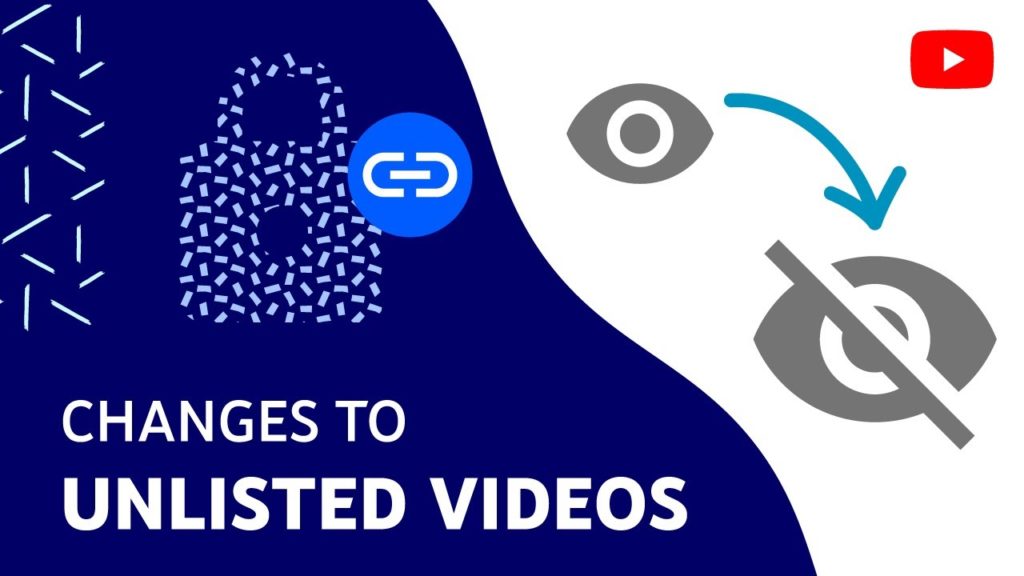
On YouTube, any publicly available videos, but labeled “Unlisted,” will have an effect. As described in a 5-minute video and blog post by YouTube, any unlisted videos uploaded before 2017 will be changed to a private one on July 23, 2017. The way private video works now, killing any old links or embedding, as well as limiting sharing to up to 50 people — all of whom require a Google account to view it. As a reminder, you and the people you choose can only view private videos. Once these videos are made privately on July 23rd, any previously used link will no longer function as Unlisted.

Google
Image Source: blog.youtube

To retain your unlisted videos in their unlisted state, you should fill out this form by 23 July 2021 before 2017. YouTube recommends that you choose to avoid this amendment when you treat your unlisted videos such as public videos (for example, they are embedded or shared on third-party websites). If you opt-out, your current connections will continue to work as they currently do, but they will not benefit from the security update.

Using YouTube, you can make your Unlisted video uploaded before 2017 as “Public.” The older videos can be re-uploaded under the new system to take advantage of the security update. Data, like views or comments, related to the original upload, will not be transmitted. Each video that is embedded using the old link must also be updated to the new video URL.

As a reminder, the Unlisted feature will not be removed. It is still possible to upload new videos as Unlisted. Only videos uploaded prior to January 1, 2017, will be affected by this update. YouTube creators can go back through their older Unlisted videos and select the privacy setting that is best for them.

Security Changes in Google Drive Links

The same change is happening for Google Drive, as announced on the Workspace Updates blog earlier today. Now a link will contain a resource key that determines who accesses or does not receive access to cloud-stored files. You’ll continue to have access to the file if you’ve already accessed it (presumably when you log into your Google account) and have “direct access.”

It is a little more complicated if you use a workspace Google account managed by your employer, school, or other company. The IT/administrator department can decide either to opt-out completely, to update anyone without an opt-out, or to upgrade and enable individual users to remove the update.

Administrators can use the Alert Center to see how much your organization affects users, folders, shared drives, and files. Search a warning with the topic “Drive security update.” Admins should decide how their organization will be asked to update their security before 23 July 2021. Admins can choose how their organization uses the security update at Admin Console Apps > Google Workspace > Drive and Docs > Sharing settings > Security update for links.

If the administrator does not choose to update the security, end-users with impacted files, starting July 26, 2021, with their impacted files, will receive an e-mail notification. End-users have to decide how to update their files by September 13, if their administration permits it.

Users not included in Google Workspace receive a notification on their affected files from Google Drive from July 26, 2021, and are able to remove the security update. The new files are subject to the above-mentioned conditions. These users are expected to decide how to apply the update to their files until September 13, 2021.

Issues with type=domain or type=anyone Drive API permission that are affected by Link=true(v2) or allowFileDiscovery = false(v3) In addition to the item ID, a resource key for accessing these items is now required.

Lenovo Thinkpad X1 Fold

Lenovo Thinkpad X1 Fold With Folding 2k Display Now Available In India.

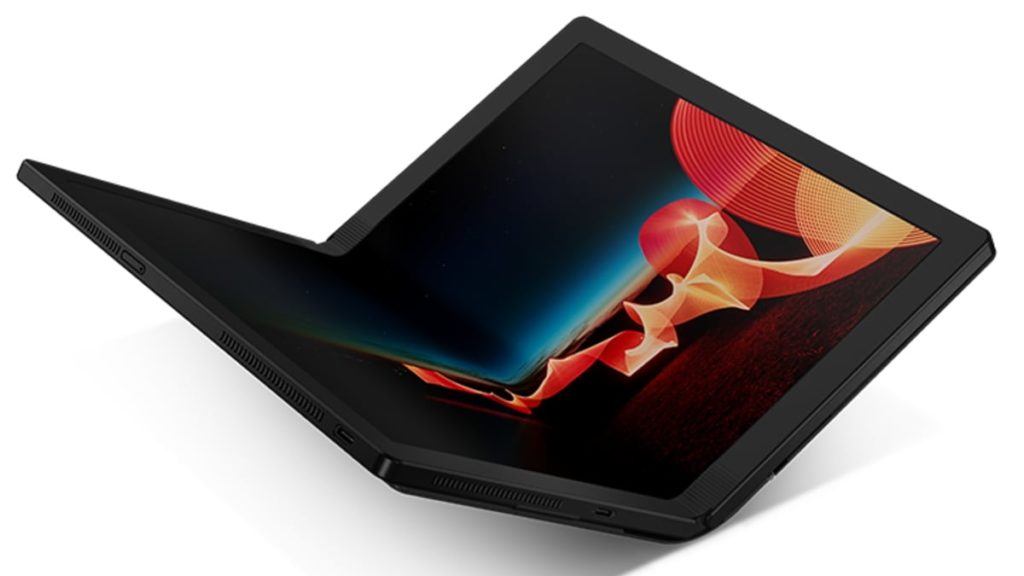
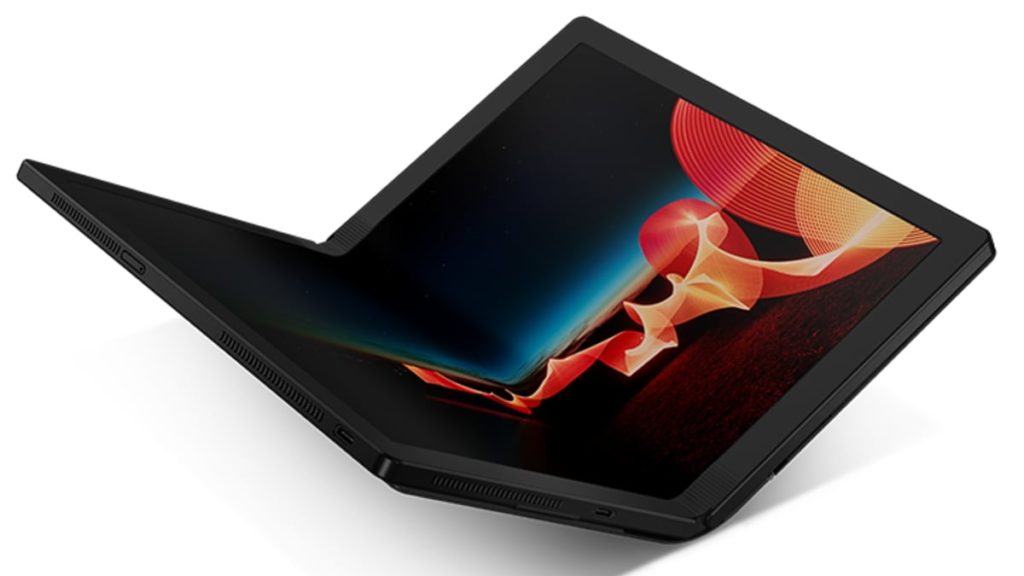
On Tuesday, Lenovo ThinkPad X1 Fold, the company’s first flagship laptop with a folding display, was released in India. The folding design of the ThinkPad X1 Fold is enabled by a multilink torque hinge. Lenovo has also included a Bluetooth Mini Fold Keyboard, which nestles inside the fold and wireless charges when placed on top of the screen. When opened, the ThinkPad X1 Fold also functions as a tablet. When you want to browse the web, watch a video, or listen to a presentation, you can use it as a tablet by using the built-in kickstand or the optional easel to prop it up.

Lenovo Thinkpad X1 Fold Specifications

The Lenovo ThinkPad X1 Fold laptop has a 13.3-inch 2K (2,048×1,536 pixel) pOLED display from LG Display that can be folded to allow for a variety of use cases. The ThinkPad X1 Fold looks more like a sketchbook than a laptop thanks to its attractive leather folio. It is not only compact and stylish, but it is also functional. With a weight of only 2.2 pounds, it is small enough to fit into a jacket pocket or even a small handbag.

To enable the folding form factor, there is a mechanical hinge between the display. Users can use the ThinkPad X1 Fold as a regular laptop in landscape mode or as a notebook in portrait mode, taking notes or drawing sketches with Lenovo’s Active Pen. Lenovo has also included its Easel Stand, which allows for easy portrait or landscape placement on a desk, as well as the Bluetooth Mini Fold Keyboard, which allows the ThinkPad X1 Fold to function as a traditional laptop.

Lenovo Thinkpad X1 Fold
Image Source: gadgets.ndtv.com

Lenovo ThinkPad X1 Fold runs Windows 10 Pro and comes preloaded with the Lenovo Mode Switcher app, which allows the machine to change orientation as needed. It quickly and easily splits the screen into two halves or uses full width for one large display. The ThinkPad X1 Fold, as the name implies, offers a split-screen experience. Fold it like a book for two side-by-side displays—ideal for comparing things, taking notes, reading, or simply multitasking. Turn it so that the split-screen appears from top to bottom, and you can sketch, jot notes, or type using the on-screen keyboard.

Unlike folding phones, which are fragile and easily damaged, the Lenovo ThinkPad X1 Fold is marketed as a rugged and tough device. MIL-STD 810H certification is claimed to have been obtained. Furthermore, Lenovo claims that the ThinkPad X1 Fold underwent additional testing to ensure that the screen could withstand the stresses of being opened and closed thousands of times. The ThinkPad X1 Fold encrypts data with a discrete Trusted Platform Module (dTPM), making it more difficult to hack and keeping your critical data more secure.

The ThinkPad X1 Fold is powered by an Intel Core i5 processor, Intel UHD graphics, 8GB of LPDDR4x RAM, and up to 1TB of PCIe-NVMe M.2 2242 SSD. Wi-Fi 6, Bluetooth v5.1, and two USB Type-C 3.2 Gen 2 ports are among the connectivity options (one of which can be used as a DisplayPort). Optional 5G/ 4G LTE support is also available. For a better multimedia experience, Lenovo has included four microphones and a Dolby Atmos speaker system. The ThinkPad X1 Fold also has a Hybrid infrared (IR) and an HD webcam for Windows Hello facial recognition and video chat.

On a single charge, the ThinkPad X1 Fold can provide up to 10.4 hours of video playback. In addition, there is 50W Rapid Charge fast charging technology.

Price And Availability

The Lenovo ThinkPad X1 Fold is priced at Rs. 3,29,000. The laptop is currently available for purchase through the Lenovo India website for a starting price of Rs. 2,48,508. Gadgets 360 contacted the company and was told that the difference between the listed and official prices is due to limited-time offers that will end at the end of this month. Customers can also choose a no-cost EMI option that lasts up to six months. Lenovo ThinkPad X1 Fold was released in the United States in January of last year for $2,499 USD (roughly Rs. 1,85,700).

Samsung

Samsung Unveils Odyssey G3, Odyssey G5, and Odyssey G7 Gaming Monitors.

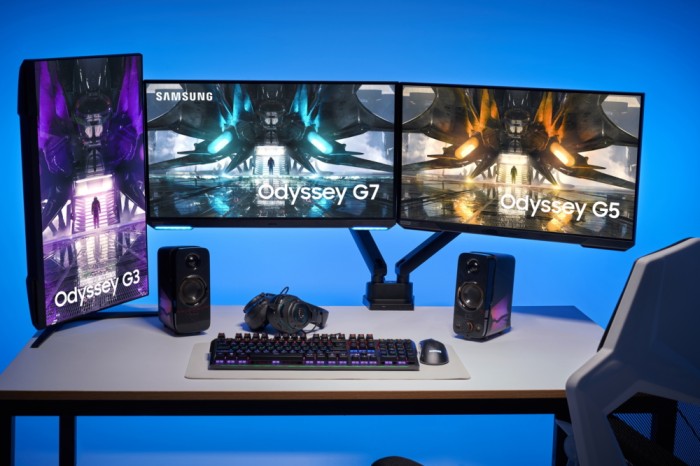
The gaming monitors Samsung Odyssey G3, Samsung Odyssey G5, and Samsung Odyssey G7 have been unveiled. Samsung Odyssey G3 has 24-inch and 27-inch displays, Odyssey G5 has a 27-inch display, and the Odyssey G7 has a 28-inch display. The new gaming monitors, according to Samsung, provide “hyper-real picture quality, a higher response level, tailored ergonomics, and intuitive usability.” The Odyssey G5 and G7 are Nvidia G-Sync compatible, and all three gaming monitors are AMD FreeSync Premium compatible.

Following the release of the curved gaming monitor in 2020, Samsung now offers a variety of Odyssey flat-screen monitors ranging in size from 24 to 28 inches. The new lineup features hyper-realistic image quality, a higher response level, ergonomic design, and intuitive usability. With these new features, gamers can enjoy true-to-life colors, pinpoint accuracy, and lightning-fast response times for their PC and console gaming entertainment devices.

As the gaming industry continues to thrive around the world, the Samsung Odyssey has quickly become the number one choice among gamers looking for incredible picture quality and high performance in a single package. The expanded lineup now allows gamers to select a monitor that meets their specific preferences and play requirements.

Specifications for the Samsung Odyssey G3

The Odyssey G3 is ideal for anyone looking for a simple way to improve their game. Pixels change with near-instantaneous response thanks to the fast 144Hz refresh rate and 1ms4 (MPRT) response time, allowing for fast-paced action and responsive on-screen performance. AMD FreeSync Premium smooths out the action for seamless gameplay, allowing players to see games exactly as the designers intended. The G3 includes a height-adjustable stand to keep players as comfortable as they are immersed.

Samsung
Image Source: news.samsung.com

Specifications for the Samsung Odyssey G7

The Odyssey G7 combines enthralling visuals with next-generation performance for gamers. The G7 produces incredible colors with more contrast, deeper blacks, and brighter whites for spectacular depth and life-like detail, thanks to an Ultra High Definition (UHD) panel with a wide 178-degree viewing angle and HDR400. Players get real-world accuracy with a 4K industry-leading 144Hz refresh rate and ultra-low 1ms2 response time, as well as NVIDIA® G-SYNC® Compatible and AMD FreeSync Premium Pro. G7 offers high-quality consistency in every play thanks to HDMI 2.1 compatibility, which delivers maximum resolution and refresh rates for not only PC but also next-generation consoles with 4K 120Hz support. The G7’s signature CoreSync design extends game colors off-screen and into players’ real-world environments, providing world-blending immersion with a personal touch.

Specifications for the Samsung Odyssey G5

The Odyssey G5 is ideal for gamers who want to take their games to the next level on PC and next-generation gaming consoles. It is the first Odyssey to include a Quad High Definition (QHD) panel with a 165Hz refresh rate and a 1ms3 response time, as well as HDR10 for stunning graphics that are ready to play. G-SYNC Compatible and AMD FreeSync Premium boost performance to give you a stutter-free competitive advantage. Players can tilt, swivel, and pivot their monitor with a height-adjustable stand to create a fully ergonomic setup that is comfortable to play on for hours.

Picture-by-picture (PBP) and picture-in-picture (PIP) with flexible customization are also available on the Odyssey G5 and Odyssey G7 for improved multitasking. In addition, Samsung has added an Auto Source Switch+ feature, which allows users to switch between sources and instantly recognize and switch to the active input.

Yamaha

Yamaha has rolled out SR-C20A and SR-B20A soundbars with in-built Subwoofers and Bluetooth 5G connectivity

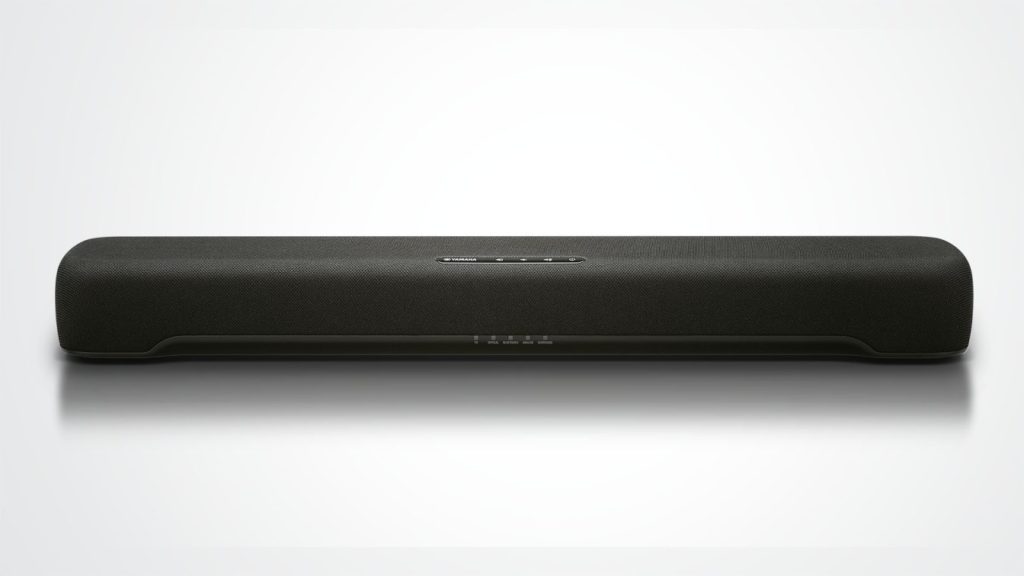
Yamaha has launched two new models of soundbars, namely, SR-C20A and SR-B20A in the Indian market. These soundbars can be controlled via an app which increases the convenience to use them. The name of the app is the Sound Bar Remote app which is newly developed to control the soundbars, change content, sound volume, switch on/off, etc from our tablet or smartphone. Both the soundbar models are equipped with an HDMI out port which supports TV ARC (Audio Return Channel) so that the audio from the connected TV is transmitted easily. The Yamaha SR-B20A is a bit more powerful than SR-C20A as it delivers 120W of total sound output. So, let’s have a detailed look at all the other specifications of these two new soundbars.

Specifications and Features of Yamaha SR-C20A

The sound technology in the Yamaha SR-C20A is the Dolby Audio and has four different modes, namely, stereo, standard, movie, and gaming. The model has a 2.1 channel setup provided with two 20W speakers for the left and the right channel. There is also a 60W subwoofer (in-built) provided with this model and offers a total sound output of 100W. The brand new Yamaha SR-C20A is also provided with an Analogue Input Port but there is no subwoofer output port.

Along with the built-in subwoofer, the model also has passive radiators which together create a very wide and impressive bass range. If someone wants to give the bass an extra boost, they can also use the Bass extension feature. With the help of the Virtual Sound Technology connected with the television, one can get a movie theatre-like experience as it reproduces immersive sound effects. The Clear Voice tech enables the users or the audience to hear sounds clearly especially movie dialogue even when the surrounding has high sound effects.

Yamaha
Image Source: cdn.mos.cms.futurecdn.net

The soundbars can be easily mounted on the wall and it is advised to install them below your TV screen to get the best experience. You can expand your entertainment as it offers the choice to connect not only with television but also with any other Bluetooth-compatible device. So, you can turn on you’re relax mode listening to your favorite music album, or be attentive to those class lectures. You can also pair it with your game console to experience a rich gaming battle.

Specifications and Features of SR-B20A

As mentioned earlier, the sound output of SR-B20A is 120W which is more than C20A and has two 30W channel speakers for the left and right sides. Though both the models have Digital Optical In ports, they do not support 4K pass through. In this model, the subwoofer has an output port which is absent in the case of SR-C20A. Speaking of sound quality, the new Yamaha SR-B20A has DTS Virtual:X which provides virtual 3D sound mode. So, along with experiencing the rich sound quality from four sides, you can feel it all over the room giving the true immersive feeling.

Like SR-C20A, this model can be installed on the wall, accessed with an app on your smart devices, and can transmit TV audio with the ARC. The uniqueness of this model comes with the rich bass reproduction with a dual built-in 75 mm (3 “) subwoofer unit combined with the dual bass reflex port (Yamaha.com). The sound modes are the same for this model as that of SR-C20A and you can swap between any modes according to your mood and convenience. Yamaha SR-B20A weighs 3.2kg which is heavier than SR-C20A (1.8kg).

Both the newly launched soundbars are priced at Rs 20,490. But, both models are currently available at a discounted prices. So, grab them at the earliest from the online site of Amazon (SR-C20A) and on the commercial site of Yamaha (SR-B20A).

Battlegrounds Mobile India

First Impressions of Battlegrounds Mobile India: PUBG Mobile Similarities and Differences (Early Access)

Battlegrounds Mobile India Early Access launched on Thursday, with the Battlegrounds Mobile India game available in beta through Google Play. We were able to obtain it and play a full match. It’s clear that Battlegrounds Mobile India is essentially PUBG Mobile with a few minor tweaks, which we’ll go over shortly. We don’t know how long the open beta will last or when it will be released, as it was made available just ahead of the previously scheduled June 18 release date. Here is the initial thoughts on the Battlegrounds Mobile India Early Access build.

If you’re a fan of PUBG Mobile, you’ll feel right at home when you launch Battlegrounds Mobile India on your Android device. You are greeted with the same home screen and background music as in PUBG Mobile after logging in or creating an account with your previous PUBG Mobile credentials. The best part is that you can import your in-game data from PUBG Mobile. We will soon publish the how-to. Interestingly, there were prompts asking if the player was over the age of 18 and if they were in India, and unfortunately, it appears that you can do this as simply as ‘yes’ without needing any verification.

We immediately entered Erangel with the Traverse – Insectoid theme from Season 19 and heard the safe gaming narration stating that this is a simulation, that it does not represent real life, and that we should not spend long hours playing. This appears to happen every time you start a match of Battlegrounds Mobile India. Unsurprisingly, the match was filled with bots, with not a single real player to be found. It was like reliving the early days of PUBG Mobile.

Battlegrounds Mobile India
Image Source: cdn.insidesport.co

The Erangel map in Battlegrounds Mobile India is the same as the one in PUBG Mobile, and you can pick up familiar weapons and equipment with the same customizable controls. The game, which is only available in India, has the advantage of being a quick and smooth experience with no lags, frame drops, or ping issues. However, the experience may differ slightly when actual players on the same server are present.

Battlegrounds Mobile India retains the same maps, weapons, game mechanics, and overall appeal as PUBG Mobile, but is repackaged for Indian users. It does, however, make a few minor changes. The game’s blood is now green rather than red. At the top left, where the number of players who are “Alive” and the number of players you “killed” is displayed, “Alive” and “Finished” are now displayed. Another precaution in the name of safety? Battlegrounds Mobile India does not allow you to select a server because the option has been disabled. It is unknown whether or not this option will be available in the future.

As previously stated, Krafton opened beta testing for Battlegrounds Mobile India for a limited number of users on Thursday, and we were able to gain access to the game.

Battlegrounds Mobile India required 6.06GB of storage on the device we tested it on (OnePlus 7 Pro) and is currently at version 1.4.0. It needs permission to access the phone’s storage, and no other permissions were requested. If you use in-game chat, you will be asked to grant microphone access. Krafton has not yet announced a release date for the game, and it is unclear how long it will be in open beta.